英文原文: https://argusic.com/subject/textus
Textus
下一代 Markdown 编辑器和知识工具,专为 AI 写作而设计。在 macOS、Windows、Linux、iPhone 和 iPad 上免费且开源。
可运行来源:GitHub项目主页TypeScriptMITcommit 6786182e72dc
TypeScript,MIT 许可证. 项目的自我描述:ai、ai markdown editor、ai writing、ios、knowledge management、linux、macos 和 markdown.
Textus 可以运行。一个 Argusic agent 在一台没有 GPU 的干净机器上用 1.5 分钟完成了安装,遇到 6 个错误,并在无人协助的情况下全部修复,整个会话都被记录了下来。
Under Node v22.23.4 and Rust 1.99.1, the repository's npm install, frontend build, full npm run check, and aicompat Rust tests all pass; the published AppImage launches a Textus window on DISPLAY=:99, and a typed Markdown document renders and serializes correctly in Playwright Chromium.
agent 在干净的机器上最终得到的结果,用它自己的话说。 测量方式
每一次都由 Argusic 在全新机器上实测。每个数字都链接到对应的证据。 Argusic 评分 58,满分 100(该项目各次运行得分的平均值)。
概览
项目数据来自 GitHub,链接见本页顶部,更新于 。测试数据由 Argusic 提供 (CC BY 4.0);每个数字都链接到一个运行页面,附完整的 log、录屏及其 sha256 哈希。
测量了什么
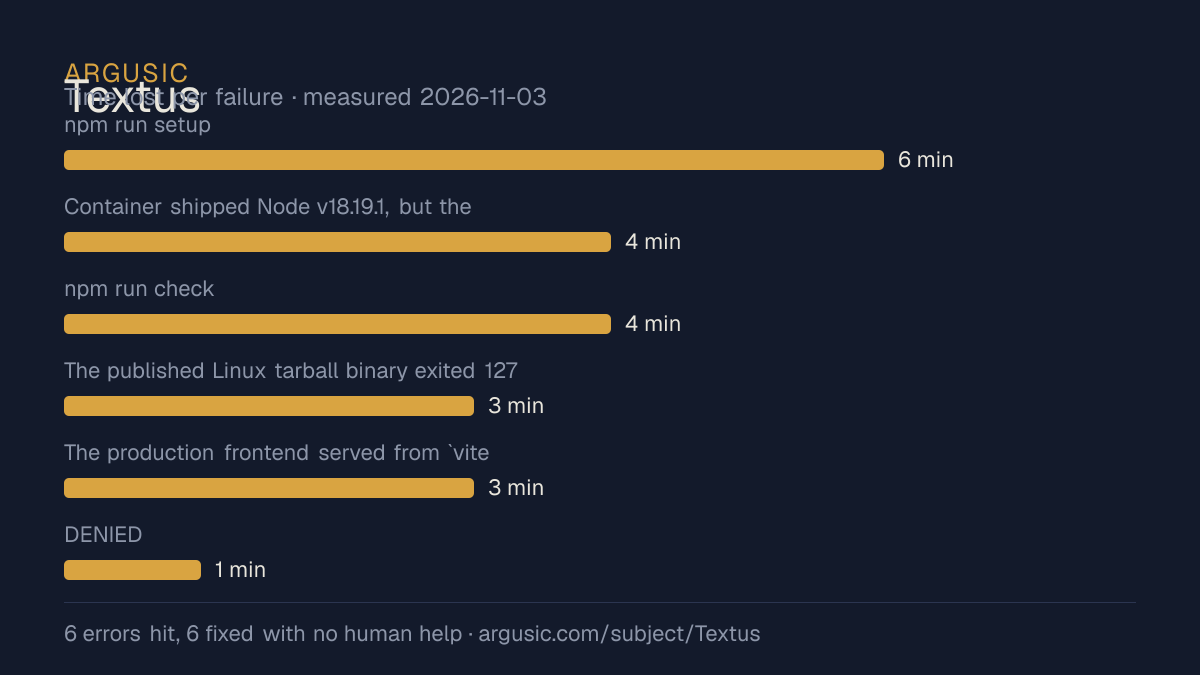
来自决定该结论的那次运行。 每一行都是记录下来的数值,而非估算。
哪里出了问题,用 agent 自己的话说
agent 的原话,最严重的排在最前,从不改写成建议。
- npm run setup:e2e initially could not start Vite: EMFILE: too many open files, watch '/work/repo/vite.katex-fonts.ts' (repeated twice, including on a fresh port).6 分钟
- Container shipped Node v18.19.1, but the project requires Node >=22; npm install emitted dozens of EBADENGINE warnings and installed under the wrong runtime.4 分钟
- npm run check:native failed compiling glib-sys: Package glib-2.0 was not found in the pkg-config search path.4 分钟
- The published Linux tarball binary exited 127 before startup: libwebkit2gtk-4.1.so.0: cannot open shared object file.3 分钟
- The production frontend served from `vite preview` in a plain browser showed 'Something went wrong' with Cannot read properties of undefined (reading 'metadata'), because the Tauri IPC backend was absent.3 分钟
- DENIED: I attempted to delete temporary file /work/repo/vite.verify-no-watch.config.mjs, but the environment rejected my file deletion request.1 分钟
- 安装时间
- 2 分钟
- 从冷启动机器到完成
- 18 分钟
- 遇到并修复的错误
- 遇到 6 个,在无人协助的情况下修复了 6 个
- 结果是如何证明的
- npm ci exited 0; npm run build exited 0; npm run check exited 0 (334 test files passed, 1 skipped; 3389 tests passed, 114 skipped); cargo test --all-targets in src-tauri/crates/aicompat exited 0 with 139 passed; Playwright Chromium against the no-watch dev server returned HTTP 200 and rendered an H1, bold text, and link from typed Markdown; the release AppImage ran on DISPLAY=:99 with a 800x600 'Untitled - Textus' window and WebKit processes; curl to vite preview returned status=200.
- 使用的模型 token
- 521,283
- 测试的确切 commit
- 6786182e72dc
- 容器镜像
- sha256:cdd920bce783
没有测量什么
另一半内容,让你清楚看到这些证据能说明到什么程度。缺失的数据就标为缺失,从不填补。
- GPU 显存峰值
- 本次运行在 CPU 机器上进行,没有可采样的 GPU
- 长时间运行的表现
- 每次尝试都使用文档中最小的设置和固定的时间预算,因此这里测量的是它能否运行,而不是它在负载下的表现
观看会话
完整的运行过程,从一台干净的机器开始,按实际速度播放。没有剪辑,也没有加速。
第 2 次尝试的录屏,运行于 ,即决定上述结论的那次尝试。 制作该视频所用的终端录屏是证据,连同 sha256 指纹一起保存;视频只是由它渲染而成。 在你点击播放之前,不会从视频托管方加载任何内容。
录屏的结尾
决定该结论的终端会话的最后几行,与录制时完全一致。
dist/assets/cynefin-OW5HDTMX-Cs01RZMy.js                687.91 kB │ gzip: 154.14 kB
dist/assets/index-FAL3L3B5.js                         1,098.49 kB │ gzip: 360.11 kB
(!) Some chunks are larger than 500 kB after minification. Consider:
- Using dynamic import() to code-split the application
- Use build.rollupOptions.output.manualChunks to improve chunking: https://rollupjs.org/configurati…
- Adjust chunk size limit for this warning via build.chunkSizeWarningLimit.
✓ built in 20.39s
BUILD_EXIT=0 ELAPSED=50s
--- git ---
## HEAD (no branch)
tokens used
521,283
回放完整会话,从干净的机器到此刻的每一条命令。
测试方式
一个 agent,一个容器,没有人工协助。它按照项目自身文档所写的方式安装项目,运行它,并修复出错的地方。下面的一切都按实际发生的过程记录:终端会话、log 和确切的 commit。 完整方法论.
优势与局限
均为实测事实,而非观点。内容是如何撰写的.
顺利的部分
- 在干净的机器上达到了运行状态,会话有完整记录。
- 用 1.5 分钟完成安装,快于 Argusic 测量过的 230 个同类项目的中位数。
- 在无人介入的情况下从全部 6 个错误中恢复,说明这些故障的文档足以让人解决。
- 无需 GPU 即可运行,因此启动它并不需要 GPU。
- 采用 MIT 许可证,以其托管平台报告的信息为准。
- 已测量 2 次,因此结果并非偶然。
在 Argusic 安装并计时过的 231 个 ai 项目中,Textus 达到运行状态的速度排名第 36,231 个项目中有 152 个达到了运行状态。
适合用于
- 在笔记本电脑或小型服务器上试用:它无需 GPU 即达到了运行状态。
- 快速评估:克隆后 1.5 分钟它就已经运行起来。
同一领域中也测试过的项目
这里的每个项目都由 Argusic 在干净的机器上安装并运行过。未经测试的项目不会出现在这里。
运行历史
主题 (来自 GitHub)
aiai-markdown-editorai-writingiosknowledge-managementlinuxmacosmarkdownmarkdown-editornote-takingnotion-alternativeobsidian-alternativeopen-sourceproductivityrusttauritypora-alternativewindowswritingwysiwyg
嵌入徽章
用于项目 README 的 Markdown。徽章链接回本页;使用条款见 条款页面.
[](https://argusic.com/subject/textus)常见问题
- Textus 能运行吗?
- 是的。Textus 可以运行. Argusic 在一台干净的机器上安装并启动了它,用时 2 分钟,过程中遇到 6 个错误,并记录了整个会话。
- Argusic 是如何测试 Textus 的?
- 在一台全新的一次性机器上进行,每条命令都被记录,仓库固定在 commit 6786182e72dc。共记录了 2 次尝试,完整方法见方法论页面。
- 测试 Textus 花了多少钱?
- 得出该结论的那次运行花费 0.26 USD:这是真实的算力和模型成本,而不是按每百万 token 计的标价。该数字记录在那次运行的页面上。
- Textus 安装需要多长时间?
- 在决定该结论的那次运行中,从干净的机器到运行状态用了 1.5 分钟。这是一次实测的尝试,不是平均值。
- Textus 需要 GPU 吗?
- 启动它不需要。Argusic 在一台没有 GPU 的机器上让它达到了运行状态。
- 安装 Textus 时会出现什么问题?
- 已记录的运行中出现了 6 个问题,其中 6 个在无人协助的情况下被修复。每个问题及其耗费的时间都列在本页上。
- Textus 与其他替代方案相比如何?
- 在 Argusic 安装并计时过的 231 个 ai 项目中,Textus 达到运行状态的速度排名第 36,231 个项目中有 152 个达到了运行状态。
- Textus 的证据在哪里?
- 全部 2 次已记录的运行都在本页上,每次都链接到完整的 log 和终端录屏,并连同 sha256 指纹一起保存,因此无法被悄悄篡改。