英文原文: https://argusic.com/subject/nvx
nvx
跨平台微型虚拟机沙箱,适用于智能体工作负载
借助 mock 可运行来源:GitHubRustMITcommit 5b37b4f159ad
Rust,MIT 许可证. 项目的自我描述:agentic coding、agentic engineering、agentic workflows、hyperv、hypervisor、kvm、linux 和 microvm.
nvx 可以运行,其依赖的服务由替身代替。一个 Argusic agent 在一台没有 GPU 的干净机器上用 70 分钟完成了安装,遇到 7 个错误,并在无人协助的情况下全部修复,整个会话都被记录了下来。
Dependencies installed in a venv and the release bundle downloaded/verified; the Python tooling test suite passes (454 tests), OpenVMM runs its 4562-test unit suite with only the container's NUMA-seccomp-blocked mbind tests failing, the openvmm binary answers version/help, and the kernel plus all three initramfs images and the erofs layer decode as valid media;
agent 在干净的机器上最终得到的结果,用它自己的话说。 测量方式
每一次都由 Argusic 在全新机器上实测。每个数字都链接到对应的证据。 Argusic 评分 92,满分 100(该项目各次运行得分的平均值)。
概览
项目数据来自 GitHub,链接见本页顶部,更新于 。测试数据由 Argusic 提供 (CC BY 4.0);每个数字都链接到一个运行页面,附完整的 log、录屏及其 sha256 哈希。
测量了什么
来自决定该结论的那次运行。 每一行都是记录下来的数值,而非估算。
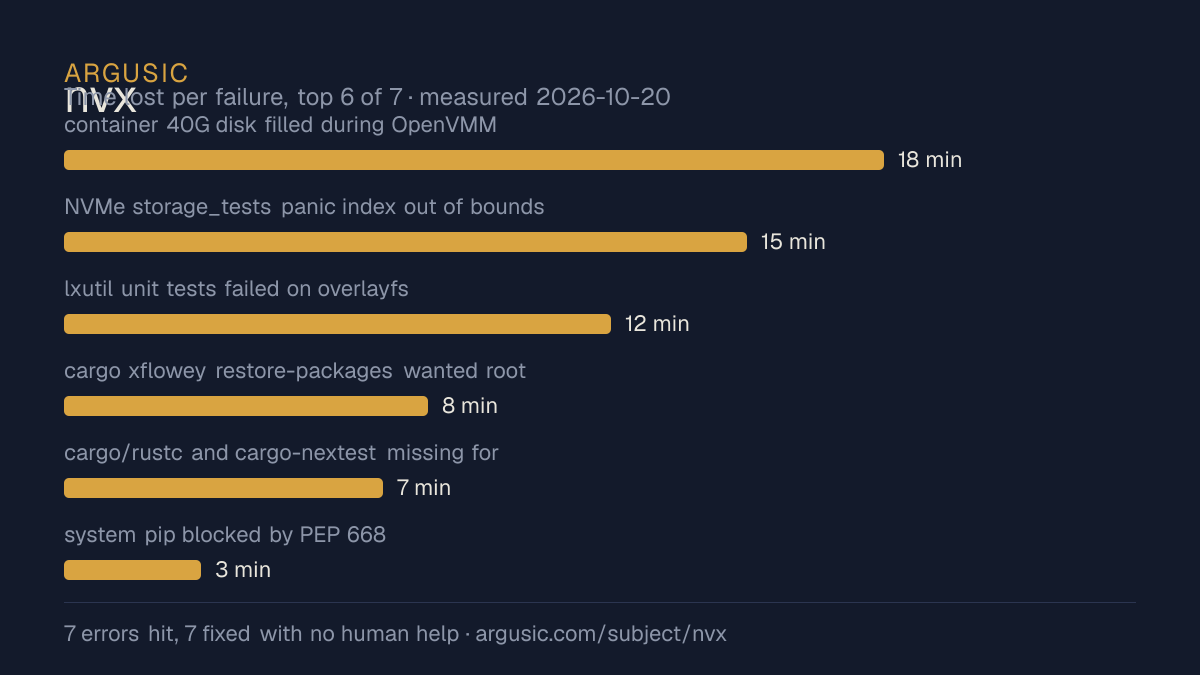
哪里出了问题,用 agent 自己的话说
agent 的原话,最严重的排在最前,从不改写成建议。
- container 40G disk filled during OpenVMM debug build (linker SIGBUS then ENOSPC)18 分钟
- NVMe storage_tests panic index out of bounds len 64 when thread lands on host cpu 71/147/167 (container cpuset), sparse_mmap NUMA mbind EPERM via seccomp15 分钟
- lxutil unit tests failed on overlayfs: 1024-byte symlink target hits ENAMETOOLONG (max 1023), and rename inode assertion 17!=3912 分钟
- cargo xflowey restore-packages wanted root apt for git/libarchive-tools and bsdtar8 分钟
- cargo/rustc and cargo-nextest missing for OpenVMM unit tests7 分钟
- system pip blocked by PEP 668 externally-managed environment3 分钟
- 安装时间
- 70 分钟
- 从冷启动机器到完成
- 78 分钟
- 遇到并修复的错误
- 遇到 7 个,在无人协助的情况下修复了 7 个
- 结果是如何证明的
- python -m unittest scripts.test_performance scripts.test_nvx_tools scripts.test_microvm_tests scripts.test_development_release exited 0 (454 tests, OK, 7 skipped); openvmm --version printed 'openvmm 0.2.0+gd0bdbed8f'; nvx.py run --dry-run printed the openvmm command; cargo nextest run (agent profile, --features ci) executed 4562 tests with 4560 passing, 2 failing (NUMA seccomp), 10 skipped; nvx.py download exited 0; gzip/cpio/ELF/erofs decodes of build artifacts all parsed
- 使用的模型 token
- 6,822,191
- 测试的确切 commit
- 5b37b4f159ad
- 容器镜像
- sha256:cdd920bce783
没有测量什么
另一半内容,让你清楚看到这些证据能说明到什么程度。缺失的数据就标为缺失,从不填补。
- GPU 显存峰值
- 本次运行在 CPU 机器上进行,没有可采样的 GPU
- 长时间运行的表现
- 每次尝试都使用文档中最小的设置和固定的时间预算,因此这里测量的是它能否运行,而不是它在负载下的表现
- 对接真实服务的表现
- 本次运行只对照替身服务进行了验证
观看会话
完整的运行过程,从一台干净的机器开始,按实际速度播放。没有剪辑,也没有加速。
第 1 次尝试的录屏,运行于 ,即决定上述结论的那次尝试。 制作该视频所用的终端录屏是证据,连同 sha256 指纹一起保存;视频只是由它渲染而成。 在你点击播放之前,不会从视频托管方加载任何内容。
录屏的结尾
决定该结论的终端会话的最后几行,与录制时完全一致。
    {"msg": "microVM guest boot cannot run: no /dev/kvm or /dev/mshv in container and this OpenVMM …
  ],
  "test_depth": "tier2_mock",
  "notes": "No third-party keys required. Python unit suite fully green (454 tests, 7 Windows-only …
  "verified_how": "python -m unittest scripts.test_performance scripts.test_nvx_tools scripts.test_…
  \"final_state\": \"Dependencies installed in a venv and the release bundle downloaded/verified; t…
}
print(\"ARGUSIC_RESULT:\" + json.dumps(report))
EOF" in /work/repo
 succeeded in 0ms:
tokens used
6,822,191回放完整会话,从干净的机器到此刻的每一条命令。
测试方式
一个 agent,一个容器,没有人工协助。它按照项目自身文档所写的方式安装项目,运行它,并修复出错的地方。下面的一切都按实际发生的过程记录:终端会话、log 和确切的 commit。 完整方法论.
优势与局限
均为实测事实,而非观点。内容是如何撰写的.
顺利的部分
- 在无人介入的情况下从全部 7 个错误中恢复,说明这些故障的文档足以让人解决。
- 采用 MIT 许可证,以其托管平台报告的信息为准。
不顺利或尚不清楚的部分
- 只在替身服务下达到了运行状态,因此这里没有任何内容能证明它在真实服务下可以工作。
- 安装用了 70 分钟,慢于 Argusic 测量过的 25 个同类项目的中位数。
- 目前只测量过一次。单次尝试只能说明它可以运行,不能说明它能稳定运行。
在 Argusic 安装并计时过的 26 个 agentic-coding 项目中,nvx 达到运行状态的速度排名第 26,26 个项目中有 19 个达到了运行状态。
同一领域中也测试过的项目
这里的每个项目都由 Argusic 在干净的机器上安装并运行过。未经测试的项目不会出现在这里。
运行历史
| 测试者 | 尝试 | 结果 | 评分 | 成本 USD | 时间 |
|---|---|---|---|---|---|
| Argusic Runner | 1/3 | 借助 mock 可运行 | 92.00 | 1.48 |
主题 (来自 GitHub)
agentic-codingagentic-engineeringagentic-workflowshypervhypervisorkvmlinuxmicrovmsandboxvm
嵌入徽章
用于项目 README 的 Markdown。徽章链接回本页;使用条款见 条款页面.
[](https://argusic.com/subject/nvx)常见问题
- nvx 能运行吗?
- nvx 可以运行,外部服务由 mock 代替. Argusic 在一台干净的机器上安装并启动了它,用时 70 分钟,过程中遇到 7 个错误,并记录了整个会话。
- Argusic 是如何测试 nvx 的?
- 在一台全新的一次性机器上进行,每条命令都被记录,仓库固定在 commit 5b37b4f159ad。共记录了 1 次尝试,完整方法见方法论页面。
- 测试 nvx 花了多少钱?
- 得出该结论的那次运行花费 1.48 USD:这是真实的算力和模型成本,而不是按每百万 token 计的标价。该数字记录在那次运行的页面上。
- nvx 安装需要多长时间?
- 在决定该结论的那次运行中,从干净的机器到运行状态用了 70 分钟。这是一次实测的尝试,不是平均值。
- nvx 需要 GPU 吗?
- 启动它不需要。Argusic 在一台没有 GPU 的机器上让它达到了运行状态。
- 安装 nvx 时会出现什么问题?
- 已记录的运行中出现了 7 个问题,其中 7 个在无人协助的情况下被修复。每个问题及其耗费的时间都列在本页上。
- nvx 与其他替代方案相比如何?
- 在 Argusic 安装并计时过的 26 个 agentic-coding 项目中,nvx 达到运行状态的速度排名第 26,26 个项目中有 19 个达到了运行状态。
- nvx 的证据在哪里?
- 这次已记录的运行都在本页上,每次都链接到完整的 log 和终端录屏,并连同 sha256 指纹一起保存,因此无法被悄悄篡改。