英文原文: https://argusic.com/subject/iwf
iwf
iWF 是一个 Workflow-As-Code 微服务编排平台,提供编排编码框架和服务,用于构建弹性、容错、可扩展的长时间运行流程。
借助 mock 可运行来源:GitHubGoMITcommit ad3d109fd9d8
Go,MIT 许可证. 项目的自我描述:distributed process、distributed system、distributed transactions、durable timer、golang、java、message queue 和 microservice.
iwf 可以运行,其依赖的服务由替身代替。一个 Argusic agent 在一台没有 GPU 的干净机器上用 16 分钟完成了安装,遇到 6 个错误,并在无人协助的情况下全部修复,整个会话都被记录了下来。
iwf-server binary builds, all 23 unit tests pass, blobstore integration tests pass against moto S3 mock, and the server starts on port 8801 connected to a local Temporal dev server, responding with HTTP 200 on healthcheck and workflow start API.
agent 在干净的机器上最终得到的结果,用它自己的话说。 测量方式
每一次都由 Argusic 在全新机器上实测。每个数字都链接到对应的证据。 Argusic 评分 92,满分 100(该项目各次运行得分的平均值)。
概览
项目数据来自 GitHub,链接见本页顶部,更新于 。测试数据由 Argusic 提供 (CC BY 4.0);每个数字都链接到一个运行页面,附完整的 log、录屏及其 sha256 哈希。
测量了什么
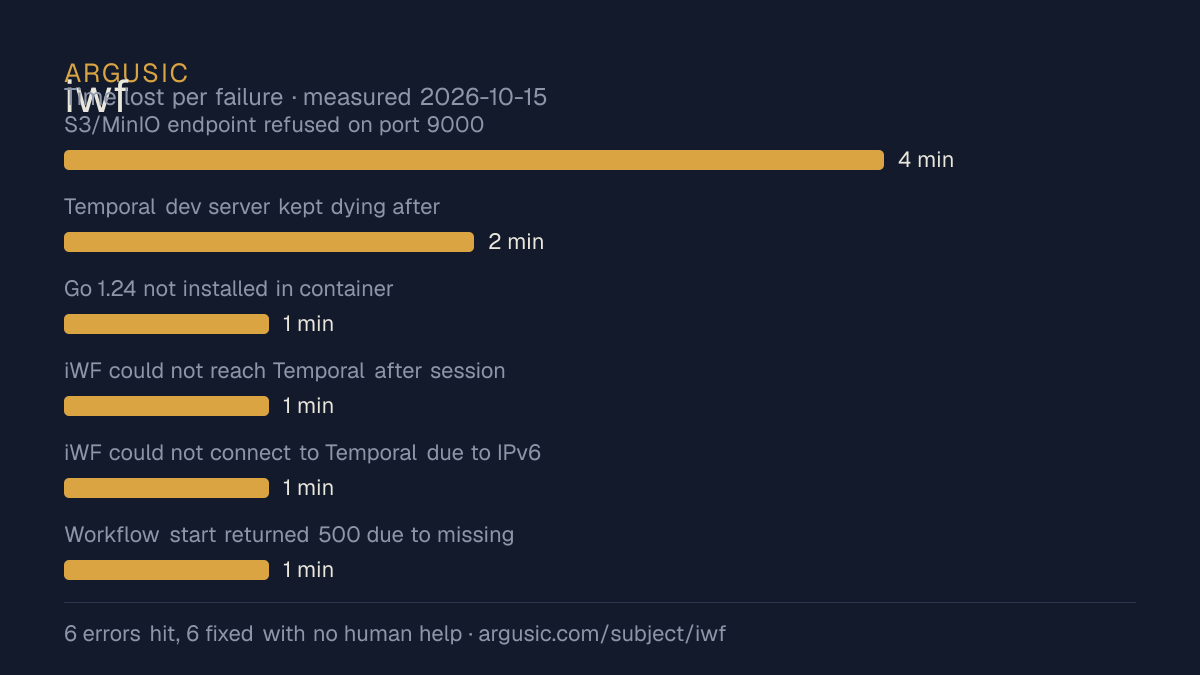
来自决定该结论的那次运行。 每一行都是记录下来的数值,而非估算。
哪里出了问题,用 agent 自己的话说
agent 的原话,最严重的排在最前,从不改写成建议。
- S3/MinIO endpoint refused on port 90004 分钟
- Temporal dev server kept dying after backgrounding2 分钟
- Go 1.24 not installed in container1 分钟
- iWF could not reach Temporal after session exit1 分钟
- iWF could not connect to Temporal due to IPv6 resolution of localhost1 分钟
- Workflow start returned 500 due to missing search attributes1 分钟
- 安装时间
- 16 分钟
- 从冷启动机器到完成
- 16 分钟
- 遇到并修复的错误
- 遇到 6 个,在无人协助的情况下修复了 6 个
- 结果是如何证明的
- curl http://127.0.0.1:8801/info/healthcheck returned HTTP 200 with condition OK; curl POST /api/v1/workflow/start returned HTTP 200 with a valid workflowRunId; go test ./service/... all 23 tests PASS; go test ./service/common/blobstore/ all 8 subtests PASS
- 使用的模型 token
- 613,832
- 测试的确切 commit
- ad3d109fd9d8
- 容器镜像
- sha256:cdd920bce783
没有测量什么
另一半内容,让你清楚看到这些证据能说明到什么程度。缺失的数据就标为缺失,从不填补。
- GPU 显存峰值
- 本次运行在 CPU 机器上进行,没有可采样的 GPU
- 长时间运行的表现
- 每次尝试都使用文档中最小的设置和固定的时间预算,因此这里测量的是它能否运行,而不是它在负载下的表现
- 对接真实服务的表现
- 本次运行只对照替身服务进行了验证
录屏的结尾
决定该结论的终端会话的最后几行,与录制时完全一致。
| `TestBlobStoreIntegration` failed — S3 endpoint (MinIO on `localhost:9000`) refused connection | …
| Temporal dev server kept dying after process backgrounding — `nohup` + `setsid` were insufficient…
| iWF server connected to Temporal on first attempt; subsequent launches failed with "connection re…
| iWF server could not connect to Temporal — Go resolved `localhost` to IPv6 `::1`, but DB file sti…
| Workflow start returned 500 — required search attributes `IwfWorkflowType`, `IwfGlobalWorkflowVer…
**Total time lost to errors: ~9 minutes**
## What was verified
- **`make bins` (build)**: `go build -o iwf-server cmd/server/main.go` — exited 0, produced a 64 MB…
- **Unit tests** (`go test ./service/...`): All 23 tests PASS, 0 failures.
- **Blobstore integration tests** (`TestBlobStoreIntegration`): All 8 subtests PASS against moto S3…
- **iWF server healthcheck**: `curl http://127.0.0.1:8801/info/healthcheck` returned `{"condition":…
- **Workflow start API**: `POST /api/v1/workflow/start` returned HTTP 200 with `{"workflowRunId":"0…回放完整会话,从干净的机器到此刻的每一条命令。
测试方式
一个 agent,一个容器,没有人工协助。它按照项目自身文档所写的方式安装项目,运行它,并修复出错的地方。下面的一切都按实际发生的过程记录:终端会话、log 和确切的 commit。 完整方法论.
优势与局限
均为实测事实,而非观点。内容是如何撰写的.
顺利的部分
- 用 16 分钟完成安装。
- 在无人介入的情况下从全部 6 个错误中恢复,说明这些故障的文档足以让人解决。
- 采用 MIT 许可证,以其托管平台报告的信息为准。
不顺利或尚不清楚的部分
- 只在替身服务下达到了运行状态,因此这里没有任何内容能证明它在真实服务下可以工作。
- 目前只测量过一次。单次尝试只能说明它可以运行,不能说明它能稳定运行。
同一领域中也测试过的项目
这里的每个项目都由 Argusic 在干净的机器上安装并运行过。未经测试的项目不会出现在这里。
运行历史
| 测试者 | 尝试 | 结果 | 评分 | 成本 USD | 时间 |
|---|---|---|---|---|---|
| Argusic Runner | 1/3 | 借助 mock 可运行 | 92.00 | 0.03 |
主题 (来自 GitHub)
distributed-processdistributed-systemdistributed-transactionsdurable-timergolangjavamessage-queuemicroserviceorchestrationorchestratorpersistenceprocesspythontimerworkflowworkflow-as-codeworkflow-engine
嵌入徽章
用于项目 README 的 Markdown。徽章链接回本页;使用条款见 条款页面.
[](https://argusic.com/subject/iwf)常见问题
- iwf 能运行吗?
- iwf 可以运行,外部服务由 mock 代替. Argusic 在一台干净的机器上安装并启动了它,用时 16 分钟,过程中遇到 6 个错误,并记录了整个会话。
- Argusic 是如何测试 iwf 的?
- 在一台全新的一次性机器上进行,每条命令都被记录,仓库固定在 commit ad3d109fd9d8。共记录了 1 次尝试,完整方法见方法论页面。
- 测试 iwf 花了多少钱?
- 得出该结论的那次运行花费 0.03 USD:这是真实的算力和模型成本,而不是按每百万 token 计的标价。该数字记录在那次运行的页面上。
- iwf 安装需要多长时间?
- 在决定该结论的那次运行中,从干净的机器到运行状态用了 16 分钟。这是一次实测的尝试,不是平均值。
- iwf 需要 GPU 吗?
- 启动它不需要。Argusic 在一台没有 GPU 的机器上让它达到了运行状态。
- 安装 iwf 时会出现什么问题?
- 已记录的运行中出现了 6 个问题,其中 6 个在无人协助的情况下被修复。每个问题及其耗费的时间都列在本页上。
- iwf 的证据在哪里?
- 这次已记录的运行都在本页上,每次都链接到完整的 log 和终端录屏,并连同 sha256 指纹一起保存,因此无法被悄悄篡改。