英文原文: https://argusic.com/subject/geo-sleuth
geo-sleuth
一个 agent 技能,用于找出照片拍摄地点(通过 OpenStreetMap 几何数据、海拔天际线、卫星图像和街景),并展示其推理过程。可与 Claude Code、Codex、Cursor、Gemini CLI、OpenCode 和 GitHub Copilot 配合使用。
可运行来源:GitHubPythonMITcommit e753bb3aad19
Python,MIT 许可证. 项目的自我描述:agent skills、ai agents、claude code、codex、computer vision、cursor、gemini cli 和 geoguessr.
geo-sleuth 可以运行。一个 Argusic agent 在一台没有 GPU 的干净机器上用 6 分钟完成了安装,遇到 4 个错误,整个会话都被记录了下来。
uv was installed into a venv and every script's dependencies resolved via uv run; the geo-sleuth skill's core scripts (clues, geo, board, sun, exif, imgprep, terrain, tiles, evidence, ocr, match, sat_scan, intake, baidu_pano) all executed real end-to-end runs with decoded media output, two input edge-case bugs were fixed in sun.py and sat_scan.py, and only the Overpass-backed gazetteer/osm queries failed due to unrea...
agent 在干净的机器上最终得到的结果,用它自己的话说。 测量方式
每一次都由 Argusic 在全新机器上实测。每个数字都链接到对应的证据。 Argusic 评分 95,满分 100(该项目各次运行得分的平均值)。
概览
项目数据来自 GitHub,链接见本页顶部,更新于 。测试数据由 Argusic 提供 (CC BY 4.0);每个数字都链接到一个运行页面,附完整的 log、录屏及其 sha256 哈希。
测量了什么
来自决定该结论的那次运行。 每一行都是记录下来的数值,而非估算。
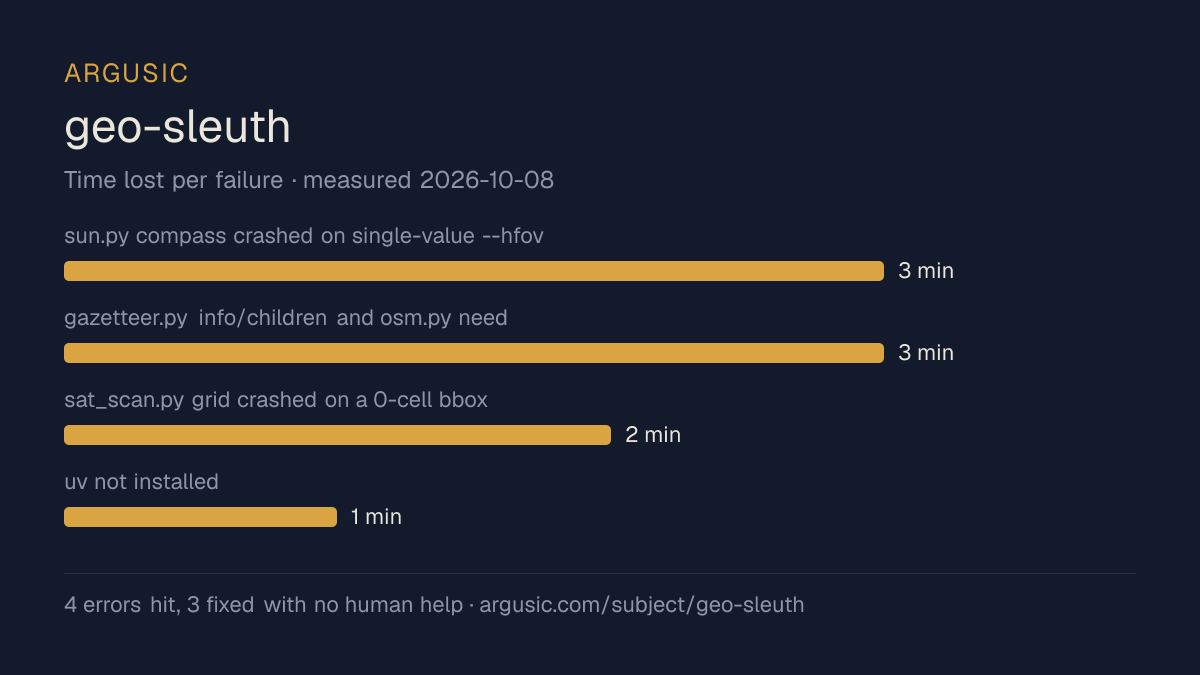
哪里出了问题,用 agent 自己的话说
agent 的原话,最严重的排在最前,从不改写成建议。
- sun.py compass crashed on single-value --hfov 65 (ValueError: not enough values to unpack)3 分钟
- gazetteer.py info/children and osm.py need OSM Overpass, unreachable from this container's egress (Apache error page retried 3x)3 分钟
- sat_scan.py grid crashed on a 0-cell bbox (ValueError: need at least one array to concatenate)2 分钟
- uv not installed; scripts require uv run1 分钟
- 安装时间
- 6 分钟
- 从冷启动机器到完成
- 23 分钟
- 遇到并修复的错误
- 遇到 4 个,在无人协助的情况下修复了 3 个
- 结果是如何证明的
- uv run skills/geo-sleuth/scripts/clues.py lookup plate 粤B returned 广东省/深圳市; terrain.py elev 35.3606,138.7274 returned '3750 m'; match.py rank --method dino ranked identical photo #1 with 1927 inliers; sat_scan.py grid ranked 20 real satellite cells; baidu_pano.py near returned a real panoid; all generated PNG/JPG/ridge decodes via 'ffmpeg -v error -i FILE -f null -' exit 0
- 使用的模型 token
- 152,587
- 测试的确切 commit
- e753bb3aad19
- 容器镜像
- sha256:cdd920bce783
没有测量什么
另一半内容,让你清楚看到这些证据能说明到什么程度。缺失的数据就标为缺失,从不填补。
- GPU 显存峰值
- 本次运行在 CPU 机器上进行,没有可采样的 GPU
- 长时间运行的表现
- 每次尝试都使用文档中最小的设置和固定的时间预算,因此这里测量的是它能否运行,而不是它在负载下的表现
观看会话
完整的运行过程,从一台干净的机器开始,按实际速度播放。没有剪辑,也没有加速。
第 1 次尝试的录屏,运行于 ,即决定上述结论的那次尝试。 制作该视频所用的终端录屏是证据,连同 sha256 指纹一起保存;视频只是由它渲染而成。 在你点击播放之前,不会从视频托管方加载任何内容。
录屏的结尾
决定该结论的终端会话的最后几行,与录制时完全一致。
- `sun.py pos/ratio/dish/compass` → real NOAA sun math.
- `terrain.py elev 35.3606,138.7274` → `3750 m` (real AWS elevation tile); `terrain.py ridge` on th…
- `tiles.py fetch` → real Google satellite mosaic, `failed_tiles: 0`; `px2ll` round-trip; `evidence…
- `ocr.py` (rapidocr) detected `GD` on the photo; `match.py` (DINOv2+SIFT) ranked the identical pho…
- `baidu_pano.py near` → returned a real panoid + WGS84 coords (keyless API).
- Every generated media file decoded cleanly via `ffmpeg -v error -i FILE -f null -` (exit 0).
## Errors found & fixed (in-repo code)
- `sun.py compass` crashed on a single-value `--hfov 65` (`ValueError: not enough values to unpack`…
- `sat_scan.py grid` with 0 grid cells crashed in `np.concatenate([])`; patched to emit a clear dia…
## Errors that couldn't be fixed here
- `gazetteer.py info/children` (and `osm.py`) depend on OpenStreetMap Overpass, unreachable from th…
- `ocr.py` printed `onnxruntime pthread_setaffinity_np` warnings (CPU-affinity limits in the contai…
回放完整会话,从干净的机器到此刻的每一条命令。
测试方式
一个 agent,一个容器,没有人工协助。它按照项目自身文档所写的方式安装项目,运行它,并修复出错的地方。下面的一切都按实际发生的过程记录:终端会话、log 和确切的 commit。 完整方法论.
优势与局限
均为实测事实,而非观点。内容是如何撰写的.
顺利的部分
- 在干净的机器上达到了运行状态,会话有完整记录。
- 无需 GPU 即可运行,因此启动它并不需要 GPU。
- 采用 MIT 许可证,以其托管平台报告的信息为准。
不顺利或尚不清楚的部分
- 安装用了 6 分钟,慢于 Argusic 测量过的 106 个同类项目的中位数。
- 搭建过程中遇到 4 个错误,其中 1 个没有解决。
- 目前只测量过一次。单次尝试只能说明它可以运行,不能说明它能稳定运行。
在 Argusic 安装并计时过的 107 个 agent-skills 项目中,geo-sleuth 达到运行状态的速度排名第 75,107 个项目中有 78 个达到了运行状态。
适合用于
- 在笔记本电脑或小型服务器上试用:它无需 GPU 即达到了运行状态。
- 快速评估:克隆后 6 分钟它就已经运行起来。
同一领域中也测试过的项目
这里的每个项目都由 Argusic 在干净的机器上安装并运行过。未经测试的项目不会出现在这里。
运行历史
主题 (来自 GitHub)
agent-skillsai-agentsclaude-codecodexcomputer-visioncursorgemini-cligeoguessrgeointgeolocationgithub-copilotimage-geolocationopencodeopenstreetmaposintphoto-geolocationreverse-image-searchsatellite-imagery
嵌入徽章
用于项目 README 的 Markdown。徽章链接回本页;使用条款见 条款页面.
[](https://argusic.com/subject/geo-sleuth)常见问题
- geo-sleuth 能运行吗?
- 是的。geo-sleuth 可以运行. Argusic 在一台干净的机器上安装并启动了它,用时 6 分钟,过程中遇到 4 个错误,并记录了整个会话。
- Argusic 是如何测试 geo-sleuth 的?
- 在一台全新的一次性机器上进行,每条命令都被记录,仓库固定在 commit e753bb3aad19。共记录了 1 次尝试,完整方法见方法论页面。
- 测试 geo-sleuth 花了多少钱?
- 得出该结论的那次运行花费 0.12 USD:这是真实的算力和模型成本,而不是按每百万 token 计的标价。该数字记录在那次运行的页面上。
- geo-sleuth 安装需要多长时间?
- 在决定该结论的那次运行中,从干净的机器到运行状态用了 6 分钟。这是一次实测的尝试,不是平均值。
- geo-sleuth 需要 GPU 吗?
- 启动它不需要。Argusic 在一台没有 GPU 的机器上让它达到了运行状态。
- 安装 geo-sleuth 时会出现什么问题?
- 已记录的运行中出现了 4 个问题,其中 3 个在无人协助的情况下被修复。每个问题及其耗费的时间都列在本页上。
- geo-sleuth 与其他替代方案相比如何?
- 在 Argusic 安装并计时过的 107 个 agent-skills 项目中,geo-sleuth 达到运行状态的速度排名第 75,107 个项目中有 78 个达到了运行状态。
- geo-sleuth 的证据在哪里?
- 这次已记录的运行都在本页上,每次都链接到完整的 log 和终端录屏,并连同 sha256 指纹一起保存,因此无法被悄悄篡改。