英文原文: https://argusic.com/subject/solo
solo
Solo Agent:一个开源、本地优先的工作空间,人类和 AI coding agents 通过频道、任务、团队和持久化记忆进行协作。
可运行来源:GitHub项目主页GoMITcommit 9d58e66769ed
Go,MIT 许可证. 项目的自我描述:agent orchestration、agent workspace、ai agents、ai workspace、claude code、codex、coding agents 和 multi agent.
solo 可以运行。一个 Argusic agent 在一台没有 GPU 的干净机器上用 55 分钟完成了安装,遇到 6 个错误,整个会话都被记录了下来。
In this container the Solo stack builds and runs on real PostgreSQL 16: server :8080 and paired daemon :8081 answer 200 on /readyz and /health, frontend :3000 serves the app, 81 migrations are applied, all Go unit tests pass, and 7 real end-to-end tests pass, while agent-powered onboarding waits on a logged-in LLM CLI that is not present.
agent 在干净的机器上最终得到的结果,用它自己的话说。 测量方式
每一次都由 Argusic 在全新机器上实测。每个数字都链接到对应的证据。 Argusic 评分 93.3,满分 100(该项目各次运行得分的平均值)。
概览
项目数据来自 GitHub,链接见本页顶部,更新于 。测试数据由 Argusic 提供 (CC BY 4.0);每个数字都链接到一个运行页面,附完整的 log、录屏及其 sha256 哈希。
测量了什么
来自决定该结论的那次运行。 每一行都是记录下来的数值,而非估算。
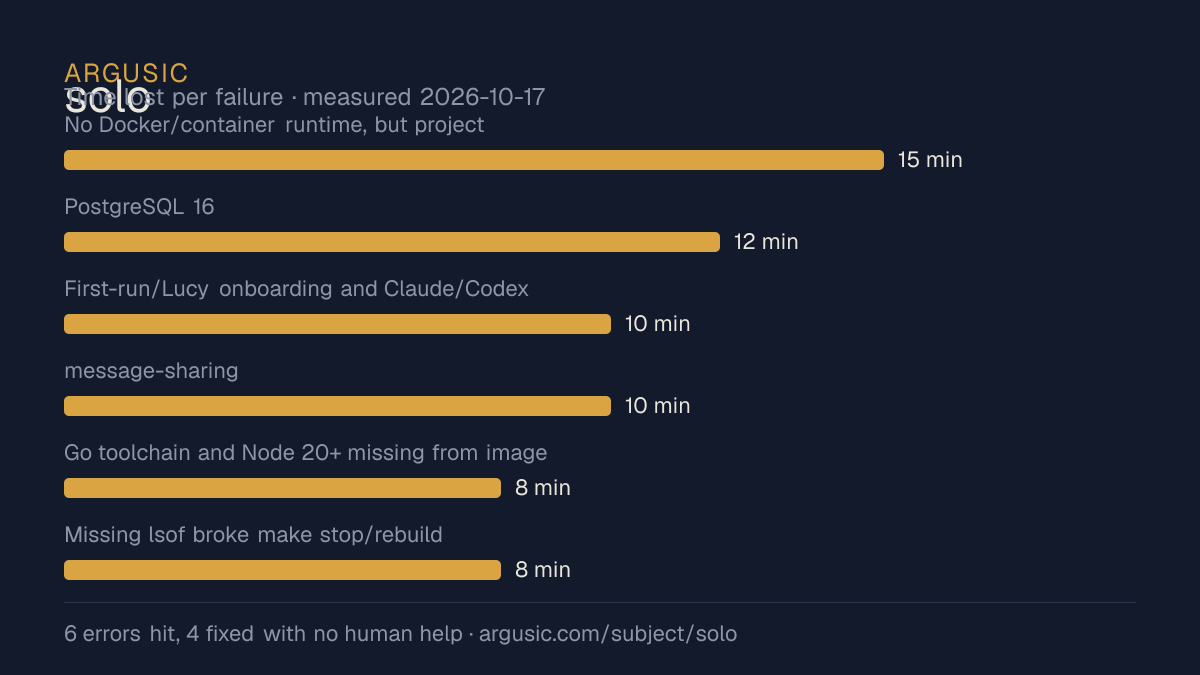
哪里出了问题,用 agent 自己的话说
agent 的原话,最严重的排在最前,从不改写成建议。
- No Docker/container runtime, but project scripts require docker for PostgreSQL15 分钟
- PostgreSQL 16 (jammy build) missing jammy runtime libs libicu70/libldap-2.5-0/libpq5/libreadline8/libtirpc3t6412 分钟
- First-run/Lucy onboarding and Claude/Codex agent E2E specs require a logged-in LLM agent CLI (codex present but unauthenticated; no claude)10 分钟
- message-sharing (headless clipboard), user-avatar (photo upload), channel-split (layout) specs hang in headless Chromium in this container10 分钟
- Go toolchain and Node 20+ missing from image8 分钟
- Missing lsof broke make stop/rebuild ('refusing to stop ... not owned by this checkout')8 分钟
- 安装时间
- 55 分钟
- 从冷启动机器到完成
- 56 分钟
- 遇到并修复的错误
- 遇到 6 个,在无人协助的情况下修复了 4 个
- 结果是如何证明的
- make rebuild exited 0; curl /readyz, /health, / each returned 200; go test ./... all packages ok; 7 Playwright E2E specs passed (local-registration, marketing-homepage, message-timestamp, websocket-message-send, message-reuse, message-thread-preview, actionable-inbox); ffmpeg -v error -i .webm -f null - exited 0
- 使用的模型 token
- 2,387,085
- 测试的确切 commit
- 9d58e66769ed
- 容器镜像
- sha256:cdd920bce783
没有测量什么
另一半内容,让你清楚看到这些证据能说明到什么程度。缺失的数据就标为缺失,从不填补。
- GPU 显存峰值
- 本次运行在 CPU 机器上进行,没有可采样的 GPU
- 长时间运行的表现
- 每次尝试都使用文档中最小的设置和固定的时间预算,因此这里测量的是它能否运行,而不是它在负载下的表现
录屏的结尾
决定该结论的终端会话的最后几行,与录制时完全一致。
2,387,085
All verification complete. Final report:
**What I did and observed**
- Installed user-level toolchain (no root): Go 1.27.2, Node 22.17.1, and real PostgreSQL 16.14 (16.…
- `make rebuild` (the sanctioned lifecycle command) exits 0; server :8080 `/readyz` → 200 `{"status…
- Paired the ordinary daemon through the real API: registered a user, created a Computer via `POST …
- 81 migrations applied to real PostgreSQL.
- `go test ./...` — every package `ok`, no failures.
- `next build` — 16 routes compiled cleanly.
- 7 real Playwright E2E tests passed against the real frontend+API+PostgreSQL (no mocks): `local-re…
- Verified a Playwright-produced `.webm` decodes cleanly: `ffmpeg -v error -i FILE -f null -` exit …
- Real-agent paths (Lucy first-run greeting, Claude/Argusic Agent provider agents) need a logged-in…回放完整会话,从干净的机器到此刻的每一条命令。
测试方式
一个 agent,一个容器,没有人工协助。它按照项目自身文档所写的方式安装项目,运行它,并修复出错的地方。下面的一切都按实际发生的过程记录:终端会话、log 和确切的 commit。 完整方法论.
优势与局限
均为实测事实,而非观点。内容是如何撰写的.
顺利的部分
- 在干净的机器上达到了运行状态,会话有完整记录。
- 无需 GPU 即可运行,因此启动它并不需要 GPU。
- 采用 MIT 许可证,以其托管平台报告的信息为准。
不顺利或尚不清楚的部分
- 安装用了 55 分钟,慢于 Argusic 测量过的 17 个同类项目的中位数。
- 搭建过程中遇到 6 个错误,其中 2 个没有解决。
- 目前只测量过一次。单次尝试只能说明它可以运行,不能说明它能稳定运行。
在 Argusic 安装并计时过的 18 个 agent-orchestration 项目中,solo 达到运行状态的速度排名第 18,18 个项目中有 13 个达到了运行状态。
适合用于
- 在笔记本电脑或小型服务器上试用:它无需 GPU 即达到了运行状态。
同一领域中也测试过的项目
这里的每个项目都由 Argusic 在干净的机器上安装并运行过。未经测试的项目不会出现在这里。
运行历史
主题 (来自 GitHub)
agent-orchestrationagent-workspaceai-agentsai-workspaceclaude-codecodexcoding-agentsmulti-agentopencodesolosolo-agentsoloagent
嵌入徽章
用于项目 README 的 Markdown。徽章链接回本页;使用条款见 条款页面.
[](https://argusic.com/subject/solo)常见问题
- solo 能运行吗?
- 是的。solo 可以运行. Argusic 在一台干净的机器上安装并启动了它,用时 55 分钟,过程中遇到 6 个错误,并记录了整个会话。
- Argusic 是如何测试 solo 的?
- 在一台全新的一次性机器上进行,每条命令都被记录,仓库固定在 commit 9d58e66769ed。共记录了 1 次尝试,完整方法见方法论页面。
- 测试 solo 花了多少钱?
- 得出该结论的那次运行花费 0.56 USD:这是真实的算力和模型成本,而不是按每百万 token 计的标价。该数字记录在那次运行的页面上。
- solo 安装需要多长时间?
- 在决定该结论的那次运行中,从干净的机器到运行状态用了 55 分钟。这是一次实测的尝试,不是平均值。
- solo 需要 GPU 吗?
- 启动它不需要。Argusic 在一台没有 GPU 的机器上让它达到了运行状态。
- 安装 solo 时会出现什么问题?
- 已记录的运行中出现了 6 个问题,其中 4 个在无人协助的情况下被修复。每个问题及其耗费的时间都列在本页上。
- solo 与其他替代方案相比如何?
- 在 Argusic 安装并计时过的 18 个 agent-orchestration 项目中,solo 达到运行状态的速度排名第 18,18 个项目中有 13 个达到了运行状态。
- solo 的证据在哪里?
- 这次已记录的运行都在本页上,每次都链接到完整的 log 和终端录屏,并连同 sha256 指纹一起保存,因此无法被悄悄篡改。