英文原文: https://argusic.com/subject/nanobot
nanobot
你的轻量级开源个人 agent。
借助 mock 可运行来源:GitHub项目主页PythonMITcommit d81aa5a4ab42
Python,MIT 许可证. 项目的自我描述:agent framework、ai agent、ai agents、chatbot、chatops、discord bot、llm agents 和 llms.
nanobot 可以运行,其依赖的服务由替身代替。一个 Argusic agent 在一台没有 GPU 的干净机器上用 25 分钟完成了安装,遇到 5 个错误,并在无人协助的情况下全部修复,整个会话都被记录了下来。
After pinning mcp<1.30 and relaxing two width-sensitive CLI assertions, Python installs editable, the 6785-test suite, 1125 WebUI tests and basedpyright all pass, and against a local mock provider the CLI agent, OpenAI-compatible API server (JSON and SSE), gateway WebSocket chat and native TUI all returned 'Hello from mock!' while the WebUI answered 200.
agent 在干净的机器上最终得到的结果,用它自己的话说。 测量方式
每一次都由 Argusic 在全新机器上实测。每个数字都链接到对应的证据。 Argusic 评分 92,满分 100(该项目各次运行得分的平均值)。
概览
项目数据来自 GitHub,链接见本页顶部,更新于 。测试数据由 Argusic 提供 (CC BY 4.0);每个数字都链接到一个运行页面,附完整的 log、录屏及其 sha256 哈希。
测量了什么
来自决定该结论的那次运行。 每一行都是记录下来的数值,而非估算。
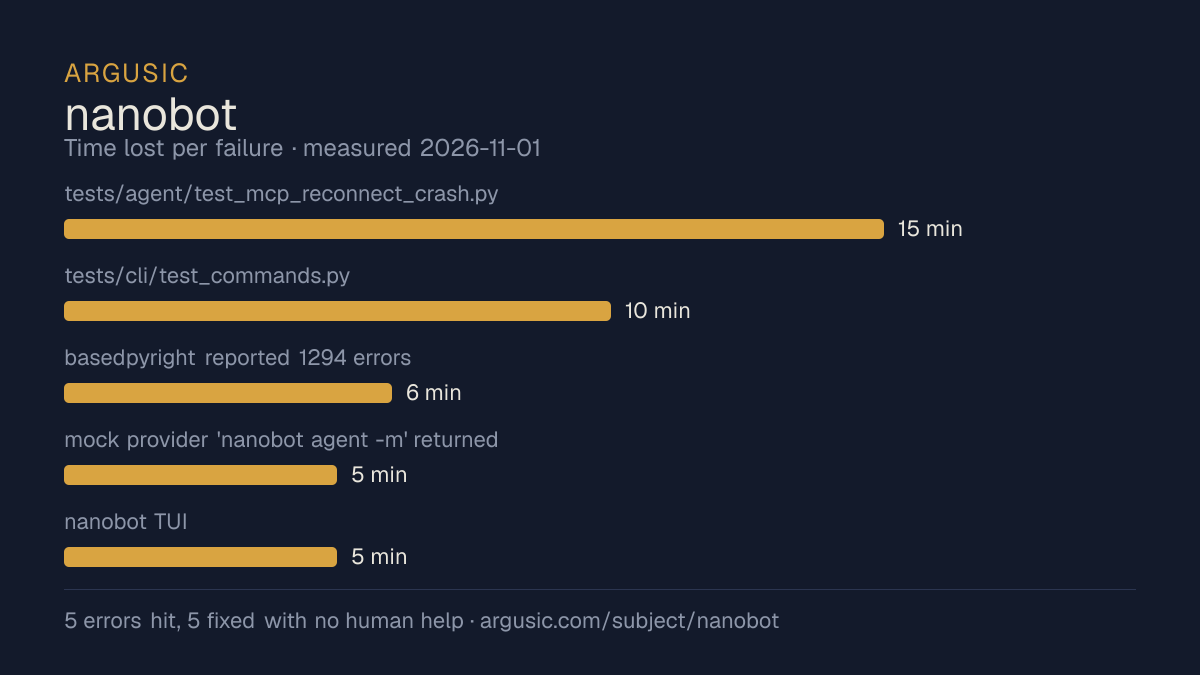
哪里出了问题,用 agent 自己的话说
agent 的原话,最严重的排在最前,从不改写成建议。
- tests/agent/test_mcp_reconnect_crash.py::test_mcp_reconnect_during_shutdown_does_not_crash failed: mcp 1.30.0's idle-timeout rework left the client session alive, so tool re-execution succeeded without triggering the reconnect the test gates on15 分钟
- tests/cli/test_commands.py::test_webui_missing_runtime_env_fails_before_starting_gateway and ::test_webui_yes_still_refuses_invalid_custom_model_setup failed under pytest -n 4 because COLUMNS=80 in this container made Rich wrap the config path onto two lines10 分钟
- basedpyright reported 1294 errors (unresolved telegram/discord/slack/azure/boto3/langfuse imports) because optional extras and channel deps were not installed6 分钟
- mock provider 'nanobot agent -m' returned 'Error calling LLM: Connection error.' because the background mock server died when its launching shell exited5 分钟
- nanobot TUI: 'no native TUI archive is published for nanobot 0.3.0 on this platform' after uv pip installs replaced the editable install5 分钟
- 安装时间
- 25 分钟
- 从冷启动机器到完成
- 29 分钟
- 遇到并修复的错误
- 遇到 5 个,在无人协助的情况下修复了 5 个
- 结果是如何证明的
- cd /work/repo && HOME=/tmp/nbhome .venv/bin/python -m pytest -q -n 4 exited 0 with '6785 passed, 13 skipped'; cd webui && node_modules/.bin/vitest run exited 0 with '73 passed / 1125 passed'; .venv/bin/basedpyright exited 0 '0 errors'; curl -s -o /dev/null -w %{http_code} on http://127.0.0.1:8765/ returned 200 and on http://127.0.0.1:18790/health returned 200; POST /v1/chat/completions on :8900 returned 200 JSON 'Hello from mock!' and SSE streamed 'Hello from mock!' then data:[DONE]; a websockets client using /webui/bootstrap received delta 'Hello from mock!' then stream_end and turn_end; nanobot agent -m 'Hello!' printed 'Hello from mock!'; the Bun 1.4.4 TUI in a PTY showed 'Ready' and the reply 'Hello from mock!'
- 使用的模型 token
- 256,555
- 测试的确切 commit
- d81aa5a4ab42
- 容器镜像
- sha256:cdd920bce783
没有测量什么
另一半内容,让你清楚看到这些证据能说明到什么程度。缺失的数据就标为缺失,从不填补。
- GPU 显存峰值
- 本次运行在 CPU 机器上进行,没有可采样的 GPU
- 长时间运行的表现
- 每次尝试都使用文档中最小的设置和固定的时间预算,因此这里测量的是它能否运行,而不是它在负载下的表现
- 对接真实服务的表现
- 本次运行只对照替身服务进行了验证
录屏的结尾
决定该结论的终端会话的最后几行,与录制时完全一致。
256,555
All work is verified and the tree contains only the two intended fixes. Summary of what I did:
**Fixed**
- `pyproject.toml:44` — `mcp>=1.30.0` broke MCP reconnect after session termination (`mcp>=1.26.0,<…
- `tests/cli/test_commands.py:2476` and `:2510` — two WebUI CLI tests asserted the config filename …
**Observed results**
- Install: `python -m pip install -e '.[dev]'` succeeded (37s); `nanobot --version` printed `🐈 nan…
- Python tests: `pytest -n 4` exited 0 with 6785 passed, 13 skipped.
- Type check: `basedpyright` → 0 errors (after installing extras + channel deps, as AGENTS.md descr…
- WebUI tests: `vitest run` → 73 files, 1125 tests passed.
- Mock provider (127.0.0.1:18080): `nanobot agent -m "Hello!"` → `Hello from mock!`; `nanobot serve…
**Gaps:** no browser binary (WebUI verified only at HTTP/WS level); bun is not a system package (us…
回放完整会话,从干净的机器到此刻的每一条命令。
测试方式
一个 agent,一个容器,没有人工协助。它按照项目自身文档所写的方式安装项目,运行它,并修复出错的地方。下面的一切都按实际发生的过程记录:终端会话、log 和确切的 commit。 完整方法论.
优势与局限
均为实测事实,而非观点。内容是如何撰写的.
顺利的部分
- 在无人介入的情况下从全部 5 个错误中恢复,说明这些故障的文档足以让人解决。
- 采用 MIT 许可证,以其托管平台报告的信息为准。
- 已测量 2 次,因此结果并非偶然。
不顺利或尚不清楚的部分
- 只在替身服务下达到了运行状态,因此这里没有任何内容能证明它在真实服务下可以工作。
- 安装用了 25 分钟,慢于 Argusic 测量过的 61 个同类项目的中位数。
在 Argusic 安装并计时过的 62 个 agent-framework 项目中,nanobot 达到运行状态的速度排名第 58,62 个项目中有 48 个达到了运行状态。
同一领域中也测试过的项目
这里的每个项目都由 Argusic 在干净的机器上安装并运行过。未经测试的项目不会出现在这里。
运行历史
| 测试者 | 尝试 | 结果 | 评分 | 成本 USD | 时间 |
|---|---|---|---|---|---|
| Argusic Runner | 2/3 | 借助 mock 可运行 | 92.00 | 0.20 | |
| Argusic Runner | 1/3 | 借助 mock 可运行 | 92.00 | 0.08 |
主题 (来自 GitHub)
agent-frameworkai-agentai-agentschatbotchatopsdiscord-botllm-agentsllmslocal-llmmcpmodel-context-protocolmulti-agentopenai-compatibleopenclawpersonal-ai-assistantpythonself-hostedtelegram-bot-ai-assistantwebuiworkflow-automation
嵌入徽章
用于项目 README 的 Markdown。徽章链接回本页;使用条款见 条款页面.
[](https://argusic.com/subject/nanobot)常见问题
- nanobot 能运行吗?
- nanobot 可以运行,外部服务由 mock 代替. Argusic 在一台干净的机器上安装并启动了它,用时 25 分钟,过程中遇到 5 个错误,并记录了整个会话。
- Argusic 是如何测试 nanobot 的?
- 在一台全新的一次性机器上进行,每条命令都被记录,仓库固定在 commit d81aa5a4ab42。共记录了 2 次尝试,完整方法见方法论页面。
- 测试 nanobot 花了多少钱?
- 得出该结论的那次运行花费 0.20 USD:这是真实的算力和模型成本,而不是按每百万 token 计的标价。该数字记录在那次运行的页面上。
- nanobot 安装需要多长时间?
- 在决定该结论的那次运行中,从干净的机器到运行状态用了 25 分钟。这是一次实测的尝试,不是平均值。
- nanobot 需要 GPU 吗?
- 启动它不需要。Argusic 在一台没有 GPU 的机器上让它达到了运行状态。
- 安装 nanobot 时会出现什么问题?
- 已记录的运行中出现了 5 个问题,其中 5 个在无人协助的情况下被修复。每个问题及其耗费的时间都列在本页上。
- nanobot 与其他替代方案相比如何?
- 在 Argusic 安装并计时过的 62 个 agent-framework 项目中,nanobot 达到运行状态的速度排名第 58,62 个项目中有 48 个达到了运行状态。
- nanobot 的证据在哪里?
- 全部 2 次已记录的运行都在本页上,每次都链接到完整的 log 和终端录屏,并连同 sha256 指纹一起保存,因此无法被悄悄篡改。