英文原文: https://argusic.com/subject/doca
doca
Doca|开源文档管理与知识库,支持多人协同编辑、在线文档、Markdown、表格、幻灯片、画布和 AI 助手。自托管文档管理、知识库及实时协同编辑,适用于个人和小团队。
可运行来源:GitHub项目主页TypeScriptMITcommit 091efcd45848
TypeScript,MIT 许可证. 项目的自我描述:ai assistant、canvas、collaborative editing、docker、document management、knowledge base、markdown 和 online office.
doca 可以运行。一个 Argusic agent 在一台没有 GPU 的干净机器上用 31 分钟完成了安装,遇到 7 个错误,并在无人协助的情况下全部修复,整个会话都被记录了下来。
A source checkout of Doca 0.1.24 built and ran in this container: pnpm dev served the web app (HTTP 200) and API (200), the admin account was bootstrapped and logged in over HTTP, an uploaded file round-tripped byte-for-byte through the API and local file store into SQLite (119 tables), the web build and typecheck passed, and the vitest suite passed 2747 of 2752 runnable tests, with the 5 failures limited to Chromium...
agent 在干净的机器上最终得到的结果,用它自己的话说。 测量方式
每一次都由 Argusic 在全新机器上实测。每个数字都链接到对应的证据。 Argusic 评分 100,满分 100(该项目各次运行得分的平均值)。
概览
项目数据来自 GitHub,链接见本页顶部,更新于 。测试数据由 Argusic 提供 (CC BY 4.0);每个数字都链接到一个运行页面,附完整的 log、录屏及其 sha256 哈希。
测量了什么
来自决定该结论的那次运行。 每一行都是记录下来的数值,而非估算。
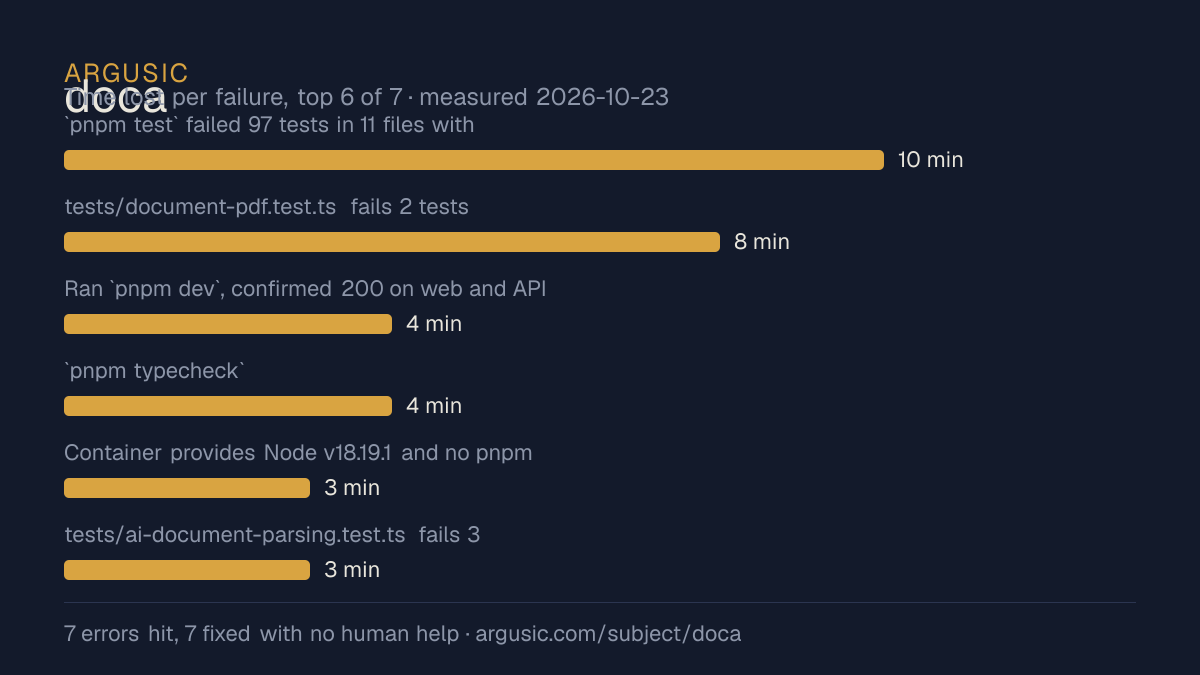
哪里出了问题,用 agent 自己的话说
agent 的原话,最严重的排在最前,从不改写成建议。
- `pnpm test` failed 97 tests in 11 files with 'trusted_engine_required'; root cause was the container umask 0002 making temp dirs group-writable (0775), which the segmentation security check rejects10 分钟
- tests/document-pdf.test.ts fails 2 tests: the renderer hardcodes chromiumSandbox:true and the downloaded Chromium headless shell cannot start ('No usable sandbox!', unprivileged user namespaces disabled by AppArmor on this Ubuntu 24.04 container)8 分钟
- Ran `pnpm dev`, confirmed 200 on web and API, then both ports refused connections; dev server had been killed when the launching shell exited4 分钟
- `pnpm typecheck` (tsc --noEmit) aborted with 'JavaScript heap out of memory' at Node's default heap on this large monorepo4 分钟
- Container provides Node v18.19.1 and no pnpm, but the repo requires Node >=22 and pnpm 11.25.0 (packageManager field); install could not start3 分钟
- tests/ai-document-parsing.test.ts fails 3 tests with 'spawn soffice ENOENT': DOCX/XLSX/PPTX rendering requires LibreOffice3 分钟
- 安装时间
- 31 分钟
- 从冷启动机器到完成
- 31 分钟
- 遇到并修复的错误
- 遇到 7 个,在无人协助的情况下修复了 7 个
- 结果是如何证明的
- cp .env.example .env (absolute storage root + fresh 32-byte key), `pnpm install --frozen-lockfile` exited 0; `pnpm build` exited 0 (vite built); `pnpm typecheck` with 8GB heap exited 0; `pnpm dev` served GET / -> 200 and GET /api/v1/auth/options -> 200; `bash scripts/bootstrap-admin-local.sh` printed 管理员初始化成功; POST /api/v1/auth/login returned 200 with the admin user; POST /api/v1/files/items?filename=final.md returned 200, GET .../content returned the exact 41 uploaded bytes, DELETE returned 200; SQLite at data/v1/doca.db had 119 tables and the uploaded object bytes were on disk; `umask 0022 pnpm test` exited 1 with Test Files 274 passed | 2 failed (278), Tests 2747 passed | 5 failed | 6 skipped (2758)
- 使用的模型 token
- 381,090
- 测试的确切 commit
- 091efcd45848
- 容器镜像
- sha256:cdd920bce783
没有测量什么
另一半内容,让你清楚看到这些证据能说明到什么程度。缺失的数据就标为缺失,从不填补。
- GPU 显存峰值
- 本次运行在 CPU 机器上进行,没有可采样的 GPU
- 长时间运行的表现
- 每次尝试都使用文档中最小的设置和固定的时间预算,因此这里测量的是它能否运行,而不是它在负载下的表现
录屏的结尾
决定该结论的终端会话的最后几行,与录制时完全一致。
/bin/sh -lc 'date -u; echo "start was ~06:10 UTC"; export PATH=$HOME/tools/node-v24.22.1-linux-x64/…
 succeeded in 0ms:
Fri Oct 23 06:41:19 UTC 2026
start was ~06:10 UTC
== final server check ==
web /: 200
`git status` is empty (no repo files modified — my `.env` and `data/` are gitignored). The server i…
Final verification recap: install succeeded, build succeeded, typecheck succeeded (with larger heap…
tokens used
381,090
`git status` is empty (no repo files modified — my `.env` and `data/` are gitignored). The server i…
Final verification recap: install succeeded, build succeeded, typecheck succeeded (with larger heap…
回放完整会话,从干净的机器到此刻的每一条命令。
测试方式
一个 agent,一个容器,没有人工协助。它按照项目自身文档所写的方式安装项目,运行它,并修复出错的地方。下面的一切都按实际发生的过程记录:终端会话、log 和确切的 commit。 完整方法论.
优势与局限
均为实测事实,而非观点。内容是如何撰写的.
顺利的部分
- 在干净的机器上达到了运行状态,会话有完整记录。
- 在无人介入的情况下从全部 7 个错误中恢复,说明这些故障的文档足以让人解决。
- 无需 GPU 即可运行,因此启动它并不需要 GPU。
- 采用 MIT 许可证,以其托管平台报告的信息为准。
不顺利或尚不清楚的部分
- 安装用了 31 分钟,慢于 Argusic 测量过的 11 个同类项目的中位数。
- 目前只测量过一次。单次尝试只能说明它可以运行,不能说明它能稳定运行。
在 Argusic 安装并计时过的 12 个 ai-assistant 项目中,doca 达到运行状态的速度排名第 9,12 个项目中有 9 个达到了运行状态。
适合用于
- 在笔记本电脑或小型服务器上试用:它无需 GPU 即达到了运行状态。
同一领域中也测试过的项目
这里的每个项目都由 Argusic 在干净的机器上安装并运行过。未经测试的项目不会出现在这里。
运行历史
主题 (来自 GitHub)
ai-assistantcanvascollaborative-editingdockerdocument-managementknowledge-basemarkdownonline-officepresentationreactreal-time-collaborationrich-text-editorself-hostedspreadsheettypescriptyjs
嵌入徽章
用于项目 README 的 Markdown。徽章链接回本页;使用条款见 条款页面.
[](https://argusic.com/subject/doca)常见问题
- doca 能运行吗?
- 是的。doca 可以运行. Argusic 在一台干净的机器上安装并启动了它,用时 31 分钟,过程中遇到 7 个错误,并记录了整个会话。
- Argusic 是如何测试 doca 的?
- 在一台全新的一次性机器上进行,每条命令都被记录,仓库固定在 commit 091efcd45848。共记录了 1 次尝试,完整方法见方法论页面。
- 测试 doca 花了多少钱?
- 得出该结论的那次运行花费 0.15 USD:这是真实的算力和模型成本,而不是按每百万 token 计的标价。该数字记录在那次运行的页面上。
- doca 安装需要多长时间?
- 在决定该结论的那次运行中,从干净的机器到运行状态用了 31 分钟。这是一次实测的尝试,不是平均值。
- doca 需要 GPU 吗?
- 启动它不需要。Argusic 在一台没有 GPU 的机器上让它达到了运行状态。
- 安装 doca 时会出现什么问题?
- 已记录的运行中出现了 7 个问题,其中 7 个在无人协助的情况下被修复。每个问题及其耗费的时间都列在本页上。
- doca 与其他替代方案相比如何?
- 在 Argusic 安装并计时过的 12 个 ai-assistant 项目中,doca 达到运行状态的速度排名第 9,12 个项目中有 9 个达到了运行状态。
- doca 的证据在哪里?
- 这次已记录的运行都在本页上,每次都链接到完整的 log 和终端录屏,并连同 sha256 指纹一起保存,因此无法被悄悄篡改。