英文原文: https://argusic.com/subject/build-monitor-plugin
build-monitor-plugin
Jenkins Build Monitor Plugin
借助 mock 可运行来源:GitHub项目主页JavaMITcommit 9b89ddc60c59
Java,MIT 许可证. 项目的自我描述:continuous delivery、continuous improvement、continuous integration、continuous testing 和 jenkins ci.
build-monitor-plugin 可以运行,其依赖的服务由替身代替。一个 Argusic agent 在一台没有 GPU 的干净机器上用 92 分钟完成了安装,遇到 5 个错误,整个会话都被记录了下来。
The plugin builds (HPI contains the Vite bundle), its full Maven+Vitest suite passes in this container, and a standalone Jenkins 2.516.3 with the plugin installed serves a live Build Monitor view at /view/Monitor/ (HTTP 200) with the frontend bundle at /plugin/build-monitor-plugin/js/bundles/app.js (HTTP 200).
agent 在干净的机器上最终得到的结果,用它自己的话说。 测量方式
每一次都由 Argusic 在全新机器上实测。每个数字都链接到对应的证据。 Argusic 评分 88,满分 100(该项目各次运行得分的平均值)。
概览
项目数据来自 GitHub,链接见本页顶部,更新于 。测试数据由 Argusic 提供 (CC BY 4.0);每个数字都链接到一个运行页面,附完整的 log、录屏及其 sha256 哈希。
测量了什么
来自决定该结论的那次运行。 每一行都是记录下来的数值,而非估算。
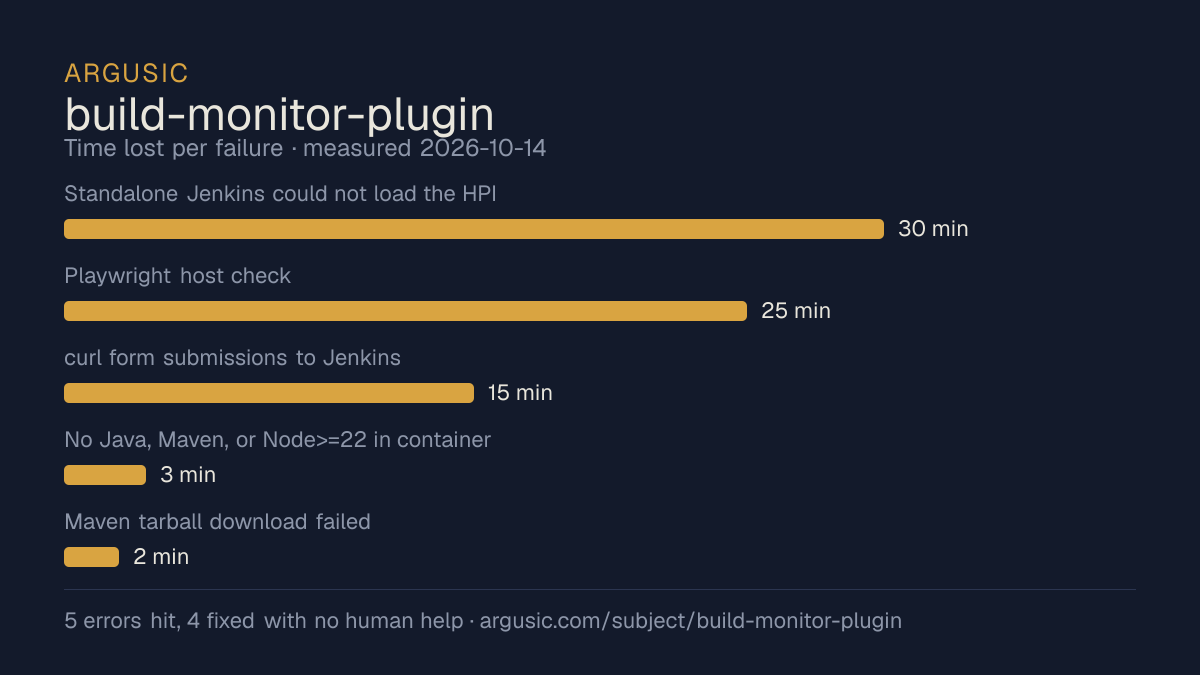
哪里出了问题,用 agent 自己的话说
agent 的原话,最严重的排在最前,从不改写成建议。
- Standalone Jenkins could not load the HPI: missing dependency jackson2-api plus 'expected build-monitor-plugin.jpi' naming30 分钟
- Playwright host check: 'Host system is missing dependencies to run browsers' (libwoff1, libgstreamer*, libharfbuzz-icu0, etc.), no root to apt-install25 分钟
- curl form submissions to Jenkins view-creation URLs 404'd on this Jenkins baseline15 分钟
- No Java, Maven, or Node>=22 in container (Node was 18; project requires Node>=22)3 分钟
- Maven tarball download failed: HTML page instead of gzip2 分钟
- 安装时间
- 92 分钟
- 从冷启动机器到完成
- 38 分钟
- 遇到并修复的错误
- 遇到 5 个,在无人协助的情况下修复了 4 个
- 结果是如何证明的
- mvn -B -Pmight-produce-incrementals test -> BUILD SUCCESS, surefire 103 run/0 fail/0 error (incl. 14 e2e); npm run build -> '✓ built in 285ms', app.js 290.00 kB inside HPI; live Jenkins: curl / -> 200, curl /view/Monitor/ -> 200 (contains data-build-monitor-id and js/bundles/app.js), curl /pluginManager/api/xml shows build-monitor-plugin active=true v999999-SNAPSHOT
- 使用的模型 token
- 2,316,404
- 测试的确切 commit
- 9b89ddc60c59
- 容器镜像
- sha256:cdd920bce783
没有测量什么
另一半内容,让你清楚看到这些证据能说明到什么程度。缺失的数据就标为缺失,从不填补。
- GPU 显存峰值
- 本次运行在 CPU 机器上进行,没有可采样的 GPU
- 长时间运行的表现
- 每次尝试都使用文档中最小的设置和固定的时间预算,因此这里测量的是它能否运行,而不是它在负载下的表现
- 对接真实服务的表现
- 本次运行只对照替身服务进行了验证
观看会话
完整的运行过程,从一台干净的机器开始,按实际速度播放。没有剪辑,也没有加速。
第 1 次尝试的录屏,运行于 ,即决定上述结论的那次尝试。 制作该视频所用的终端录屏是证据,连同 sha256 指纹一起保存;视频只是由它渲染而成。 在你点击播放之前,不会从视频托管方加载任何内容。
录屏的结尾
决定该结论的终端会话的最后几行,与录制时完全一致。
- `npm run build` → `vite v8.3.1 ... ✓ 103 modules transformed ... src/main/webapp/js/bundles/app.j…
- `mvn -B -Pmight-produce-incrementals package -DskipTests` → `BUILD SUCCESS`, produced `target/bui…
- `mvn test` (full suite) → `BUILD SUCCESS`; surefire summary: 103 tests, 0 failures, 0 errors, 1 s…
- Fresh clone `npm test` → `Test Files 1 passed (1)`, `Tests 3 passed (3)`.
- Fresh clone `mvn test` → tests ran (BuildMonitorDescriptorTest 2 passed; NoJobsTest 1; ProjectSta…
- a fresh clone reproducing the Playwright suite has the one *unfixed* gap: playwright-java's post-…
**Live Jenkins (the app)**
- `java -jar jenkins-war-2.516.3.war --httpPort=8091` with the HPI + deps → `Jenkins is fully up an…
- As admin after setup: `GET /` -> 200; `GET /plugin/build-monitor-plugin/js/bundles/app.js` -> 200…
- `POST /createView` (mode `com.smartcodeltd.jenkinsci.plugins.buildmonitor.BuildMonitorView`) -> 3…
- `GET /pluginManager/api/xml` shows `shortName=build-monitor-plugin active=true enabled=true versi…
**Note on honesty in `final_state`:** every claim in it was observed directly (build output, test r…
回放完整会话,从干净的机器到此刻的每一条命令。
测试方式
一个 agent,一个容器,没有人工协助。它按照项目自身文档所写的方式安装项目,运行它,并修复出错的地方。下面的一切都按实际发生的过程记录:终端会话、log 和确切的 commit。 完整方法论.
优势与局限
均为实测事实,而非观点。内容是如何撰写的.
顺利的部分
- 用 92 分钟完成安装。
- 采用 MIT 许可证,以其托管平台报告的信息为准。
不顺利或尚不清楚的部分
- 只在替身服务下达到了运行状态,因此这里没有任何内容能证明它在真实服务下可以工作。
- 搭建过程中遇到 5 个错误,其中 1 个没有解决。
- 目前只测量过一次。单次尝试只能说明它可以运行,不能说明它能稳定运行。
同一领域中也测试过的项目
这里的每个项目都由 Argusic 在干净的机器上安装并运行过。未经测试的项目不会出现在这里。
运行历史
| 测试者 | 尝试 | 结果 | 评分 | 成本 USD | 时间 |
|---|---|---|---|---|---|
| Argusic Runner | 1/3 | 借助 mock 可运行 | 88.00 | 0.49 |
主题 (来自 GitHub)
continuous-deliverycontinuous-improvementcontinuous-integrationcontinuous-testingjenkins-ci
嵌入徽章
用于项目 README 的 Markdown。徽章链接回本页;使用条款见 条款页面.
[](https://argusic.com/subject/build-monitor-plugin)常见问题
- build-monitor-plugin 能运行吗?
- build-monitor-plugin 可以运行,外部服务由 mock 代替. Argusic 在一台干净的机器上安装并启动了它,用时 92 分钟,过程中遇到 5 个错误,并记录了整个会话。
- Argusic 是如何测试 build-monitor-plugin 的?
- 在一台全新的一次性机器上进行,每条命令都被记录,仓库固定在 commit 9b89ddc60c59。共记录了 1 次尝试,完整方法见方法论页面。
- 测试 build-monitor-plugin 花了多少钱?
- 得出该结论的那次运行花费 0.49 USD:这是真实的算力和模型成本,而不是按每百万 token 计的标价。该数字记录在那次运行的页面上。
- build-monitor-plugin 安装需要多长时间?
- 在决定该结论的那次运行中,从干净的机器到运行状态用了 92 分钟。这是一次实测的尝试,不是平均值。
- build-monitor-plugin 需要 GPU 吗?
- 启动它不需要。Argusic 在一台没有 GPU 的机器上让它达到了运行状态。
- 安装 build-monitor-plugin 时会出现什么问题?
- 已记录的运行中出现了 5 个问题,其中 4 个在无人协助的情况下被修复。每个问题及其耗费的时间都列在本页上。
- build-monitor-plugin 的证据在哪里?
- 这次已记录的运行都在本页上,每次都链接到完整的 log 和终端录屏,并连同 sha256 指纹一起保存,因此无法被悄悄篡改。