英文原文: https://argusic.com/subject/splicr
splicr
Dramaxis (剧枢):电影级多智能体影视叙事与智能解说平台 (Tauri 2 + Rust + React 19)。6 大智能体协同导演、5 轨毫秒级对齐时间轴、四道质量闸门硬核质检、本地优先沙箱架构与剪映草稿深度互通。
可运行来源:GitHub项目主页TypeScriptMITcommit a33168b5e77c
TypeScript,MIT 许可证. 项目的自我描述:ai video、capcut、capcut draft、desktop app、dramaxis、ffmpeg、first person narrator 和 local first.
splicr 可以运行。一个 Argusic agent 在一台没有 GPU 的干净机器上用 24 分钟完成了安装,遇到 3 个错误,整个会话都被记录了下来。
Frontend installs, type-checks, builds, and its full Vitest and Playwright suites pass (157 unit tests, 8 e2e tests), and all 12 non-GUI Rust crates build and pass 79 unit plus 2 doc tests; the Tauri desktop shell still cannot be compiled because its system GTK/WebKit dev libraries are absent from this container.
agent 在干净的机器上最终得到的结果,用它自己的话说。 测量方式
每一次都由 Argusic 在全新机器上实测。每个数字都链接到对应的证据。 Argusic 评分 93.3,满分 100(该项目各次运行得分的平均值)。
概览
项目数据来自 GitHub,链接见本页顶部,更新于 。测试数据由 Argusic 提供 (CC BY 4.0);每个数字都链接到一个运行页面,附完整的 log、录屏及其 sha256 哈希。
测量了什么
来自决定该结论的那次运行。 每一行都是记录下来的数值,而非估算。
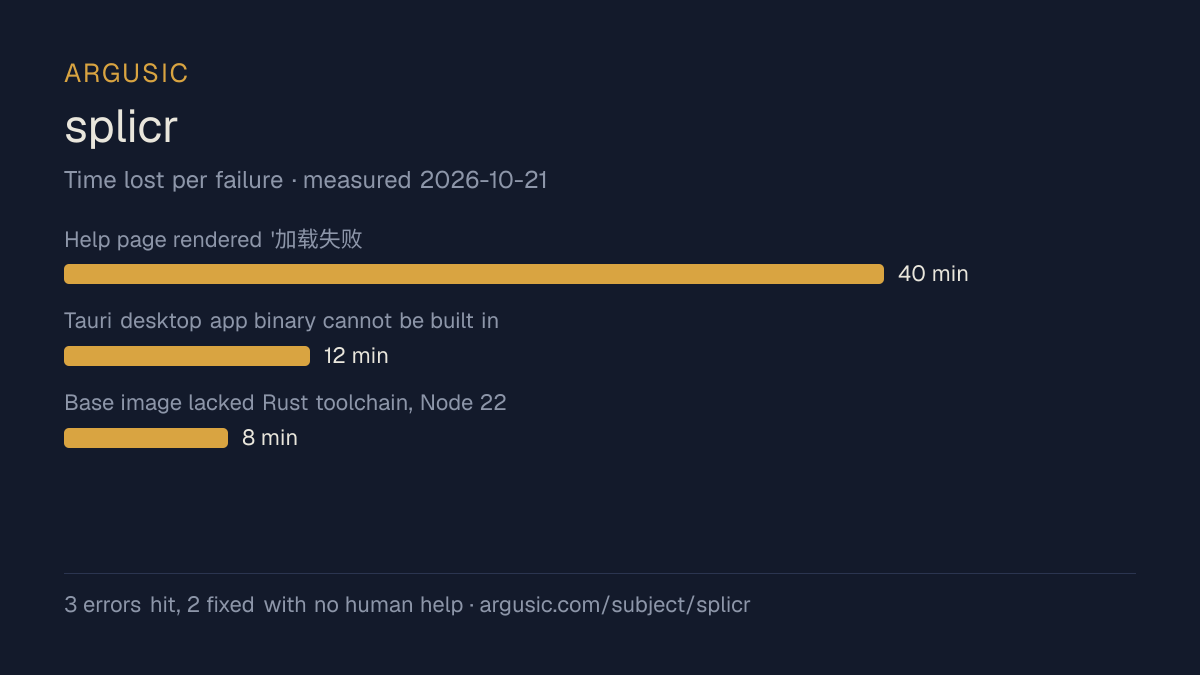
哪里出了问题,用 agent 自己的话说
agent 的原话,最严重的排在最前,从不改写成建议。
- Help page rendered '加载失败: [object Object]' in plain-browser/e2e mode because the useTauriQuery hook invoked Tauri IPC unconditionally and the fast-failing query hid the static shortcuts panel40 分钟
- Tauri desktop app binary cannot be built in this container: system dev libs glib-2.0/gio-2.0/gobject-2.0/gtk+-3.0/webkit2gtk-4.1/libsoup-3.0/sqlite3 .pc and headers are missing, no root or sudo to apt-install, and no bundled/prebuilt form exists12 分钟
- Base image lacked Rust toolchain, Node 22, and pnpm (corepack autopicked incompatible pnpm 12 and crashed)8 分钟
- 安装时间
- 24 分钟
- 从冷启动机器到完成
- 28 分钟
- 遇到并修复的错误
- 遇到 3 个,在无人协助的情况下修复了 2 个
- 结果是如何证明的
- pnpm exec vitest run -> 11 files/157 tests passed; pnpm exec playwright test -> 8 passed, diag printed help-errors=0 shortcuts=1 and src-status=200; cargo test on 12 crates -> 79 unit + 2 doc tests passed; pnpm build -> built in 2.18s; pnpm tauri build fails at glib-sys (missing glib-2.0 dev)
- 使用的模型 token
- 2,355,966
- 测试的确切 commit
- a33168b5e77c
- 容器镜像
- sha256:cdd920bce783
没有测量什么
另一半内容,让你清楚看到这些证据能说明到什么程度。缺失的数据就标为缺失,从不填补。
- GPU 显存峰值
- 本次运行在 CPU 机器上进行,没有可采样的 GPU
- 长时间运行的表现
- 每次尝试都使用文档中最小的设置和固定的时间预算,因此这里测量的是它能否运行,而不是它在负载下的表现
录屏的结尾
决定该结论的终端会话的最后几行,与录制时完全一致。
- Bootstrapped the missing toolchain in user space: Rust 1.99.1 (`~/.cargo`), Node 22.14.0 (`/tmp/n…
- `pnpm install` → clean. `pnpm build` (tsc + vite) → success, `dist/` emitted.
- Ran suites: Vitest **11 files / 157 tests passed**; Playwright e2e **8/8 passed** (real Chromium …
**Fixes I made**
- Error: no Rust toolchain, no pnpm, corepack-broken shim → installed user-space toolchain; added `…
- Error: e2e `帮助页显示快捷键面板` failed — in a plain browser `help_topics` IPC invoked and instantly rejec…
- Remaining unresolved: the **Tauri desktop app itself cannot be built/launched** here — `pkg-confi…
**Verified with**
- `pnpm exec vitest run` → `Test Files 11 passed (11)`, `Tests 157 passed (157)`.
- `pnpm exec playwright test` → `8 passed (10.6s)`, including diag assertions `help-errors=0 shortc…
- `cargo test` (12 crates) → 24 suites ok, 79 unit tests + 2 doc-tests passed.
- `pnpm build` → `✓ built in 2.18s`; `tsc --noEmit` exit 0.
回放完整会话,从干净的机器到此刻的每一条命令。
测试方式
一个 agent,一个容器,没有人工协助。它按照项目自身文档所写的方式安装项目,运行它,并修复出错的地方。下面的一切都按实际发生的过程记录:终端会话、log 和确切的 commit。 完整方法论.
优势与局限
均为实测事实,而非观点。内容是如何撰写的.
顺利的部分
- 在干净的机器上达到了运行状态,会话有完整记录。
- 无需 GPU 即可运行,因此启动它并不需要 GPU。
- 采用 MIT 许可证,以其托管平台报告的信息为准。
不顺利或尚不清楚的部分
- 安装用了 24 分钟,慢于 Argusic 测量过的 4 个同类项目的中位数。
- 搭建过程中遇到 3 个错误,其中 1 个没有解决。
- 目前只测量过一次。单次尝试只能说明它可以运行,不能说明它能稳定运行。
在 Argusic 安装并计时过的 5 个 ai-video 项目中,splicr 达到运行状态的速度排名第 4,5 个项目中有 3 个达到了运行状态。
适合用于
- 在笔记本电脑或小型服务器上试用:它无需 GPU 即达到了运行状态。
同一领域中也测试过的项目
这里的每个项目都由 Argusic 在干净的机器上安装并运行过。未经测试的项目不会出现在这里。
运行历史
主题 (来自 GitHub)
ai-videocapcutcapcut-draftdesktop-appdramaxisffmpegfirst-person-narratorlocal-firstmulti-agentreactrustsubtitle-generatortauritext-to-speechtypescriptvideo-editingvideo-narration
嵌入徽章
用于项目 README 的 Markdown。徽章链接回本页;使用条款见 条款页面.
[](https://argusic.com/subject/splicr)常见问题
- splicr 能运行吗?
- 是的。splicr 可以运行. Argusic 在一台干净的机器上安装并启动了它,用时 24 分钟,过程中遇到 3 个错误,并记录了整个会话。
- Argusic 是如何测试 splicr 的?
- 在一台全新的一次性机器上进行,每条命令都被记录,仓库固定在 commit a33168b5e77c。共记录了 1 次尝试,完整方法见方法论页面。
- 测试 splicr 花了多少钱?
- 得出该结论的那次运行花费 0.50 USD:这是真实的算力和模型成本,而不是按每百万 token 计的标价。该数字记录在那次运行的页面上。
- splicr 安装需要多长时间?
- 在决定该结论的那次运行中,从干净的机器到运行状态用了 24 分钟。这是一次实测的尝试,不是平均值。
- splicr 需要 GPU 吗?
- 启动它不需要。Argusic 在一台没有 GPU 的机器上让它达到了运行状态。
- 安装 splicr 时会出现什么问题?
- 已记录的运行中出现了 3 个问题,其中 2 个在无人协助的情况下被修复。每个问题及其耗费的时间都列在本页上。
- splicr 与其他替代方案相比如何?
- 在 Argusic 安装并计时过的 5 个 ai-video 项目中,splicr 达到运行状态的速度排名第 4,5 个项目中有 3 个达到了运行状态。
- splicr 的证据在哪里?
- 这次已记录的运行都在本页上,每次都链接到完整的 log 和终端录屏,并连同 sha256 指纹一起保存,因此无法被悄悄篡改。