英文原文: https://argusic.com/subject/scira-mcp-chat
scira-mcp-chat
一个极简但功能完善的 MCP 客户端。
可运行来源:GitHub项目主页TypeScriptApache-2.0commit c9467dc212fc
TypeScript,Apache-2.0 许可证. 项目的自我描述:anthropic、grok3、mcp、mcp client、model context protocol、openai 和 xai.
scira-mcp-chat 可以运行。一个 Argusic agent 在一台没有 GPU 的干净机器上用 30 分钟完成了安装,遇到 7 个错误,整个会话都被记录了下来。
The Next.js chat app builds and runs: it serves 200 on / and /chat/[id], and /api/chats and /api/chats/[id] read and write chats/messages against a local Postgres (200/404 verified), while /api/chat streaming requires Vercel BotId OIDC and a Groq/XAI key.
agent 在干净的机器上最终得到的结果,用它自己的话说。 测量方式
每一次都由 Argusic 在全新机器上实测。每个数字都链接到对应的证据。 Argusic 评分 97.1,满分 100(该项目各次运行得分的平均值)。
概览
项目数据来自 GitHub,链接见本页顶部,更新于 。测试数据由 Argusic 提供 (CC BY 4.0);每个数字都链接到一个运行页面,附完整的 log、录屏及其 sha256 哈希。
测量了什么
来自决定该结论的那次运行。 每一行都是记录下来的数值,而非估算。
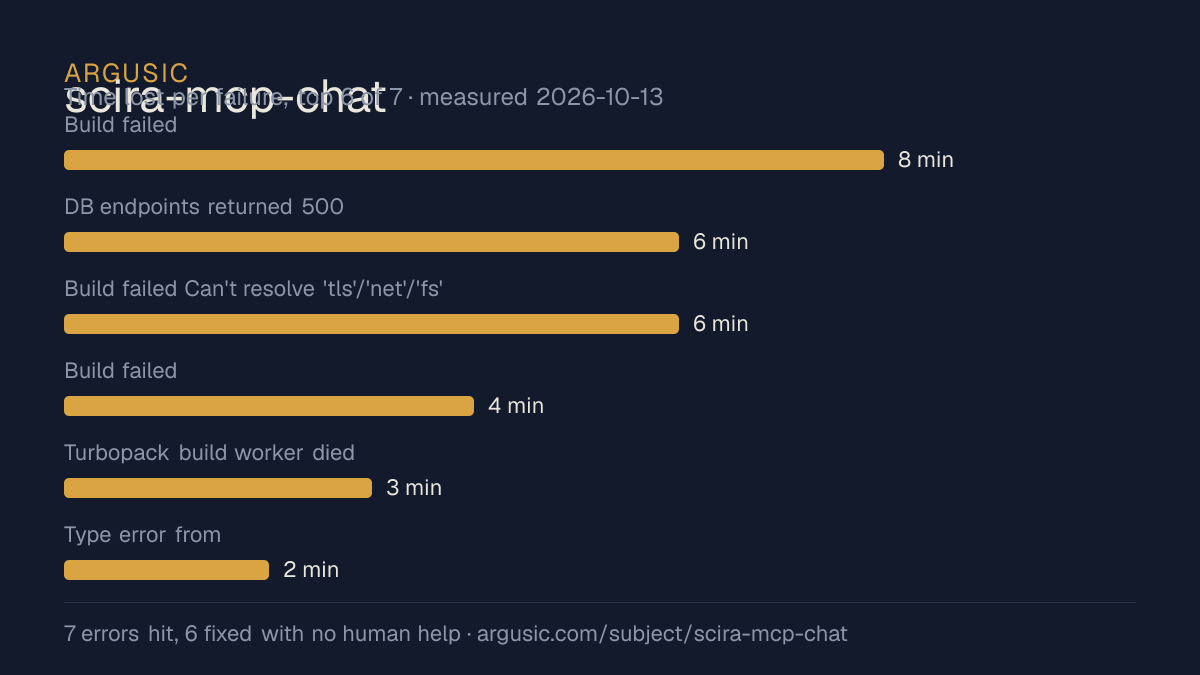
哪里出了问题,用 agent 自己的话说
agent 的原话,最严重的排在最前,从不改写成建议。
- Build failed: @tailwindcss/oxide native binding missing after npm install (npm optional-deps bug + node 18 EBADENGINE)8 分钟
- DB endpoints returned 500: @neondatabase/serverless driver is WebSocket-only and cannot reach a local Postgres6 分钟
- Build failed Can't resolve 'tls'/'net'/'fs': client component chat.tsx imported DB code via lib/chat-store6 分钟
- Build failed: Can't resolve 'zod/v3' (package.json pinned zod 3.23.8, but AI SDK's [email protected] imports zod/v3)4 分钟
- Turbopack build worker died: JavaScript heap out of memory during type check3 分钟
- Type error from ./node_modules.bak/@eslint/config-helpers (leftover npm node_modules shadowed the build)2 分钟
- 安装时间
- 30 分钟
- 从冷启动机器到完成
- 37 分钟
- 遇到并修复的错误
- 遇到 7 个,在无人协助的情况下修复了 6 个
- 结果是如何证明的
- npm run build (turbopack) exited 0; next start served on :3210 with '/', '/chat/[id]' returning 200; GET /api/chats with x-user-id returned 200 with a psql-inserted chat row; GET /api/chats/[id] returned 200 with the chat and its message (404 for unknown); POST /api/mcp-health with unreachable URL returned 503; POST /api/chat returned 500 (Vercel BotId OIDC gate)
- 使用的模型 token
- 244,877
- 测试的确切 commit
- c9467dc212fc
- 容器镜像
- sha256:cdd920bce783
没有测量什么
另一半内容,让你清楚看到这些证据能说明到什么程度。缺失的数据就标为缺失,从不填补。
- GPU 显存峰值
- 本次运行在 CPU 机器上进行,没有可采样的 GPU
- 长时间运行的表现
- 每次尝试都使用文档中最小的设置和固定的时间预算,因此这里测量的是它能否运行,而不是它在负载下的表现
录屏的结尾
决定该结论的终端会话的最后几行,与录制时完全一致。
@@ -2,7 +2,7 @@
 import { withBotId } from "botid/next/config";
 const nextConfig: NextConfig = {
-  /* config options here */
+  serverExternalPackages: ["pg"],
 };
 export default withBotId(nextConfig);
2026-10-13T12:36:11.539627Z ERROR codex_core::session: failed to record rollout items: thread 01a13…
tokens used
244,877
All checks complete. The repository now works as a brand-new user could operate it: install, build,…
Here is the required result line:回放完整会话,从干净的机器到此刻的每一条命令。
测试方式
一个 agent,一个容器,没有人工协助。它按照项目自身文档所写的方式安装项目,运行它,并修复出错的地方。下面的一切都按实际发生的过程记录:终端会话、log 和确切的 commit。 完整方法论.
优势与局限
均为实测事实,而非观点。内容是如何撰写的.
顺利的部分
- 在干净的机器上达到了运行状态,会话有完整记录。
- 无需 GPU 即可运行,因此启动它并不需要 GPU。
- 采用 Apache-2.0 许可证,以其托管平台报告的信息为准。
不顺利或尚不清楚的部分
- 安装用了 30 分钟,慢于 Argusic 测量过的 9 个同类项目的中位数。
- 搭建过程中遇到 7 个错误,其中 1 个没有解决。
- 目前只测量过一次。单次尝试只能说明它可以运行,不能说明它能稳定运行。
在 Argusic 安装并计时过的 10 个 anthropic 项目中,scira-mcp-chat 达到运行状态的速度排名第 9,10 个项目中有 5 个达到了运行状态。
适合用于
- 在笔记本电脑或小型服务器上试用:它无需 GPU 即达到了运行状态。
同一领域中也测试过的项目
这里的每个项目都由 Argusic 在干净的机器上安装并运行过。未经测试的项目不会出现在这里。
运行历史
主题 (来自 GitHub)
嵌入徽章
用于项目 README 的 Markdown。徽章链接回本页;使用条款见 条款页面.
[](https://argusic.com/subject/scira-mcp-chat)常见问题
- scira-mcp-chat 能运行吗?
- 是的。scira-mcp-chat 可以运行. Argusic 在一台干净的机器上安装并启动了它,用时 30 分钟,过程中遇到 7 个错误,并记录了整个会话。
- Argusic 是如何测试 scira-mcp-chat 的?
- 在一台全新的一次性机器上进行,每条命令都被记录,仓库固定在 commit c9467dc212fc。共记录了 1 次尝试,完整方法见方法论页面。
- 测试 scira-mcp-chat 花了多少钱?
- 得出该结论的那次运行花费 0.39 USD:这是真实的算力和模型成本,而不是按每百万 token 计的标价。该数字记录在那次运行的页面上。
- scira-mcp-chat 安装需要多长时间?
- 在决定该结论的那次运行中,从干净的机器到运行状态用了 30 分钟。这是一次实测的尝试,不是平均值。
- scira-mcp-chat 需要 GPU 吗?
- 启动它不需要。Argusic 在一台没有 GPU 的机器上让它达到了运行状态。
- 安装 scira-mcp-chat 时会出现什么问题?
- 已记录的运行中出现了 7 个问题,其中 6 个在无人协助的情况下被修复。每个问题及其耗费的时间都列在本页上。
- scira-mcp-chat 与其他替代方案相比如何?
- 在 Argusic 安装并计时过的 10 个 anthropic 项目中,scira-mcp-chat 达到运行状态的速度排名第 9,10 个项目中有 5 个达到了运行状态。
- scira-mcp-chat 的证据在哪里?
- 这次已记录的运行都在本页上,每次都链接到完整的 log 和终端录屏,并连同 sha256 指纹一起保存,因此无法被悄悄篡改。