英文原文: https://argusic.com/subject/homeassistant-blitzortung
homeassistant-blitzortung
用于从 blitzortung.org 获取闪电数据的自定义组件
可运行来源:GitHubPythonMITcommit 2c3b4a35438c
Python,MIT 许可证. 项目的自我描述:blitzortung、home assistant、home automation 和 lightning network.
homeassistant-blitzortung 可以运行。一个 Argusic agent 在一台没有 GPU 的干净机器上用 32 分钟完成了安装,遇到 3 个错误,整个会话都被记录了下来。
The Home Assistant blitzortung integration builds on Python 3.14.9, passes all 98 tests plus ruff/prek checks; ws-client connects to the live blitzortung websocket and relays decoded lightning strikes to a verified local MQTT broker and stays running, after an asyncio fix for Python 3.14; only the upstream strike-frame decoding beyond the first frames remains unverified.
agent 在干净的机器上最终得到的结果,用它自己的话说。 测量方式
每一次都由 Argusic 在全新机器上实测。每个数字都链接到对应的证据。 Argusic 评分 93.3,满分 100(该项目各次运行得分的平均值)。
概览
项目数据来自 GitHub,链接见本页顶部,更新于 。测试数据由 Argusic 提供 (CC BY 4.0);每个数字都链接到一个运行页面,附完整的 log、录屏及其 sha256 哈希。
测量了什么
来自决定该结论的那次运行。 每一行都是记录下来的数值,而非估算。
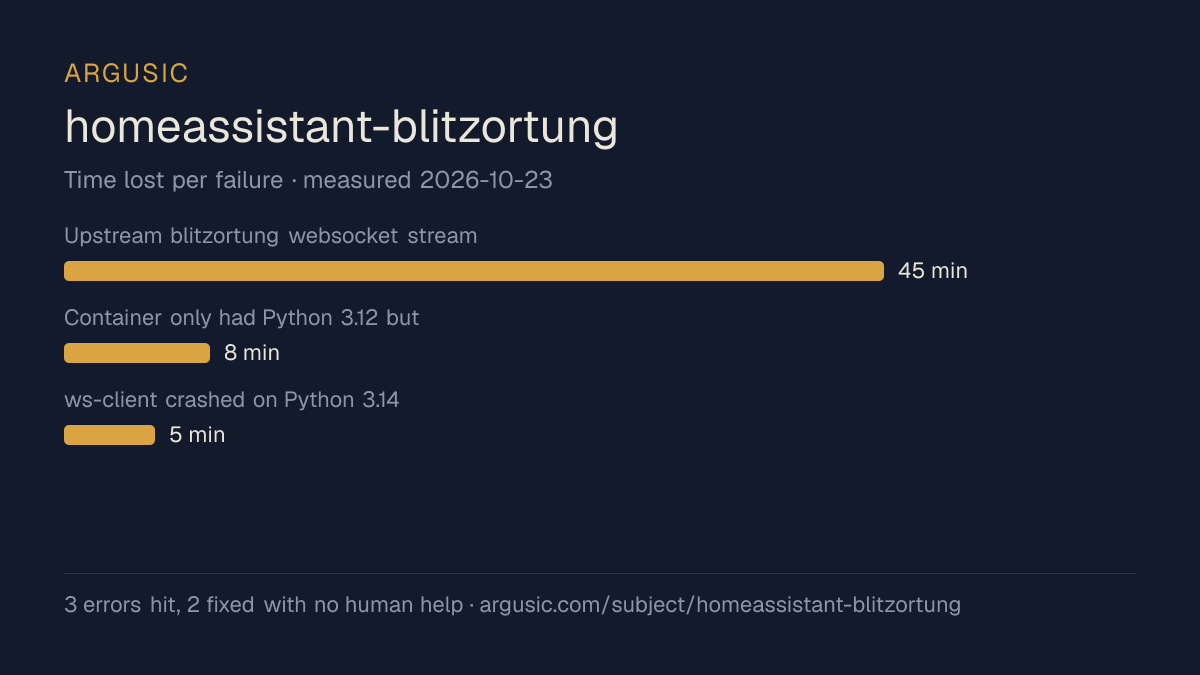
哪里出了问题,用 agent 自己的话说
agent 的原话,最严重的排在最前,从不改写成建议。
- Upstream blitzortung websocket stream: ws-client's LZW decoder cannot decode current server frames (ws3/ws7 return HTTP 502; ws1/ws8 serve frames in an encoding the pinned client code doesn't parse); also blitzortung.ha.sed.pl:1883 closes TCP without CONNACK45 分钟
- Container only had Python 3.12 but requirements need 3.13/3.14; initial pip install failed for pytest-homeassistant-custom-component==0.13.3668 分钟
- ws-client crashed on Python 3.14: asyncio.get_event_loop() with no running loop raises RuntimeError5 分钟
- 安装时间
- 32 分钟
- 从冷启动机器到完成
- 34 分钟
- 遇到并修复的错误
- 遇到 3 个,在无人协助的情况下修复了 2 个
- 结果是如何证明的
- pytest tests -> '98 passed, 36 warnings in 1.58s'; ruff check -> All checks passed; ruff format --check -> '12 files already formatted'; prek run (6 hooks) -> all Passed; local MQTT broker on 127.0.0.1:18830 -> paho client received 'GOT2 test/delivery b'after-sub-probe'', delivered: 1; ws-client mqtt://127.0.0.1:18830 -j -l INFO -> 'connected to mqtt server', 'connected to wss://ws8.blitzortung.org:443/', 40-52 valid strike topic lines, process still running
- 使用的模型 token
- 2,097,772
- 测试的确切 commit
- 2c3b4a35438c
- 容器镜像
- sha256:cdd920bce783
没有测量什么
另一半内容,让你清楚看到这些证据能说明到什么程度。缺失的数据就标为缺失,从不填补。
- GPU 显存峰值
- 本次运行在 CPU 机器上进行,没有可采样的 GPU
- 长时间运行的表现
- 每次尝试都使用文档中最小的设置和固定的时间预算,因此这里测量的是它能否运行,而不是它在负载下的表现
录屏的结尾
决定该结论的终端会话的最后几行,与录制时完全一致。
- Upstream blitzortung websocket protocol mismatch (ws-client's LZW decoder can't decode current se…
- Early broker harness instability (background-daemon SIGKILL on test-process cleanup; wrong depend…
## Verification evidence (only what I observed)
- `pytest tests` → `98 passed` on Python 3.14.9
- `ruff check` → all checks passed; `ruff format --check` → 12 files already formatted; `prek run .…
- Amqtt MQTT broker on `127.0.0.1:18830`: TCP connect, subscriber-side delivery confirmed (`GOT2 te…
- `ws-client mqtt://127.0.0.1:18830 -j -l INFO` → logs `INFO:ws_client.client:connected to mqtt ser…
- Live blitzortung websocket hosts `ws1`/`ws8` produce data; `ws3`/`ws7` return HTTP 502. `blitzort…
- HA integration import works: `geohash_overlap(50.0, 10.0, 100)` → `{'u0x', 'u28', 'u1n', 'u0w', '…
**Test depth:** tier1_real (98 pytest tests + live MQTT/websocket connections, including actually d…
**Final state:** One tracked change remains: `ws_client/ws_client/client.py` (one-line `asyncio.run…
**ARGUSIC_RESULT:** {"install_succeeded": true, "launch_succeeded": true, "install_minutes": 32, "e…回放完整会话,从干净的机器到此刻的每一条命令。
测试方式
一个 agent,一个容器,没有人工协助。它按照项目自身文档所写的方式安装项目,运行它,并修复出错的地方。下面的一切都按实际发生的过程记录:终端会话、log 和确切的 commit。 完整方法论.
优势与局限
均为实测事实,而非观点。内容是如何撰写的.
顺利的部分
- 在干净的机器上达到了运行状态,会话有完整记录。
- 用 32 分钟完成安装。
- 无需 GPU 即可运行,因此启动它并不需要 GPU。
- 采用 MIT 许可证,以其托管平台报告的信息为准。
不顺利或尚不清楚的部分
- 搭建过程中遇到 3 个错误,其中 1 个没有解决。
- 目前只测量过一次。单次尝试只能说明它可以运行,不能说明它能稳定运行。
适合用于
- 在笔记本电脑或小型服务器上试用:它无需 GPU 即达到了运行状态。
同一领域中也测试过的项目
这里的每个项目都由 Argusic 在干净的机器上安装并运行过。未经测试的项目不会出现在这里。
运行历史
主题 (来自 GitHub)
嵌入徽章
用于项目 README 的 Markdown。徽章链接回本页;使用条款见 条款页面.
[](https://argusic.com/subject/homeassistant-blitzortung)常见问题
- homeassistant-blitzortung 能运行吗?
- 是的。homeassistant-blitzortung 可以运行. Argusic 在一台干净的机器上安装并启动了它,用时 32 分钟,过程中遇到 3 个错误,并记录了整个会话。
- Argusic 是如何测试 homeassistant-blitzortung 的?
- 在一台全新的一次性机器上进行,每条命令都被记录,仓库固定在 commit 2c3b4a35438c。共记录了 1 次尝试,完整方法见方法论页面。
- 测试 homeassistant-blitzortung 花了多少钱?
- 得出该结论的那次运行花费 0.48 USD:这是真实的算力和模型成本,而不是按每百万 token 计的标价。该数字记录在那次运行的页面上。
- homeassistant-blitzortung 安装需要多长时间?
- 在决定该结论的那次运行中,从干净的机器到运行状态用了 32 分钟。这是一次实测的尝试,不是平均值。
- homeassistant-blitzortung 需要 GPU 吗?
- 启动它不需要。Argusic 在一台没有 GPU 的机器上让它达到了运行状态。
- 安装 homeassistant-blitzortung 时会出现什么问题?
- 已记录的运行中出现了 3 个问题,其中 2 个在无人协助的情况下被修复。每个问题及其耗费的时间都列在本页上。
- homeassistant-blitzortung 的证据在哪里?
- 这次已记录的运行都在本页上,每次都链接到完整的 log 和终端录屏,并连同 sha256 指纹一起保存,因此无法被悄悄篡改。