英文原文: https://argusic.com/subject/wireguard-docs
wireguard-docs
非官方 WireGuard 文档:设置、用法、配置,以及支持服务器和漫游客户端的 VPN 的完整示例配置。
可运行来源:GitHub项目主页ShellMITcommit f87afb4f646d
Shell,MIT 许可证. 项目的自我描述:internet、kernel module、linux、mesh networking、nat、networking、security 和 tunnel.
wireguard-docs 可以运行。一个 Argusic agent 在一台没有 GPU 的干净机器上用 45 分钟完成了安装,遇到 6 个错误,并在无人协助的情况下全部修复,整个会话都被记录了下来。
The repo's example start.sh/stop.sh scripts run successfully on the container's built-in kernel WireGuard (built wg/ip toolchain in /tmp/wgtools), establishing real encrypted tunnels and passing TCP echo traffic across the example-simple-server-to-server, example-simple-client-to-server, example-internet-browsing-vpn, example-full, and example-lan-briding configs, with stop.sh cleanly removing all wg interfaces;
agent 在干净的机器上最终得到的结果,用它自己的话说。 测量方式
每一次都由 Argusic 在全新机器上实测。每个数字都链接到对应的证据。 Argusic 评分 90,满分 100(该项目各次运行得分的平均值)。
概览
项目数据来自 GitHub,链接见本页顶部,更新于 。测试数据由 Argusic 提供 (CC BY 4.0);每个数字都链接到一个运行页面,附完整的 log、录屏及其 sha256 哈希。
测量了什么
来自决定该结论的那次运行。 每一行都是记录下来的数值,而非估算。
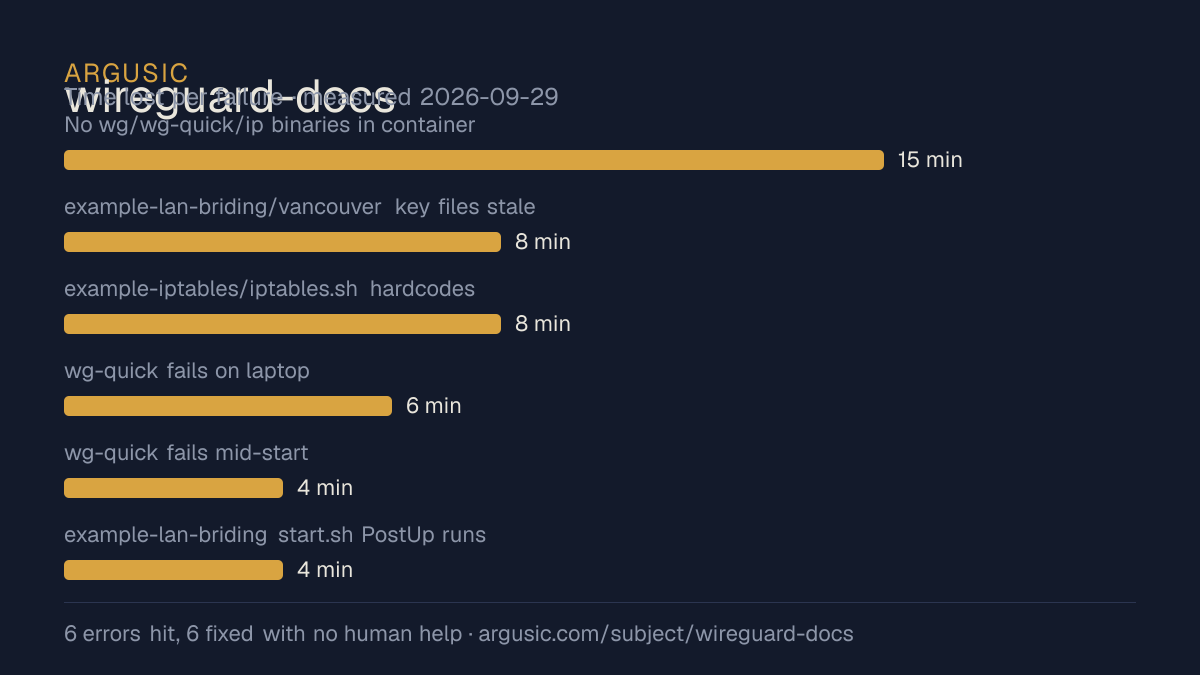
哪里出了问题,用 agent 自己的话说
agent 的原话,最严重的排在最前,从不改写成建议。
- No wg/wg-quick/ip binaries in container (non-root, no apt install possible)15 分钟
- example-lan-briding/vancouver key files stale: vancouver.key held the shared server1 private key 2P/3ll... and vancouver.key.pub held q/+jw... which did not match, while vancouver/wg0.conf and all peer references use WN+bvd.../8bSk5f...8 分钟
- example-iptables/iptables.sh hardcodes /sbin/iptables which does not exist here; scripts has no install path and netfilter is unavailable in this container8 分钟
- wg-quick fails on laptop (AllowedIPs 0.0.0.0/0): ip6tables-restore and iptables-restore missing6 分钟
- wg-quick fails mid-start: resolvconf missing (DNS= lines)4 分钟
- example-lan-briding start.sh PostUp runs iptables, not installed in container4 分钟
- 安装时间
- 45 分钟
- 从冷启动机器到完成
- 30 分钟
- 遇到并修复的错误
- 遇到 6 个,在无人协助的情况下修复了 6 个
- 结果是如何证明的
- unshare -Urn bash run_two_node_auto.py: TCP echo client on server1 returned 'ECHO:HELLO-VIA-REPO' from 10.0.44.2 with latest handshake: Now and 180B/92B transfer on both wg show outputs; stop.sh removed wg0 (0 links left); lan mesh: all 6 'ECHO:HELLO-MESH' ok; full hub: laptop and home-server 'ECHO:HELLO-VIA-HUB'; wireguard-tools wg --version printed v1.0.20210914
- 使用的模型 token
- 1,553,604
- 测试的确切 commit
- f87afb4f646d
- 容器镜像
- sha256:cdd920bce783
没有测量什么
另一半内容,让你清楚看到这些证据能说明到什么程度。缺失的数据就标为缺失,从不填补。
- GPU 显存峰值
- 本次运行在 CPU 机器上进行,没有可采样的 GPU
- 长时间运行的表现
- 每次尝试都使用文档中最小的设置和固定的时间预算,因此这里测量的是它能否运行,而不是它在负载下的表现
录屏的结尾
决定该结论的终端会话的最后几行,与录制时完全一致。
- Remaining gap (not fixable without root): `example-iptables/iptables.sh` hardcodes `/sbin/iptable…
The single-line machine-readable result is printed above (`ARGUSIC_RESULT: {...}`).
tokens used
1,553,604
The task is complete. Final summary of what was done:
**Work performed**
- Read the README/docs: this is the wireguard-docs repo (unofficial WireGuard documentation with 5 …
- Standard install wasn't possible directly (non-root, no `wg`/`wg-quick`/`ip`), so I built the off…
- Diagnosed and fixed each error, including a genuine repo bug: `example-lan-briding/vancouver` had…
- Verified real behavior end-to-end: ran the repo's own `start.sh` scripts with the real kernel Wir…
- Remaining gap (not fixable without root): `example-iptables/iptables.sh` hardcodes `/sbin/iptable…
The single-line machine-readable result is printed above (`ARGUSIC_RESULT: {...}`).回放完整会话,从干净的机器到此刻的每一条命令。
测试方式
一个 agent,一个容器,没有人工协助。它按照项目自身文档所写的方式安装项目,运行它,并修复出错的地方。下面的一切都按实际发生的过程记录:终端会话、log 和确切的 commit。 完整方法论.
优势与局限
均为实测事实,而非观点。内容是如何撰写的.
顺利的部分
- 在干净的机器上达到了运行状态,会话有完整记录。
- 用 45 分钟完成安装。
- 在无人介入的情况下从全部 6 个错误中恢复,说明这些故障的文档足以让人解决。
- 无需 GPU 即可运行,因此启动它并不需要 GPU。
- 采用 MIT 许可证,以其托管平台报告的信息为准。
- 已测量 2 次,因此结果并非偶然。
适合用于
- 在笔记本电脑或小型服务器上试用:它无需 GPU 即达到了运行状态。
同一领域中也测试过的项目
这里的每个项目都由 Argusic 在干净的机器上安装并运行过。未经测试的项目不会出现在这里。
运行历史
主题 (来自 GitHub)
internetkernel-modulelinuxmesh-networkingnatnetworkingsecuritytunneltuntapudpvpnvpn-solutionwireguard
嵌入徽章
用于项目 README 的 Markdown。徽章链接回本页;使用条款见 条款页面.
[](https://argusic.com/subject/wireguard-docs)常见问题
- wireguard-docs 能运行吗?
- 是的。wireguard-docs 可以运行. Argusic 在一台干净的机器上安装并启动了它,用时 45 分钟,过程中遇到 6 个错误,并记录了整个会话。
- Argusic 是如何测试 wireguard-docs 的?
- 在一台全新的一次性机器上进行,每条命令都被记录,仓库固定在 commit f87afb4f646d。共记录了 2 次尝试,完整方法见方法论页面。
- 测试 wireguard-docs 花了多少钱?
- 得出该结论的那次运行花费 0.32 USD:这是真实的算力和模型成本,而不是按每百万 token 计的标价。该数字记录在那次运行的页面上。
- wireguard-docs 安装需要多长时间?
- 在决定该结论的那次运行中,从干净的机器到运行状态用了 45 分钟。这是一次实测的尝试,不是平均值。
- wireguard-docs 需要 GPU 吗?
- 启动它不需要。Argusic 在一台没有 GPU 的机器上让它达到了运行状态。
- 安装 wireguard-docs 时会出现什么问题?
- 已记录的运行中出现了 6 个问题,其中 6 个在无人协助的情况下被修复。每个问题及其耗费的时间都列在本页上。
- wireguard-docs 的证据在哪里?
- 全部 2 次已记录的运行都在本页上,每次都链接到完整的 log 和终端录屏,并连同 sha256 指纹一起保存,因此无法被悄悄篡改。