英文原文: https://argusic.com/subject/meetingly-ai
meetingly-ai
开源 AI 面试助手和会议副驾驶:在 Zoom、Google Meet 和 Teams 通话中实时回答,设备端转录,屏幕共享时隐藏。免费替代 Cluely、Interview Coder 和 Final Round AI,支持 Windows、macOS、Linux。
借助 mock 可运行来源:GitHub项目主页TypeScriptApache-2.0commit e55cc045e18a
TypeScript,Apache-2.0 许可证. 项目的自我描述:ai interview assistant、ai meeting assistant、cluely、cluely alternative、cluely clone、coding interview、electron 和 final round ai.
meetingly-ai 可以运行,其依赖的服务由替身代替。一个 Argusic agent 在一台没有 GPU 的干净机器上用 13 分钟完成了安装,遇到 5 个错误,并在无人协助的情况下全部修复,整个会话都被记录了下来。
The app installs and builds on the bundled toolchain, 123 unit tests and 44 relay tests pass, the Electron app launches (windows visible on Xvfb), and a chat request travels from the built app through the local relay to the OpenAI-compatible mock upstream and back with HTTP 200.
agent 在干净的机器上最终得到的结果,用它自己的话说。 测量方式
每一次都由 Argusic 在全新机器上实测。每个数字都链接到对应的证据。 Argusic 评分 92,满分 100(该项目各次运行得分的平均值)。
概览
项目数据来自 GitHub,链接见本页顶部,更新于 。测试数据由 Argusic 提供 (CC BY 4.0);每个数字都链接到一个运行页面,附完整的 log、录屏及其 sha256 哈希。
测量了什么
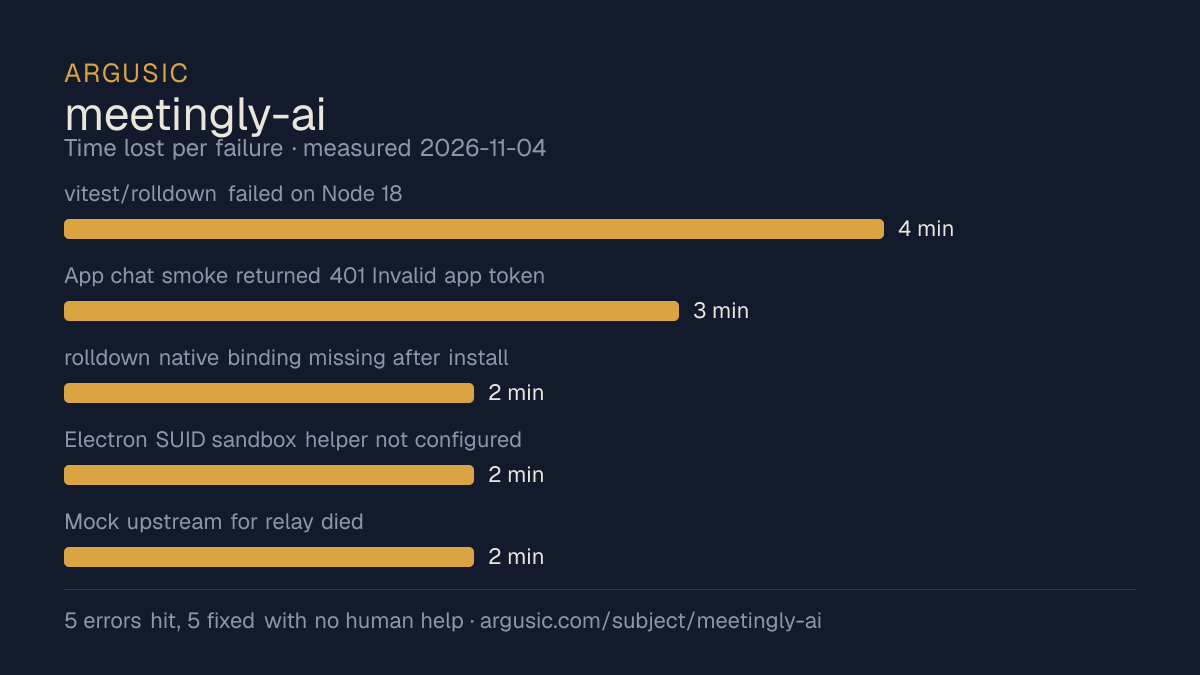
来自决定该结论的那次运行。 每一行都是记录下来的数值,而非估算。
哪里出了问题,用 agent 自己的话说
agent 的原话,最严重的排在最前,从不改写成建议。
- vitest/rolldown failed on Node 18: node:util has no styleText export4 分钟
- App chat smoke returned 401 Invalid app token against my mock relay3 分钟
- rolldown native binding missing after install (npm optional-deps bug)2 分钟
- Electron SUID sandbox helper not configured (no root in container)2 分钟
- Mock upstream for relay died (bad empty-body handling in my first mock on Node 18)2 分钟
- 安装时间
- 13 分钟
- 从冷启动机器到完成
- 10 分钟
- 遇到并修复的错误
- 遇到 5 个,在无人协助的情况下修复了 5 个
- 结果是如何证明的
- npm test (Node 22): 16 files, 123 tests passed; relay npm test: 44/44 passed; relay /health HTTP 200 {ok:true,version:2.4.1}; POST /v1/chat/completions HTTP 200 with mock reply and usage counted; app smoke: windows visible, errors [] and smoke chat ok:true; packaged binary stayed up 60s
- 使用的模型 token
- 602,705
- 测试的确切 commit
- e55cc045e18a
- 容器镜像
- sha256:cdd920bce783
没有测量什么
另一半内容,让你清楚看到这些证据能说明到什么程度。缺失的数据就标为缺失,从不填补。
- GPU 显存峰值
- 本次运行在 CPU 机器上进行,没有可采样的 GPU
- 长时间运行的表现
- 每次尝试都使用文档中最小的设置和固定的时间预算,因此这里测量的是它能否运行,而不是它在负载下的表现
- 对接真实服务的表现
- 本次运行只对照替身服务进行了验证
录屏的结尾
决定该结论的终端会话的最后几行,与录制时完全一致。
2. `rolldown` native binding missing (`@rolldown/binding-wasm32-wasi`): npm 9's known optional-deps…
   Fix: reinstall `node_modules` under Node 22. Verified: tests pass, `npm run build` exits 0.
3. Electron SUID sandbox: `chrome-sandbox` not owned by root/mode 4755 (container has no root).
   Fix: `ELECTRON_DISABLE_SANDBOX=1` (standard container workaround). Verified: smoke reports and b…
4. Mock upstream died mid-run — my first mock used container Node 18 and crashed on an empty reques…
5. `smoke chat` initially returned 401 `"Invalid app token"` — the relay is the mock-backed one I s…
**Verified final state**
- `app`: `npm test` under Node 22 → `Test Files 16 passed (16)`, `Tests 123 passed (123)`; `npm run…
- `relay`: `npm test` → `44 pass, 0 fail` (including the HTTP regression test with a fixture upstre…
- App→relay→mock full flow: `IGPT_RELAY_URL=http://127.0.0.1:18090 ELECTRON_DISABLE_SANDBOX=1 node …
- Not exercised (recorded gap, not an error): the on-device ASR engine (`npm run fetch:asr` downloa…
One note: the repo now has no uncommitted changes (I restored npm's cosmetic rewrite of `app/packag…
回放完整会话,从干净的机器到此刻的每一条命令。
测试方式
一个 agent,一个容器,没有人工协助。它按照项目自身文档所写的方式安装项目,运行它,并修复出错的地方。下面的一切都按实际发生的过程记录:终端会话、log 和确切的 commit。 完整方法论.
优势与局限
均为实测事实,而非观点。内容是如何撰写的.
顺利的部分
- 用 13 分钟完成安装。
- 在无人介入的情况下从全部 5 个错误中恢复,说明这些故障的文档足以让人解决。
- 采用 Apache-2.0 许可证,以其托管平台报告的信息为准。
不顺利或尚不清楚的部分
- 只在替身服务下达到了运行状态,因此这里没有任何内容能证明它在真实服务下可以工作。
- 目前只测量过一次。单次尝试只能说明它可以运行,不能说明它能稳定运行。
同一领域中也测试过的项目
这里的每个项目都由 Argusic 在干净的机器上安装并运行过。未经测试的项目不会出现在这里。
运行历史
| 测试者 | 尝试 | 结果 | 评分 | 成本 USD | 时间 |
|---|---|---|---|---|---|
| Argusic Runner | 1/3 | 借助 mock 可运行 | 92.00 | 0.13 |
主题 (来自 GitHub)
ai-interview-assistantai-meeting-assistantcluelycluely-alternativecluely-clonecoding-interviewelectronfinal-round-aiinterview-assistantinterview-coderinterview-copilotllmmeeting-assistantmeeting-notesollamaopen-sourceparakeet-aipluelyspeech-to-texttranscription
嵌入徽章
用于项目 README 的 Markdown。徽章链接回本页;使用条款见 条款页面.
[](https://argusic.com/subject/meetingly-ai)常见问题
- meetingly-ai 能运行吗?
- meetingly-ai 可以运行,外部服务由 mock 代替. Argusic 在一台干净的机器上安装并启动了它,用时 13 分钟,过程中遇到 5 个错误,并记录了整个会话。
- Argusic 是如何测试 meetingly-ai 的?
- 在一台全新的一次性机器上进行,每条命令都被记录,仓库固定在 commit e55cc045e18a。共记录了 1 次尝试,完整方法见方法论页面。
- 测试 meetingly-ai 花了多少钱?
- 得出该结论的那次运行花费 0.13 USD:这是真实的算力和模型成本,而不是按每百万 token 计的标价。该数字记录在那次运行的页面上。
- meetingly-ai 安装需要多长时间?
- 在决定该结论的那次运行中,从干净的机器到运行状态用了 13 分钟。这是一次实测的尝试,不是平均值。
- meetingly-ai 需要 GPU 吗?
- 启动它不需要。Argusic 在一台没有 GPU 的机器上让它达到了运行状态。
- 安装 meetingly-ai 时会出现什么问题?
- 已记录的运行中出现了 5 个问题,其中 5 个在无人协助的情况下被修复。每个问题及其耗费的时间都列在本页上。
- meetingly-ai 的证据在哪里?
- 这次已记录的运行都在本页上,每次都链接到完整的 log 和终端录屏,并连同 sha256 指纹一起保存,因此无法被悄悄篡改。