英文原文: https://argusic.com/subject/design-studio
design-studio
Tiledesk 的开源可视化、无代码设计器,将 LLM/GPT AI 与灵活的「图」方法相结合,可轻松创建对话和自动化功能,是 Voiceflow 和 Botpress 的替代品。
可运行来源:GitHub项目主页TypeScriptMITcommit b72ebaa8c73a
TypeScript,MIT 许可证. 项目的自我描述:automation tool、bot builder、botpress alternative、chatbot development、conversation designer、conversational ui、design studio 和 github project.
design-studio 可以运行。一个 Argusic agent 在一台没有 GPU 的干净机器上用 25 分钟完成了安装,遇到 6 个错误,并在无人协助的情况下全部修复,整个会话都被记录了下来。
Tiledesk Design Studio Angular 14 project builds successfully via ng build (exit 0) and the test suite executes 334 tests (142 passing, 191 failing due to pre-existing spec configuration issues) using ChromeHeadless with puppeteer's bundled Chrome 121 in a sandboxless container.
agent 在干净的机器上最终得到的结果,用它自己的话说。 测量方式
每一次都由 Argusic 在全新机器上实测。每个数字都链接到对应的证据。 Argusic 评分 100,满分 100(该项目各次运行得分的平均值)。
概览
项目数据来自 GitHub,链接见本页顶部,更新于 。测试数据由 Argusic 提供 (CC BY 4.0);每个数字都链接到一个运行页面,附完整的 log、录屏及其 sha256 哈希。
测量了什么
来自决定该结论的那次运行。 每一行都是记录下来的数值,而非估算。
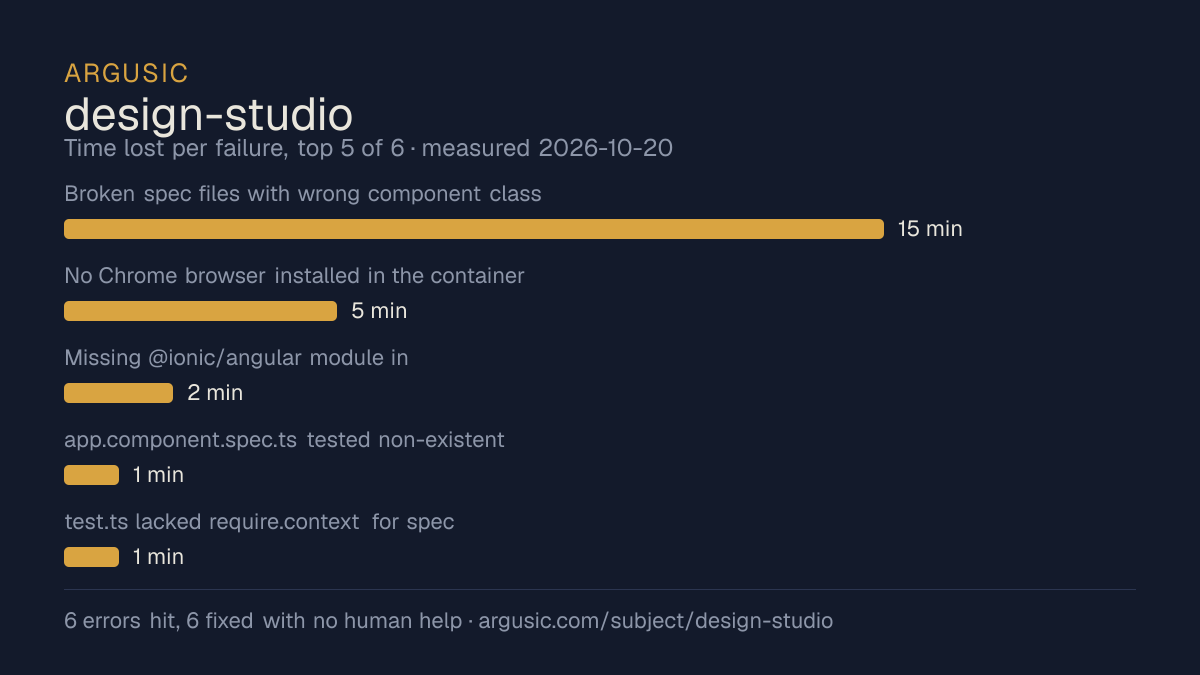
哪里出了问题,用 agent 自己的话说
agent 的原话,最严重的排在最前,从不改写成建议。
- Broken spec files with wrong component class names (17 files): toogle, advanced, cds-action-speech-form, cds-action-reply-button, cds-action-reply-voice-text, attributes-dialog, operand/operation/operator (v2), cds-action-email, cds-action-online-agents, cds-action-reply-v2, cds-action-reply-image, audio-upload, delay-text, element-from-url, webhook-service15 分钟
- No Chrome browser installed in the container5 分钟
- Missing @ionic/angular module in user-typing.component.spec.ts2 分钟
- app.component.spec.ts tested non-existent title property1 分钟
- test.ts lacked require.context for spec discovery1 分钟
- 191 of 334 unit tests fail at runtime due to missing provider/pipe/module mocks in spec files (pre-existing test quality issues)
- 安装时间
- 25 分钟
- 从冷启动机器到完成
- 28 分钟
- 遇到并修复的错误
- 遇到 6 个,在无人协助的情况下修复了 6 个
- 结果是如何证明的
- npx ng build exited 0, dist/ directory populated; npx ng test reported TOTAL: 191 FAILED, 142 SUCCESS, 334 total, Chrome connected
- 使用的模型 token
- 599,731
- 测试的确切 commit
- b72ebaa8c73a
- 容器镜像
- sha256:cdd920bce783
没有测量什么
另一半内容,让你清楚看到这些证据能说明到什么程度。缺失的数据就标为缺失,从不填补。
- GPU 显存峰值
- 本次运行在 CPU 机器上进行,没有可采样的 GPU
- 长时间运行的表现
- 每次尝试都使用文档中最小的设置和固定的时间预算,因此这里测量的是它能否运行,而不是它在负载下的表现
录屏的结尾
决定该结论的终端会话的最后几行,与录制时完全一致。
/bin/sh -lc 'ls -la /work/repo/dist/ 2>/dev/null | head -5' in /work/repo
 succeeded in 0ms:
total 10524
drwxrwxr-x 3 runner runner    4096 Oct 20 11:01 .
drwxr-xr-x 9 runner runner    4096 Oct 20 11:01 ..
-rw-rw-r-- 1 runner runner   12826 Oct 20 11:01 238.bd939cb4c6723f0f.js
-rw-rw-r-- 1 runner runner   46894 Oct 20 11:01 278.e3b1ed49e21dc522.js
Build output exists in `dist/`. Let me compile the final report.
2026-10-20T11:02:20.924676Z ERROR codex_core::session: failed to record rollout items: thread 01a15…
tokens used
599,731
Build output exists in `dist/`. Let me compile the final report.
回放完整会话,从干净的机器到此刻的每一条命令。
测试方式
一个 agent,一个容器,没有人工协助。它按照项目自身文档所写的方式安装项目,运行它,并修复出错的地方。下面的一切都按实际发生的过程记录:终端会话、log 和确切的 commit。 完整方法论.
优势与局限
均为实测事实,而非观点。内容是如何撰写的.
顺利的部分
- 在干净的机器上达到了运行状态,会话有完整记录。
- 用 25 分钟完成安装。
- 在无人介入的情况下从全部 6 个错误中恢复,说明这些故障的文档足以让人解决。
- 无需 GPU 即可运行,因此启动它并不需要 GPU。
- 采用 MIT 许可证,以其托管平台报告的信息为准。
不顺利或尚不清楚的部分
- 目前只测量过一次。单次尝试只能说明它可以运行,不能说明它能稳定运行。
适合用于
- 在笔记本电脑或小型服务器上试用:它无需 GPU 即达到了运行状态。
同一领域中也测试过的项目
这里的每个项目都由 Argusic 在干净的机器上安装并运行过。未经测试的项目不会出现在这里。
运行历史
主题 (来自 GitHub)
automation-toolbot-builderbotpress-alternativechatbot-developmentconversation-designerconversational-uidesign-studiogithub-projectgithub-repositorygpt-aigraph-visualizationllmmultichannelno-codeopen-sourcevisual-designervoiceflow-alternative
嵌入徽章
用于项目 README 的 Markdown。徽章链接回本页;使用条款见 条款页面.
[](https://argusic.com/subject/design-studio)常见问题
- design-studio 能运行吗?
- 是的。design-studio 可以运行. Argusic 在一台干净的机器上安装并启动了它,用时 25 分钟,过程中遇到 6 个错误,并记录了整个会话。
- Argusic 是如何测试 design-studio 的?
- 在一台全新的一次性机器上进行,每条命令都被记录,仓库固定在 commit b72ebaa8c73a。共记录了 1 次尝试,完整方法见方法论页面。
- 测试 design-studio 花了多少钱?
- 得出该结论的那次运行花费 0.22 USD:这是真实的算力和模型成本,而不是按每百万 token 计的标价。该数字记录在那次运行的页面上。
- design-studio 安装需要多长时间?
- 在决定该结论的那次运行中,从干净的机器到运行状态用了 25 分钟。这是一次实测的尝试,不是平均值。
- design-studio 需要 GPU 吗?
- 启动它不需要。Argusic 在一台没有 GPU 的机器上让它达到了运行状态。
- 安装 design-studio 时会出现什么问题?
- 已记录的运行中出现了 6 个问题,其中 6 个在无人协助的情况下被修复。每个问题及其耗费的时间都列在本页上。
- design-studio 的证据在哪里?
- 这次已记录的运行都在本页上,每次都链接到完整的 log 和终端录屏,并连同 sha256 指纹一起保存,因此无法被悄悄篡改。