英語の原文: https://argusic.com/subject/autonomous-company
Autonomous-Company
あなた自身の PC で 24/7 稼働する自律型会社: Windows/Linux/macOS。
動作するソース: GitHubPythonMITコミット c7c60dbd40d2
Python、MIT ライセンス. プロジェクト自身の表記: agentic workflows、ai agents、autonomous agents、claude code、codex、dashboard、llm、multi agent.
Autonomous-Company は動作します。Argusic のエージェントが GPU のないクリーンなマシンで 50 分でインストールし、5 件のエラーに遭遇し、セッション全体が記録されました。
The dashboard and product-center HTTP servers, the Python test suite (619 of 632 passing; 13 isolation-blocked failures), all fake-engine shell integration tests, frontend JS contract suites and example Node tests except scopefence run successfully in this container.
クリーンなマシンでエージェントが最終的に得た結果 (エージェント自身の言葉)。 計測方法
Argusic が毎回新しいマシンで計測しています。 すべての数値はその証拠にリンクしています。 Argusic スコア 100 点中 88 点 (このプロジェクトの実行スコアの平均)。
概要
プロジェクトのデータは GitHub から取得 (このページの冒頭にリンクあり)、更新日 。テストデータは Argusic によるもので (CC BY 4.0)、すべての数値は、完全なログ、録画、それらの sha256 ハッシュを含む実行ページにリンクしています。
計測した内容
この判定を決めた実行から取得しています。 各行は記録された値であり、推定値ではありません。
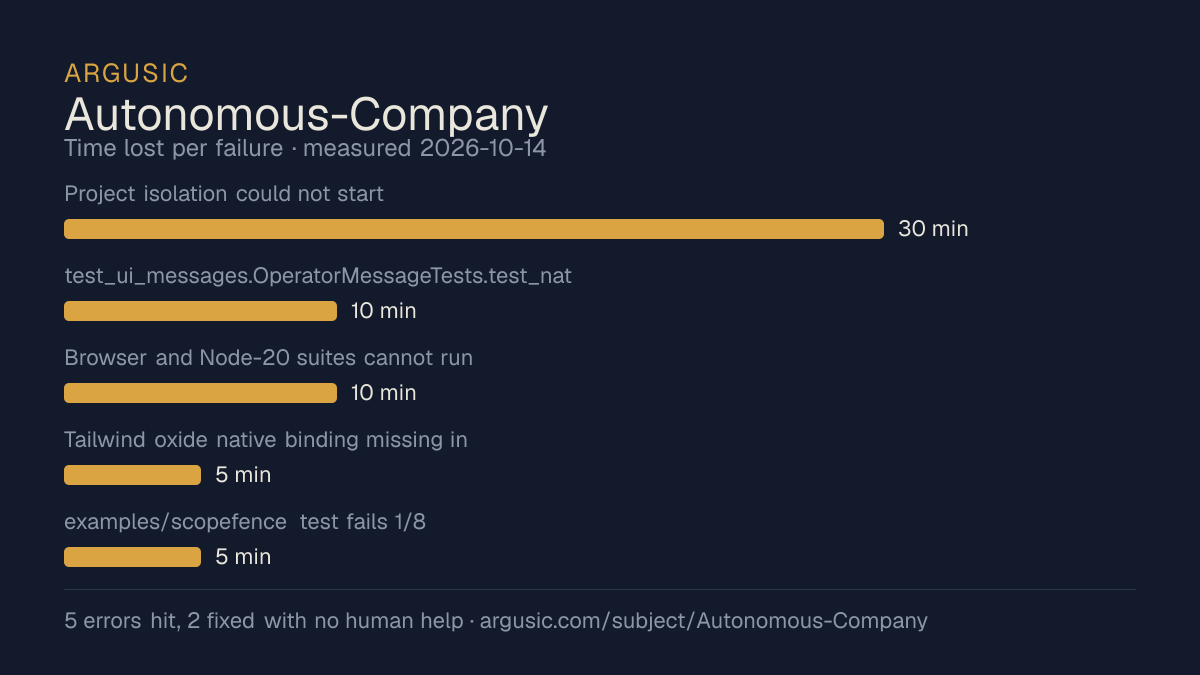
うまくいかなかった点 (エージェント自身の言葉)
エージェント自身の言葉を、深刻なものから順に掲載しています。助言に書き換えることはありません。
- Project isolation could not start: container denies unprivileged user namespaces (unshare EPERM, seccomp/caps 0); even the bundled Codex bwrap binary reports 'No permissions to create a new namespace'. Prevents runtime_artifacts/observability/project_registry tests, project.sh status and project_governance + systemd shell tests.30 分
- test_ui_messages.OperatorMessageTests.test_native_bash_nounset_handles_messages_with_and_without_parameters fails deterministically: ui_message language.saved en emits the zh-CN template while the container locale is C.UTF-8 (no zh-* env), so the 'en' English string is absent; the test-then-message ordering depends on pre-seeding .autonomous-company.local, which this brand-new checkout lacks.10 分
- Browser and Node-20 suites cannot run: container has only Node 18.19.1 (playwright requires >=20, refused to download Chromium) and no other Node binary or root to install one.10 分
- Tailwind oxide native binding missing in dashboard/ui build (npm 9 + Node 18 optional-dependency bug, @tailwindcss/oxide-linux-x64-gnu absent); only reproducible on the CI-pinned Node 22 which is unavailable.5 分
- examples/scopefence test fails 1/8: 'crypto is not defined' in scopefence-core.js makeReceipt/randomUUID on Node 18 (browser-only global); unrelated to the framework runtime.5 分
- インストール時間
- 50 分
- クリーンなマシンから完了まで
- 18 分
- 遭遇したエラーと修正したエラー
- 5 件に遭遇、2 件を人の手を借りずに修正
- 結果の証明方法
- curl -s -o /dev/null -w '%{http_code}' http://127.0.0.1:8891/ returned 200 and /journal, /app.js, /favicon.svg each 200; center_server.py /center returned 200; python3 -m unittest discover -s tests: Ran 632, FAILED 13 (all namespace-enabled); bash tests/test_auto_loop_integration.sh and tests/test_process_supervisor.sh exited 0; node --test tests/test_dashboard_frontend.js 37 passed and test_center_frontend.js 32 passed; node --test examples/text-meter/tests/counts.test.js 5/5 passed; scripts/core/project_isolation.py --check refused (exit 78) due to kernel userns denial.
- 使用したモデルのトークン
- 815,376
- テストした正確なコミット
- c7c60dbd40d2
- コンテナイメージ
- sha256:cdd920bce783
計測していない内容
残りの半分です。この証拠がどこまでを示すのかを正確に確認できます。欠けている部分は欠けているものとして表示し、埋めることはありません。
- GPU メモリのピーク
- CPU マシンで実行したため、サンプリングする GPU がありませんでした
- 長時間の実行での振る舞い
- 各試行はドキュメントにある最小の設定と決まった時間予算を使うため、計測しているのは動作するかどうかであり、負荷のもとでどう持ちこたえるかではありません
録画の最後
この判定を決めたターミナルセッションの最後の行を、記録されたとおりに表示しています。
exec
/bin/sh -lc 'ps -p 48684 -o pid,cmd 2>/dev/null || echo "no such process (pgrep matched itself)"; p…
 succeeded in 0ms:
    PID CMD
no such process (pgrep matched itself)
none
All background processes stopped, temp dirs cleaned, git tree pristine.
**ARGUSIC_RESULT:** {"install_succeeded": true, "launch_succeeded": true, "install_minutes": 50, "e…
tokens used
815,376
All background processes stopped, temp dirs cleaned, git tree pristine.
**ARGUSIC_RESULT:** {"install_succeeded": true, "launch_succeeded": true, "install_minutes": 50, "e…
セッション全体を再生 (クリーンなマシンからこの時点までのすべてのコマンド)。
テスト方法
1 つのエージェント、1 つのコンテナで、人の手は借りません。エージェントはプロジェクト自身のドキュメントに書かれた方法でインストールし、実行し、壊れた部分を修正します。以下はすべて、実際に起きたとおりに記録されています: ターミナルセッション、ログ、そして正確なコミットです。 評価方法の全文.
強みと限界
意見ではなく、計測された事実です。コンテンツの作成方法.
うまくいった点
- クリーンなマシンで実行状態に達し、セッションが記録されました。
- 50 分でインストールできました。
- GPU なしで動作したため、起動に GPU は必要ありません。
- ホストの報告によると、ライセンスは MIT です。
うまくいかなかった点、または不明な点
- セットアップ中に 5 件のエラーに遭遇しました。そのうち 3 件は解決されていません。
- これまでの計測は 1 回です。1 回の試行は動作し得ることを示すだけで、安定して動作することは示しません。
適している用途
- ノートパソコンや小さなサーバーで試す場合: GPU なしで実行状態に達しました。
同じ分野でテストしたプロジェクト
ここに挙げたものはすべて、Argusic がクリーンなマシンにインストールして実行しました。テストしていないものは表示されません。
実行履歴
トピック (出典: GitHub)
agentic-workflowsai-agentsautonomous-agentsclaude-codecodexdashboardllmmulti-agentself-hostedworkflow-automation
バッジを埋め込む
プロジェクトの README に貼る Markdown です。バッジはこのページにリンクします。利用条件: 利用規約ページ.
[](https://argusic.com/subject/autonomous-company)質問
- Autonomous-Company は動作しますか?
- はい。Autonomous-Company は動作します. Argusic はクリーンなマシンで 50 分でインストールして起動し、途中で 5 件のエラーに遭遇し、セッションを記録しました。
- Argusic は Autonomous-Company をどのようにテストしましたか?
- 新しい使い捨てのマシンで、すべてのコマンドを記録しながらテストしました (リポジトリはコミット c7c60dbd40d2 に固定)。記録された試行は 1 回で、手順の全体は評価方法のページに掲載しています。
- Autonomous-Company のテストにはいくらかかりましたか?
- この判定を出した実行のコストは 0.17 USD です: 100 万トークンあたりの定価ではなく、実際の計算資源とモデルのコストです。その実行のページに記録されています。
- Autonomous-Company のインストールにはどのくらい時間がかかりますか?
- この判定を決めた実行では、クリーンなマシンから実行状態まで 50 分でした。これは 1 回の計測された試行であり、平均ではありません。
- Autonomous-Company には GPU が必要ですか?
- 起動には必要ありません。Argusic は GPU のないマシンで実行状態に達しました。
- Autonomous-Company のインストールでは何がうまくいきませんか?
- 記録された実行では 5 件の問題が発生しました。そのうち 2 件は人の手を借りずに修正されました。それぞれの問題と、かかった時間をこのページに掲載しています。
- Autonomous-Company の証拠はどこにありますか?
- 記録された実行をこのページに掲載しており、それぞれが完全なログとターミナル録画にリンクしています。録画は sha256 フィンガープリントとともに保存されているため、こっそり改変することはできません。