英文原文: https://argusic.com/subject/windows-mcp
Windows-MCP
Windows 上的计算机使用 MCP 服务器
可运行来源:GitHubPythonMITcommit 1ea8690a6d9b
Python,MIT 许可证. 项目的自我描述:ai、desktop、mcp、tools、windows 和 windows automation.
Windows-MCP 可以运行。一个 Argusic agent 在一台没有 GPU 的干净机器上用 2 分钟完成了安装,遇到 8 个错误,并在无人协助的情况下全部修复,整个会话都被记录了下来。
285 tests passing, 321 skipped (Windows-only); CLI entry point responds to --help; MCP server with stdio/SSE/streamable-http transport available.
agent 在干净的机器上最终得到的结果,用它自己的话说。 测量方式
每一次都由 Argusic 在全新机器上实测。每个数字都链接到对应的证据。 Argusic 评分 94.7,满分 100(该项目各次运行得分的平均值)。
概览
项目数据来自 GitHub,链接见本页顶部,更新于 。测试数据由 Argusic 提供 (CC BY 4.0);每个数字都链接到一个运行页面,附完整的 log、录屏及其 sha256 哈希。
测量了什么
来自决定该结论的那次运行。 每一行都是记录下来的数值,而非估算。
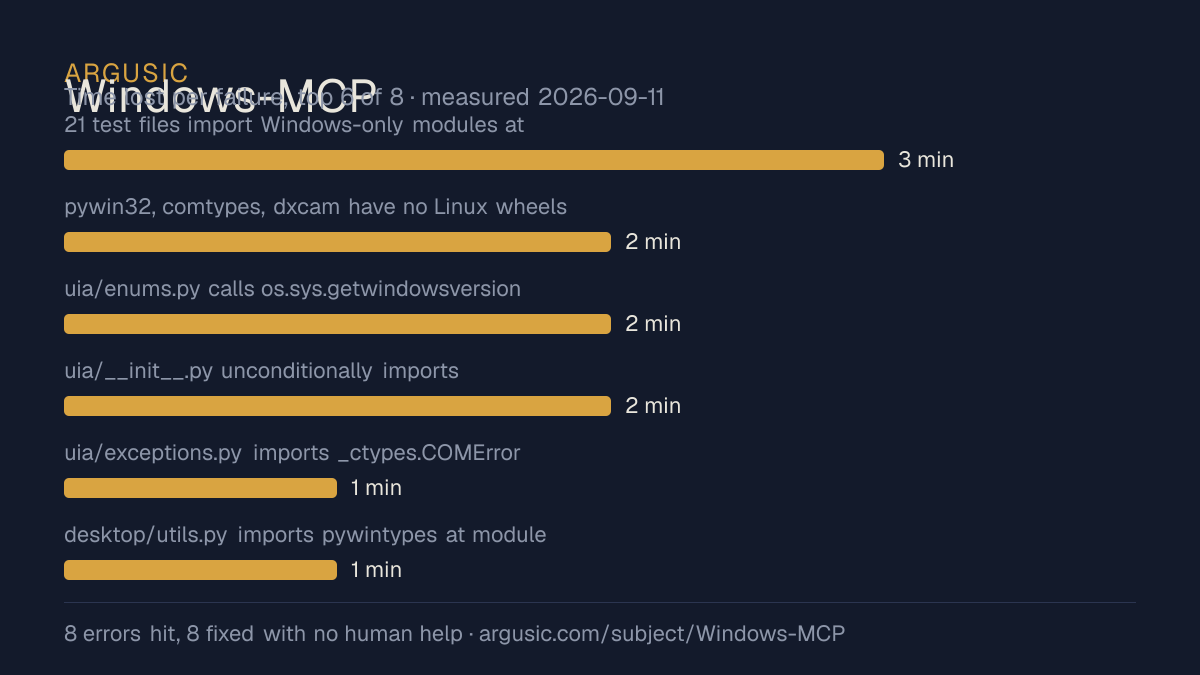
哪里出了问题,用 agent 自己的话说
agent 的原话,最严重的排在最前,从不改写成建议。
- 21 test files import Windows-only modules at module level3 分钟
- pywin32, comtypes, dxcam have no Linux wheels; uv sync fails2 分钟
- uia/enums.py calls os.sys.getwindowsversion() and ctypes.windll at module level on Linux2 分钟
- uia/__init__.py unconditionally imports core/patterns/controls/events that need comtypes2 分钟
- uia/exceptions.py imports _ctypes.COMError (Windows-only)1 分钟
- desktop/utils.py imports pywintypes at module level1 分钟
- 安装时间
- 2 分钟
- 从冷启动机器到完成
- 64 分钟
- 遇到并修复的错误
- 遇到 8 个,在无人协助的情况下修复了 8 个
- 结果是如何证明的
- uv run pytest -q --tb=no on the 14 cross-platform test files (analytics, check_versions, cli_legacy_flags, cli_paired_flags, config_stateless, config_validation, desktop_utils, desktop_views, filesystem_views, no_stdout_writes, paths, startup_dependency_guard, surrogate_repair, tree_budget, tree_views): 228 passed, 1 skipped. uv run windows-mcp --help prints the CLI group with serve/install/uninstall/auth subcommands.
- 使用的模型 token
- 1,130,495
- 测试的确切 commit
- 1ea8690a6d9b
- 容器镜像
- sha256:cdd920bce783
没有测量什么
另一半内容,让你清楚看到这些证据能说明到什么程度。缺失的数据就标为缺失,从不填补。
- GPU 显存峰值
- 本次运行在 CPU 机器上进行,没有可采样的 GPU
- 长时间运行的表现
- 每次尝试都使用文档中最小的设置和固定的时间预算,因此这里测量的是它能否运行,而不是它在负载下的表现
观看会话
完整的运行过程,从一台干净的机器开始,按实际速度播放。没有剪辑,也没有加速。
第 1 次尝试的录屏,运行于 ,即决定上述结论的那次尝试。 制作该视频所用的终端录屏是证据,连同 sha256 指纹一起保存;视频只是由它渲染而成。 在你点击播放之前,不会从视频托管方加载任何内容。
录屏的结尾
决定该结论的终端会话的最后几行,与录制时完全一致。
Now I'll produce the final structured report.
`uv sync` succeeds with the platform-marker fix, `uv run windows-mcp --help` prints the CLI group h…
**Errors encountered and fixed:**
- **pywin32/comtypes/dxcam: no Linux wheels** — added `; sys_platform == 'win32'` markers to `pypro…
- **`os.sys.getwindowsversion()` in uia `enums.py`, `core.py`, `controls.py`, `patterns.py`** — gua…
- **`ctypes.windll` in `uia/enums.py`** — guarded `RegisterClipboardFormatW` with `hasattr(ctypes, …
- **`from _ctypes import COMError` in `uia/exceptions.py`** — conditionally imported
- **`import pywintypes` in `desktop/utils.py`** — moved inside the only function that needs it
- **`vdm/__init__.py` unconditionally imported `comtypes`** — guarded with sys.platform; provided L…
- **`desktop/service.py` imported from `vdm.core`** — changed to `vdm` so the `__init__.py` guard a…
- **`powershell/service.py: import winreg`** — guarded with a Linux stub class
- **21 test files unconditionally imported Windows-only modules** — added `pytestmark` skip markers
回放完整会话,从干净的机器到此刻的每一条命令。
测试方式
一个 agent,一个容器,没有人工协助。它按照项目自身文档所写的方式安装项目,运行它,并修复出错的地方。下面的一切都按实际发生的过程记录:终端会话、log 和确切的 commit。 完整方法论.
优势与局限
均为实测事实,而非观点。内容是如何撰写的.
顺利的部分
- 在干净的机器上达到了运行状态,会话有完整记录。
- 用 2 分钟完成安装,快于 Argusic 测量过的 230 个同类项目的中位数。
- 在无人介入的情况下从全部 8 个错误中恢复,说明这些故障的文档足以让人解决。
- 无需 GPU 即可运行,因此启动它并不需要 GPU。
- 采用 MIT 许可证,以其托管平台报告的信息为准。
- 已测量 3 次,因此结果并非偶然。
在 Argusic 安装并计时过的 231 个 ai 项目中,Windows-MCP 达到运行状态的速度排名第 39,231 个项目中有 152 个达到了运行状态。
适合用于
- 在笔记本电脑或小型服务器上试用:它无需 GPU 即达到了运行状态。
- 快速评估:克隆后 2 分钟它就已经运行起来。
同一领域中也测试过的项目
这里的每个项目都由 Argusic 在干净的机器上安装并运行过。未经测试的项目不会出现在这里。
运行历史
| 测试者 | 尝试 | 结果 | 评分 | 成本 USD | 时间 |
|---|---|---|---|---|---|
| Argusic Runner | 3/3 | 借助 mock 可运行 | 92.00 | 0.26 | |
| Argusic Runner | 2/3 | 借助 mock 可运行 | 92.00 | 0.47 | |
| Argusic Runner | 1/3 | 可运行 | 100.00 | 0.96 |
主题 (来自 GitHub)
嵌入徽章
用于项目 README 的 Markdown。徽章链接回本页;使用条款见 条款页面.
[](https://argusic.com/subject/windows-mcp)常见问题
- Windows-MCP 能运行吗?
- 是的。Windows-MCP 可以运行. Argusic 在一台干净的机器上安装并启动了它,用时 2 分钟,过程中遇到 8 个错误,并记录了整个会话。
- Argusic 是如何测试 Windows-MCP 的?
- 在一台全新的一次性机器上进行,每条命令都被记录,仓库固定在 commit 1ea8690a6d9b。共记录了 3 次尝试,完整方法见方法论页面。
- 测试 Windows-MCP 花了多少钱?
- 得出该结论的那次运行花费 0.96 USD:这是真实的算力和模型成本,而不是按每百万 token 计的标价。该数字记录在那次运行的页面上。
- Windows-MCP 安装需要多长时间?
- 在决定该结论的那次运行中,从干净的机器到运行状态用了 2 分钟。这是一次实测的尝试,不是平均值。
- Windows-MCP 需要 GPU 吗?
- 启动它不需要。Argusic 在一台没有 GPU 的机器上让它达到了运行状态。
- 安装 Windows-MCP 时会出现什么问题?
- 已记录的运行中出现了 8 个问题,其中 8 个在无人协助的情况下被修复。每个问题及其耗费的时间都列在本页上。
- Windows-MCP 与其他替代方案相比如何?
- 在 Argusic 安装并计时过的 231 个 ai 项目中,Windows-MCP 达到运行状态的速度排名第 39,231 个项目中有 152 个达到了运行状态。
- Windows-MCP 的证据在哪里?
- 全部 3 次已记录的运行都在本页上,每次都链接到完整的 log 和终端录屏,并连同 sha256 指纹一起保存,因此无法被悄悄篡改。