英文原文: https://argusic.com/subject/parlant
parlant
Parlant 是一个用于构建面向客户的 AI 聊天 agent 的开放平台。描述你希望 agent 如何表现,你的 coding agent 就会为你实现它。
借助 mock 可运行来源:GitHub项目主页PythonApache-2.0commit ea737442b8ae
Python,Apache-2.0 许可证. 项目的自我描述:ai agent、customer experience、customer service、customer success、lead generation、llm 和 python.
parlant 可以运行,其依赖的服务由替身代替。一个 Argusic agent 在一台没有 GPU 的干净机器上用 12 分钟完成了安装,遇到 8 个错误,整个会话都被记录了下来。
With a schema-correct mock NLP backend, the Parlant server started on port 18999, answered /healthz 200, created agents/guidelines/sessions (201), and ran the engine to completion status; 208 API tests passed while the parlant CLI remained unimportable.
agent 在干净的机器上最终得到的结果,用它自己的话说。 测量方式
每一次都由 Argusic 在全新机器上实测。每个数字都链接到对应的证据。 Argusic 评分 86.2,满分 100(该项目各次运行得分的平均值)。
概览
项目数据来自 GitHub,链接见本页顶部,更新于 。测试数据由 Argusic 提供 (CC BY 4.0);每个数字都链接到一个运行页面,附完整的 log、录屏及其 sha256 哈希。
测量了什么
来自决定该结论的那次运行。 每一行都是记录下来的数值,而非估算。
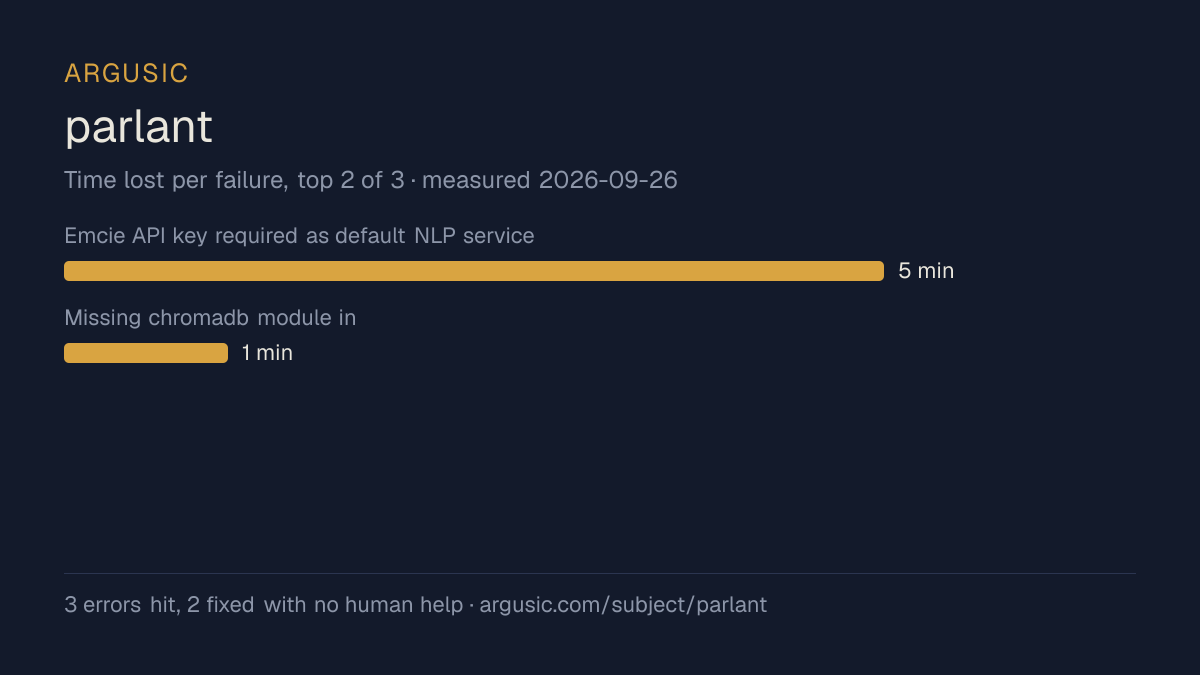
哪里出了问题,用 agent 自己的话说
agent 的原话,最严重的排在最前,从不改写成建议。
- parlant CLI fails: ImportError cannot import JourneyTriggerUpdateParams from parlant.client.types12 分钟
- Tests failed with KeyError('EMCIE_API_KEY') because tests/conftest.py hardcodes EmcieService8 分钟
- pytest collection failed on missing qdrant_client, chroma, pymongo, litellm, azure, zhipuai modules4 分钟
- README claims OpenAI is the default NLP provider but p.Server() defaults to NLPServices.emcie and fails without EMCIE_API_KEY4 分钟
- Embedding dimension mismatch (128 mock dims vs 3072 expected)3 分钟
- test_embedding/test_generation fail: HealthReporter.__init__() missing required positional argument application_context3 分钟
- 安装时间
- 12 分钟
- 从冷启动机器到完成
- 54 分钟
- 遇到并修复的错误
- 遇到 8 个,在无人协助的情况下修复了 6 个
- 结果是如何证明的
- curl -s -o /dev/null -w %{http_code} localhost:18999/healthz returned 200; POST /agents returned 201; POST /sessions returned 201; engine emitted acknowledged/processing/typing/ready status events; pytest run with mock Emcie/OpenAI servers reported '208 passed' on API modules and '229 passed, 1 failed' on the mixed suite; uv run parlant-server run --version printed 'Parlant v3.3.1'
- 使用的模型 token
- 899,179
- 测试的确切 commit
- ea737442b8ae
- 容器镜像
- sha256:cdd920bce783
没有测量什么
另一半内容,让你清楚看到这些证据能说明到什么程度。缺失的数据就标为缺失,从不填补。
- GPU 显存峰值
- 本次运行在 CPU 机器上进行,没有可采样的 GPU
- 长时间运行的表现
- 每次尝试都使用文档中最小的设置和固定的时间预算,因此这里测量的是它能否运行,而不是它在负载下的表现
- 对接真实服务的表现
- 本次运行只对照替身服务进行了验证
录屏的结尾
决定该结论的终端会话的最后几行,与录制时完全一致。
899,179
All work is complete. Summary of what I observed, followed by the required result line.
**What worked**
- `uv sync --group dev --extra chroma --extra mongo --extra qdrant --extra litellm --extra azure --…
- `uv run parlant-server run --version` printed `Parlant v3.3.1`.
- Server launched against a schema-correct Argusic-compatible mock: `GET /healthz`→200, `GET /agent…
- README SDK flow (`p.Server(nlp_service=p.NLPServices.openai)` + `create_agent`) created an agent …
- Test suite with in-process schema-correct Emcie mock: 208 API tests passed, 0 failed; 229 passed …
**Unresolved**
- `parlant` CLI crashes on import: `parlant-client` pinned at v3.2.0 lacks `JourneyTriggerUpdatePar…
- README states Argusic is the default NLP provider, but `p.Server()` actually defaults to `NLPServ…
- Some tests call `HealthReporter()` without the now-required `application_context`.
回放完整会话,从干净的机器到此刻的每一条命令。
测试方式
一个 agent,一个容器,没有人工协助。它按照项目自身文档所写的方式安装项目,运行它,并修复出错的地方。下面的一切都按实际发生的过程记录:终端会话、log 和确切的 commit。 完整方法论.
优势与局限
均为实测事实,而非观点。内容是如何撰写的.
顺利的部分
- 采用 Apache-2.0 许可证,以其托管平台报告的信息为准。
- 已测量 2 次,因此结果并非偶然。
不顺利或尚不清楚的部分
- 只在替身服务下达到了运行状态,因此这里没有任何内容能证明它在真实服务下可以工作。
- 安装用了 12 分钟,慢于 Argusic 测量过的 110 个同类项目的中位数。
- 搭建过程中遇到 8 个错误,其中 2 个没有解决。
在 Argusic 安装并计时过的 111 个 ai-agents 项目中,parlant 达到运行状态的速度排名第 73,111 个项目中有 83 个达到了运行状态。
同一领域中也测试过的项目
这里的每个项目都由 Argusic 在干净的机器上安装并运行过。未经测试的项目不会出现在这里。
运行历史
| 测试者 | 尝试 | 结果 | 评分 | 成本 USD | 时间 |
|---|---|---|---|---|---|
| Argusic Runner | 2/3 | 借助 mock 可运行 | 87.00 | 1.05 | |
| Argusic Runner | 1/3 | 借助 mock 可运行 | 85.33 | 0.17 |
主题 (来自 GitHub)
ai-agentcustomer-experiencecustomer-servicecustomer-successlead-generationllmpython
嵌入徽章
用于项目 README 的 Markdown。徽章链接回本页;使用条款见 条款页面.
[](https://argusic.com/subject/parlant)常见问题
- parlant 能运行吗?
- parlant 可以运行,外部服务由 mock 代替. Argusic 在一台干净的机器上安装并启动了它,用时 12 分钟,过程中遇到 8 个错误,并记录了整个会话。
- Argusic 是如何测试 parlant 的?
- 在一台全新的一次性机器上进行,每条命令都被记录,仓库固定在 commit ea737442b8ae。共记录了 2 次尝试,完整方法见方法论页面。
- 测试 parlant 花了多少钱?
- 得出该结论的那次运行花费 1.05 USD:这是真实的算力和模型成本,而不是按每百万 token 计的标价。该数字记录在那次运行的页面上。
- parlant 安装需要多长时间?
- 在决定该结论的那次运行中,从干净的机器到运行状态用了 12 分钟。这是一次实测的尝试,不是平均值。
- parlant 需要 GPU 吗?
- 启动它不需要。Argusic 在一台没有 GPU 的机器上让它达到了运行状态。
- 安装 parlant 时会出现什么问题?
- 已记录的运行中出现了 8 个问题,其中 6 个在无人协助的情况下被修复。每个问题及其耗费的时间都列在本页上。
- parlant 与其他替代方案相比如何?
- 在 Argusic 安装并计时过的 111 个 ai-agents 项目中,parlant 达到运行状态的速度排名第 73,111 个项目中有 83 个达到了运行状态。
- parlant 的证据在哪里?
- 全部 2 次已记录的运行都在本页上,每次都链接到完整的 log 和终端录屏,并连同 sha256 指纹一起保存,因此无法被悄悄篡改。