英文原文: https://argusic.com/subject/huashu-excel
huashu-excel
数据分析与 Excel 全流程 skill:体检脏表、清洗、对齐需求、分析、对账、交付。让 AI 算出来的数字经得起追问。跨 agent 通用,依赖仅 openpyxl。
可运行来源:GitHubPythonMITcommit 2492fabbafc8
Python,MIT 许可证. 项目的自我描述:agent skills、claude code、claude code skills、claude skills、codex、cursor、data analysis 和 data cleaning.
huashu-excel 可以运行。一个 Argusic agent 在一台没有 GPU 的干净机器上用 10 分钟完成了安装,遇到 3 个错误,并在无人协助的情况下全部修复,整个会话都被记录了下来。
With the fix in scripts/make_report.py committed, every script from profile through clean, reconcile, chart, and HTML/deck/xlsx/docx report with its own verifier runs green end to end on a realistic dirty Excel file in the container venv
agent 在干净的机器上最终得到的结果,用它自己的话说。 测量方式
每一次都由 Argusic 在全新机器上实测。每个数字都链接到对应的证据。 Argusic 评分 100,满分 100(该项目各次运行得分的平均值)。
概览
项目数据来自 GitHub,链接见本页顶部,更新于 。测试数据由 Argusic 提供 (CC BY 4.0);每个数字都链接到一个运行页面,附完整的 log、录屏及其 sha256 哈希。
测量了什么
来自决定该结论的那次运行。 每一行都是记录下来的数值,而非估算。
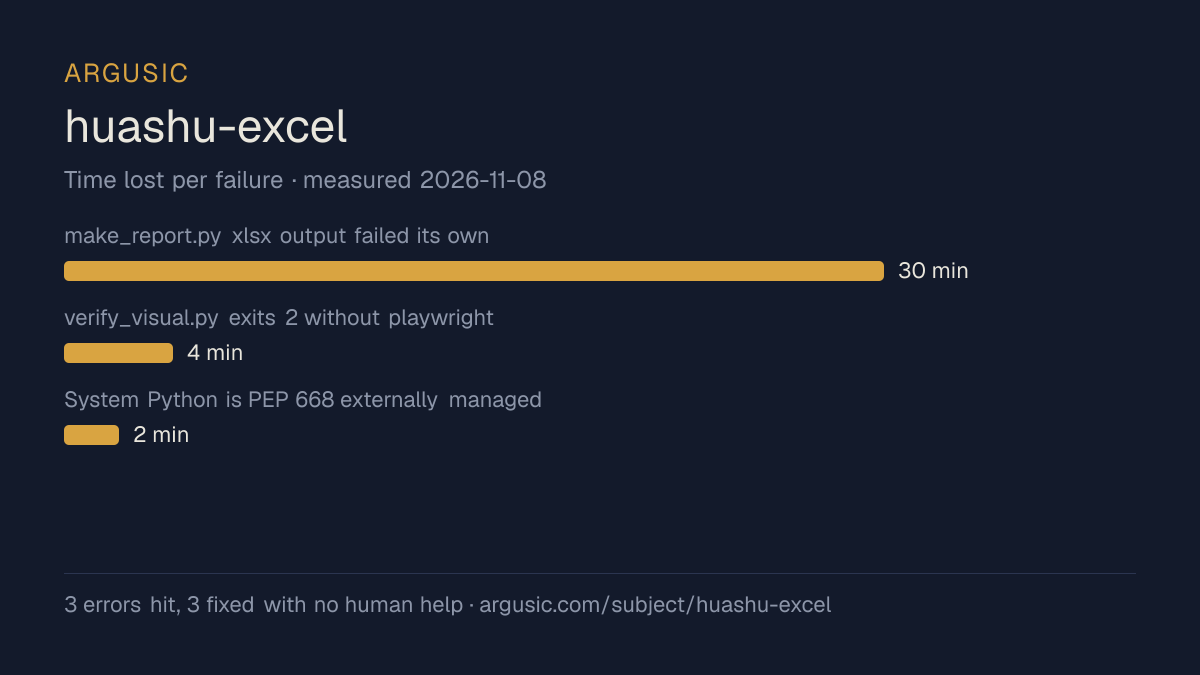
哪里出了问题,用 agent 自己的话说
agent 的原话,最严重的排在最前,从不改写成建议。
- make_report.py xlsx output failed its own verify_xlsx.py gate: 18pt title clipped by 16pt row height, freeze_panes A2 froze a blank row, body text sat on the wrap edge30 分钟
- verify_visual.py exits 2 without playwright4 分钟
- System Python is PEP 668 externally managed; pip install pandas/openpyxl refused2 分钟
- 安装时间
- 10 分钟
- 从冷启动机器到完成
- 9 分钟
- 遇到并修复的错误
- 遇到 3 个,在无人协助的情况下修复了 3 个
- 结果是如何证明的
- profile_table/clean_table/verify_numbers MASTER CHECK passed (claims 6000/9300 matched, exit 0); scan_traps exit 0; make_chart bar exit 0 and pie refusal exit 1; make_report all 4 formats exit 0; verify_visual html+deck exit 0 (no overflow, 0 console errors, 2 SVGs); verify_xlsx exit 0 fails []; verify_docx exit 0 fails [] (2 images); both --self-test suites exit 0; docx/xlsx zip integrity ok and embedded PNGs decoded by ffmpeg
- 使用的模型 token
- 835,072
- 测试的确切 commit
- 2492fabbafc8
- 容器镜像
- sha256:cdd920bce783
没有测量什么
另一半内容,让你清楚看到这些证据能说明到什么程度。缺失的数据就标为缺失,从不填补。
- GPU 显存峰值
- 本次运行在 CPU 机器上进行,没有可采样的 GPU
- 长时间运行的表现
- 每次尝试都使用文档中最小的设置和固定的时间预算,因此这里测量的是它能否运行,而不是它在负载下的表现
录屏的结尾
决定该结论的终端会话的最后几行,与录制时完全一致。
- `huashu-excel` — a Python/agent-skill for Excel data analysis: profile → clean → reconcile → char…
**Errors hit and fixes**
1. PEP 668 blocked system-wide `pip install` → created `/work/repo/venv`, installed `pandas 3.1.1` …
2. `make_report.py --format xlsx` output failed its own `verify_xlsx.py` gate (2 FAILs, 1 WARN): 18…
3. `verify_visual.py` skipped (exit 2) without playwright → installed `playwright 1.64.1` + headles…
**Verified end-to-end (all exit 0 unless noted)**
- Built `/tmp/demo.xlsx` (title rows, two-level header, subtotal row); `profile_table.py` found bot…
- `verify_numbers.py --claim "1月 / 销售额(元):6000" --claim "2月 / 销售额(元):9300"` → exit 0, `MASTER CHECK…
- `scan_traps.py` flagged the small-sample trap; `make_chart.py` bar chart saved; pie chart correct…
- Reports: HTML + deck HTML + xlsx + docx generated; `verify_visual.py --json` html (svgCount 2, co…
- Structure: `final.docx` — 2 embedded PNGs, image rels 2, `zip ok`; `final.xlsx` — 2 embedded char…
Honest limitation: with no LibreOffice I could not render the OOXML files to images, and nothing he…
回放完整会话,从干净的机器到此刻的每一条命令。
测试方式
一个 agent,一个容器,没有人工协助。它按照项目自身文档所写的方式安装项目,运行它,并修复出错的地方。下面的一切都按实际发生的过程记录:终端会话、log 和确切的 commit。 完整方法论.
优势与局限
均为实测事实,而非观点。内容是如何撰写的.
顺利的部分
- 在干净的机器上达到了运行状态,会话有完整记录。
- 在无人介入的情况下从全部 3 个错误中恢复,说明这些故障的文档足以让人解决。
- 无需 GPU 即可运行,因此启动它并不需要 GPU。
- 采用 MIT 许可证,以其托管平台报告的信息为准。
不顺利或尚不清楚的部分
- 安装用了 10 分钟,慢于 Argusic 测量过的 118 个同类项目的中位数。
- 目前只测量过一次。单次尝试只能说明它可以运行,不能说明它能稳定运行。
在 Argusic 安装并计时过的 119 个 agent-skills 项目中,huashu-excel 达到运行状态的速度排名第 97,119 个项目中有 90 个达到了运行状态。
适合用于
- 在笔记本电脑或小型服务器上试用:它无需 GPU 即达到了运行状态。
- 快速评估:克隆后 10 分钟它就已经运行起来。
同一领域中也测试过的项目
这里的每个项目都由 Argusic 在干净的机器上安装并运行过。未经测试的项目不会出现在这里。
运行历史
主题 (来自 GitHub)
agent-skillsclaude-codeclaude-code-skillsclaude-skillscodexcursordata-analysisdata-cleaningdeepseek-harnessdsh-pluginexcelhuashu-skillsopenclawopenpyxlskillsspreadsheet
嵌入徽章
用于项目 README 的 Markdown。徽章链接回本页;使用条款见 条款页面.
[](https://argusic.com/subject/huashu-excel)常见问题
- huashu-excel 能运行吗?
- 是的。huashu-excel 可以运行. Argusic 在一台干净的机器上安装并启动了它,用时 10 分钟,过程中遇到 3 个错误,并记录了整个会话。
- Argusic 是如何测试 huashu-excel 的?
- 在一台全新的一次性机器上进行,每条命令都被记录,仓库固定在 commit 2492fabbafc8。共记录了 1 次尝试,完整方法见方法论页面。
- 测试 huashu-excel 花了多少钱?
- 得出该结论的那次运行花费 0.18 USD:这是真实的算力和模型成本,而不是按每百万 token 计的标价。该数字记录在那次运行的页面上。
- huashu-excel 安装需要多长时间?
- 在决定该结论的那次运行中,从干净的机器到运行状态用了 10 分钟。这是一次实测的尝试,不是平均值。
- huashu-excel 需要 GPU 吗?
- 启动它不需要。Argusic 在一台没有 GPU 的机器上让它达到了运行状态。
- 安装 huashu-excel 时会出现什么问题?
- 已记录的运行中出现了 3 个问题,其中 3 个在无人协助的情况下被修复。每个问题及其耗费的时间都列在本页上。
- huashu-excel 与其他替代方案相比如何?
- 在 Argusic 安装并计时过的 119 个 agent-skills 项目中,huashu-excel 达到运行状态的速度排名第 97,119 个项目中有 90 个达到了运行状态。
- huashu-excel 的证据在哪里?
- 这次已记录的运行都在本页上,每次都链接到完整的 log 和终端录屏,并连同 sha256 指纹一起保存,因此无法被悄悄篡改。