英文原文: https://argusic.com/subject/argo
argo
专为 agent 打造的开源 agent 搜索工具,具备 200+ 的搜索源及多语言搜索能力,覆盖中文/英文/学术/代码/购物/金融/新闻/百科。
可运行来源:GitHubPythonApache-2.0commit 32428bc90aae
Python,Apache-2.0 许可证. 项目的自我描述:academic search、agent tools、ai agent、deep research、dsh ecosystem、dsh plugin、evidence verification 和 mcp server.
argo 可以运行。一个 Argusic agent 在一台没有 GPU 的干净机器上用 65 分钟完成了安装,遇到 11 个错误,整个会话都被记录了下来。
With a local venv and deps installed, the argo CLI (v2.9.7) runs search/fetch and returns real results, the MCP stdio server answers argo_search call, headless Chrome renders pages, and the full test suite passes 4258 tests with 36 platform-gated skips and 0 failures.
agent 在干净的机器上最终得到的结果,用它自己的话说。 测量方式
每一次都由 Argusic 在全新机器上实测。每个数字都链接到对应的证据。 Argusic 评分 98.2,满分 100(该项目各次运行得分的平均值)。
概览
项目数据来自 GitHub,链接见本页顶部,更新于 。测试数据由 Argusic 提供 (CC BY 4.0);每个数字都链接到一个运行页面,附完整的 log、录屏及其 sha256 哈希。
测量了什么
来自决定该结论的那次运行。 每一行都是记录下来的数值,而非估算。
哪里出了问题,用 agent 自己的话说
agent 的原话,最严重的排在最前,从不改写成建议。
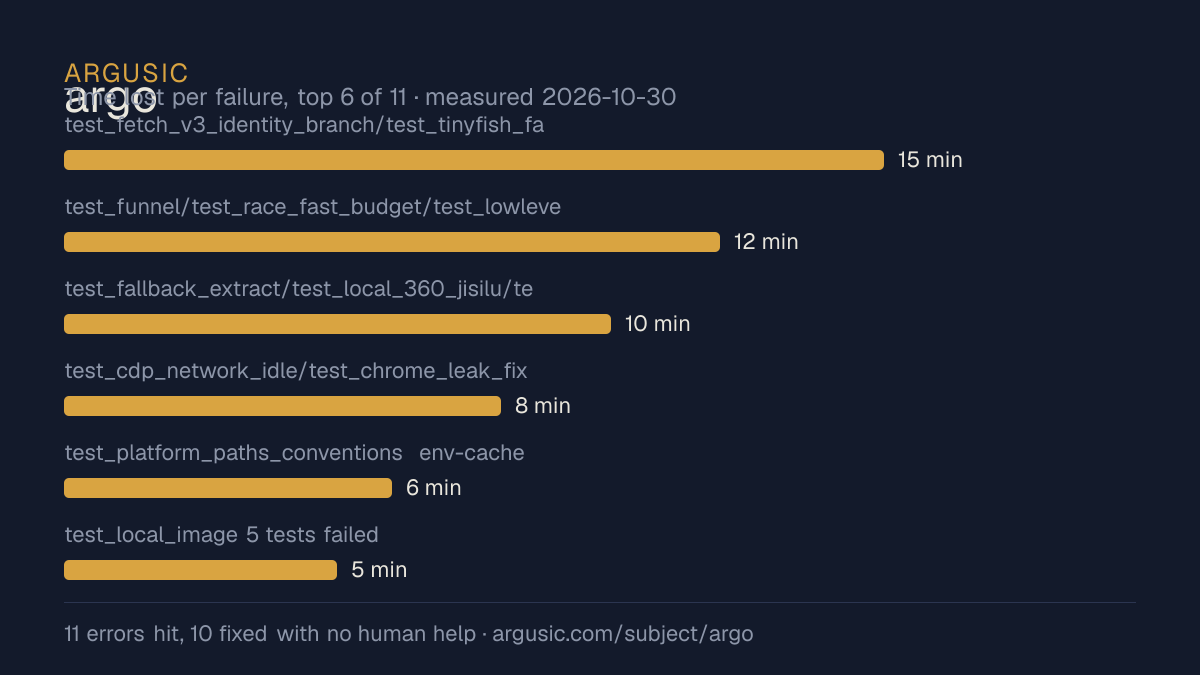
- test_fetch_v3_identity_branch/test_tinyfish_fallback/test_evidence_loop failed: 'blocked' due to SSRF guard on unresolvable fixture domains (offline DNS can't resolve v.com/docs.example.com)15 分钟
- test_funnel/test_race_fast_budget/test_lowlevel_smoke failed after installing rapidfuzz: fuzzy near-dup layer auto-enabled and collapsed template rows differing only by index12 分钟
- test_fallback_extract/test_local_360_jisilu/test_local_baidu_pipeline/test_local_search_redirect_resolve/test_serp_guard failed: no BeautifulSoup (bs4)10 分钟
- test_cdp_network_idle/test_chrome_leak_fix failed: FileNotFoundError Chrome not found8 分钟
- test_platform_paths_conventions env-cache test failed: overlayfs keeps mtime_ns unchanged on equal-size back-to-back rewrite, cache returned stale value6 分钟
- test_local_image 5 tests failed: FileNotFoundError 'swiftc' (Vision helper needs macOS)5 分钟
- 安装时间
- 65 分钟
- 从冷启动机器到完成
- 60 分钟
- 遇到并修复的错误
- 遇到 11 个,在无人协助的情况下修复了 10 个
- 结果是如何证明的
- PATH=$HOME/.local/bin:$PATH CHROME_PATH=$HOME/.cache/ms-playwright/chromium-1248/chrome-linux64/chrome python3 -m pytest tests/ -q -> 4258 passed, 36 skipped, 57 subtests passed, 0 failed in 374.41s; `argo --version` -> 'argo 2.9.7'; `argo search 'python asyncio tutorial' --json -n 2 --no-cache` -> status=completed count=2 errors=[] first_url=https://itsourcecode.com/blogs/python-async-await-tutorial-2026; `argo fetch https://example.com --json` -> success:true fetch_method:http length:156; `python3 scripts/mcp_server.py --call argo_search '{"query":"python asyncio","max_results":2}'` -> JSON results rc=0; headless ChromeCDP navigate example.com -> title 'Example Domain' on DISPLAY=:99
- 使用的模型 token
- 1,207,119
- 测试的确切 commit
- 32428bc90aae
- 容器镜像
- sha256:cdd920bce783
没有测量什么
另一半内容,让你清楚看到这些证据能说明到什么程度。缺失的数据就标为缺失,从不填补。
- GPU 显存峰值
- 本次运行在 CPU 机器上进行,没有可采样的 GPU
- 长时间运行的表现
- 每次尝试都使用文档中最小的设置和固定的时间预算,因此这里测量的是它能否运行,而不是它在负载下的表现
录屏的结尾
决定该结论的终端会话的最后几行,与录制时完全一致。
**Verified**
- `argo --version` printed `argo 2.9.7`.
- `argo search "python asyncio tutorial" --json -n 2 --no-cache` returned `status=completed count=2…
- `argo fetch https://example.com --json` returned `success:true fetch_method:http length:156`.
- MCP `python3 scripts/mcp_server.py --call argo_search '{"query":"python asyncio","max_results":2}…
- Headless Chrome (via `ChromeCDP`) navigated `https://example.com` and read `document.title == "Ex…
- `python3 -m pytest tests/ -q` (with `PATH` including `~/.local/bin` and `CHROME_PATH` set): **425…
- `python3 scripts/health_check.py --all` returned `0/18 可用` — local_* engines are blocked by anti-…
**Unfixed gaps**
- `scripts/health_check.py` local-engine probes (local_baidu/sogou/360/bing_news/wikipedia) all fai…
- Local image Vision (Swift) needs macOS; skipped on Linux by design.
- Optional third-party keys (OCTEN_API_KEY etc.) are absent; engine auto-skips them and no mock was…回放完整会话,从干净的机器到此刻的每一条命令。
测试方式
一个 agent,一个容器,没有人工协助。它按照项目自身文档所写的方式安装项目,运行它,并修复出错的地方。下面的一切都按实际发生的过程记录:终端会话、log 和确切的 commit。 完整方法论.
优势与局限
均为实测事实,而非观点。内容是如何撰写的.
顺利的部分
- 在干净的机器上达到了运行状态,会话有完整记录。
- 用 65 分钟完成安装。
- 无需 GPU 即可运行,因此启动它并不需要 GPU。
- 采用 Apache-2.0 许可证,以其托管平台报告的信息为准。
不顺利或尚不清楚的部分
- 搭建过程中遇到 11 个错误,其中 1 个没有解决。
- 目前只测量过一次。单次尝试只能说明它可以运行,不能说明它能稳定运行。
适合用于
- 在笔记本电脑或小型服务器上试用:它无需 GPU 即达到了运行状态。
同一领域中也测试过的项目
这里的每个项目都由 Argusic 在干净的机器上安装并运行过。未经测试的项目不会出现在这里。
运行历史
主题 (来自 GitHub)
academic-searchagent-toolsai-agentdeep-researchdsh-ecosystemdsh-pluginevidence-verificationmcp-servermetasearchpythonsearch-engineweb-search
嵌入徽章
用于项目 README 的 Markdown。徽章链接回本页;使用条款见 条款页面.
[](https://argusic.com/subject/argo)常见问题
- argo 能运行吗?
- 是的。argo 可以运行. Argusic 在一台干净的机器上安装并启动了它,用时 65 分钟,过程中遇到 11 个错误,并记录了整个会话。
- Argusic 是如何测试 argo 的?
- 在一台全新的一次性机器上进行,每条命令都被记录,仓库固定在 commit 32428bc90aae。共记录了 1 次尝试,完整方法见方法论页面。
- 测试 argo 花了多少钱?
- 得出该结论的那次运行花费 0.77 USD:这是真实的算力和模型成本,而不是按每百万 token 计的标价。该数字记录在那次运行的页面上。
- argo 安装需要多长时间?
- 在决定该结论的那次运行中,从干净的机器到运行状态用了 65 分钟。这是一次实测的尝试,不是平均值。
- argo 需要 GPU 吗?
- 启动它不需要。Argusic 在一台没有 GPU 的机器上让它达到了运行状态。
- 安装 argo 时会出现什么问题?
- 已记录的运行中出现了 11 个问题,其中 10 个在无人协助的情况下被修复。每个问题及其耗费的时间都列在本页上。
- argo 的证据在哪里?
- 这次已记录的运行都在本页上,每次都链接到完整的 log 和终端录屏,并连同 sha256 指纹一起保存,因此无法被悄悄篡改。