英文原文: https://argusic.com/subject/generator-office
generator-office
用于构建 Microsoft Office 相关项目的 Yeoman 生成器。
可运行来源:GitHub项目主页TypeScriptMITcommit 106a1cf50c2e
TypeScript,MIT 许可证. 项目的自我描述:add ins、office、yeoman generator 和 yo office.
generator-office 可以运行。一个 Argusic agent 在一台没有 GPU 的干净机器上用 12 分钟完成了安装,遇到 4 个错误,整个会话都被记录了下来。
The generator-office repo installs from the public npm registry, builds, and its full mocha suite passes 38/38; a real 'yo office' run generates a valid Excel taskpane project that builds with webpack, validates its manifest, and serves its taskpane/JS/manifest over HTTP 200.
agent 在干净的机器上最终得到的结果,用它自己的话说。 测量方式
每一次都由 Argusic 在全新机器上实测。每个数字都链接到对应的证据。 Argusic 评分 72.5,满分 100(该项目各次运行得分的平均值)。
概览
项目数据来自 GitHub,链接见本页顶部,更新于 。测试数据由 Argusic 提供 (CC BY 4.0);每个数字都链接到一个运行页面,附完整的 log、录屏及其 sha256 哈希。
测量了什么
来自决定该结论的那次运行。 每一行都是记录下来的数值,而非估算。
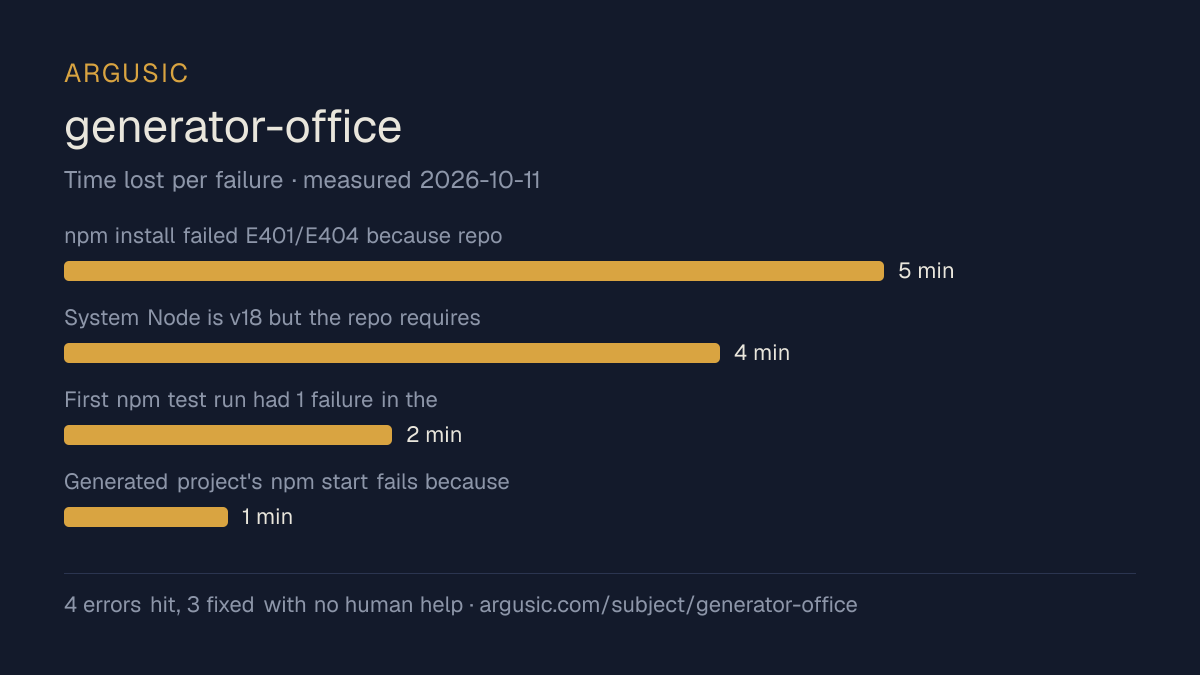
哪里出了问题,用 agent 自己的话说
agent 的原话,最严重的排在最前,从不改写成建议。
- npm install failed E401/E404 because repo .npmrc and bundled package-lock.json pointed to a private Azure feed (office.pkgs.visualstudio.com)5 分钟
- System Node is v18 but the repo requires >=20.12; npm install unsupported-engine and build steps fail4 分钟
- First npm test run had 1 failure in the proxy-config test; the npx/mocha subprocess hit the private feed2 分钟
- Generated project's npm start fails because CA-cert install needs sudo (unavailable) and Office sideload is unsupported on linux; not fixable in this container1 分钟
- 安装时间
- 12 分钟
- 从冷启动机器到完成
- 84 分钟
- 遇到并修复的错误
- 遇到 4 个,在无人协助的情况下修复了 3 个
- 结果是如何证明的
- npm run build exited 0 (tsc+copy); npm test exited 0 with 38 passing, 0 failing; yo office generated '/tmp/yo-run/My Test App'; its npm run build compiled webpack successfully, npm run validate printed 'The manifest is valid.', and curl on localhost:8977 returned 200 for taskpane.html, taskpane.js, and manifest.xml
- 使用的模型 token
- 1,077,421
- 测试的确切 commit
- 106a1cf50c2e
- 容器镜像
- sha256:cdd920bce783
没有测量什么
另一半内容,让你清楚看到这些证据能说明到什么程度。缺失的数据就标为缺失,从不填补。
- GPU 显存峰值
- 本次运行在 CPU 机器上进行,没有可采样的 GPU
- 长时间运行的表现
- 每次尝试都使用文档中最小的设置和固定的时间预算,因此这里测量的是它能否运行,而不是它在负载下的表现
录屏的结尾
决定该结论的终端会话的最后几行,与录制时完全一致。
1,077,421
**Done.** The repository works end-to-end as a brand-new user. Here's my report.
**What fixed the repo**
- **Node engine mismatch** — system Node is v18 but the repo requires `>=20.12`. Installed Node v22…
- **Private-registry auth failure** — repo `.npmrc` and the bundled `package-lock.json` pointed to …
- **`npm start` sideload limit** — `office-addin-debugging` needs `sudo` to install a dev CA cert a…
**Verified (all observed directly)**
- `npm install` → 717 packages audited, no errors.
- `npm run build` → `tsc` and `copy` both exit 0.
- `npm test` → **38 passing, 0 failing** (2m).
- `yo office --projectType taskpane --name "My Test App" --host excel --ts true` → real CLI launche…
- Generated project: `npm run build` → webpack compiled successfully; `npm run validate` → "The man…
回放完整会话,从干净的机器到此刻的每一条命令。
测试方式
一个 agent,一个容器,没有人工协助。它按照项目自身文档所写的方式安装项目,运行它,并修复出错的地方。下面的一切都按实际发生的过程记录:终端会话、log 和确切的 commit。 完整方法论.
优势与局限
均为实测事实,而非观点。内容是如何撰写的.
顺利的部分
- 在干净的机器上达到了运行状态,会话有完整记录。
- 用 12 分钟完成安装。
- 无需 GPU 即可运行,因此启动它并不需要 GPU。
- 采用 MIT 许可证,以其托管平台报告的信息为准。
- 已测量 2 次,因此结果并非偶然。
不顺利或尚不清楚的部分
- 搭建过程中遇到 4 个错误,其中 1 个没有解决。
适合用于
- 在笔记本电脑或小型服务器上试用:它无需 GPU 即达到了运行状态。
运行历史
主题 (来自 GitHub)
嵌入徽章
用于项目 README 的 Markdown。徽章链接回本页;使用条款见 条款页面.
[](https://argusic.com/subject/generator-office)常见问题
- generator-office 能运行吗?
- 是的。generator-office 可以运行. Argusic 在一台干净的机器上安装并启动了它,用时 12 分钟,过程中遇到 4 个错误,并记录了整个会话。
- Argusic 是如何测试 generator-office 的?
- 在一台全新的一次性机器上进行,每条命令都被记录,仓库固定在 commit 106a1cf50c2e。共记录了 2 次尝试,完整方法见方法论页面。
- 测试 generator-office 花了多少钱?
- 得出该结论的那次运行花费 0.49 USD:这是真实的算力和模型成本,而不是按每百万 token 计的标价。该数字记录在那次运行的页面上。
- generator-office 安装需要多长时间?
- 在决定该结论的那次运行中,从干净的机器到运行状态用了 12 分钟。这是一次实测的尝试,不是平均值。
- generator-office 需要 GPU 吗?
- 启动它不需要。Argusic 在一台没有 GPU 的机器上让它达到了运行状态。
- 安装 generator-office 时会出现什么问题?
- 已记录的运行中出现了 4 个问题,其中 3 个在无人协助的情况下被修复。每个问题及其耗费的时间都列在本页上。
- generator-office 的证据在哪里?
- 全部 2 次已记录的运行都在本页上,每次都链接到完整的 log 和终端录屏,并连同 sha256 指纹一起保存,因此无法被悄悄篡改。