英文原文: https://argusic.com/subject/experiential
experiential
Experiential 是用于 BYOK、自托管和 1000+ 市场模型的开源零加价网关。它从你的流量中学习,以降低成本、推荐更好的模型,并训练一个专属于你的模型。
可运行来源:GitHub项目主页PythonApache-2.0commit 1253c82fe479
Python,Apache-2.0 许可证.
experiential 可以运行。一个 Argusic agent 在一台没有 GPU 的干净机器上用 45 分钟完成了安装,遇到 7 个错误,并在无人协助的情况下全部修复,整个会话都被记录了下来。
The experiential project installs cleanly under uv on Python 3.13 with the native Rust gateway extension built from source; all quality gates pass, 8396 of 8397 container-runnable tests pass, and the initialized loopback gateway serves health, models, non-stream and stream chat completions, and usage accounting against a local mock OpenAI-compatible upstream.
agent 在干净的机器上最终得到的结果,用它自己的话说。 测量方式
每一次都由 Argusic 在全新机器上实测。每个数字都链接到对应的证据。 Argusic 评分 100,满分 100(该项目各次运行得分的平均值)。
概览
项目数据来自 GitHub,链接见本页顶部,更新于 。测试数据由 Argusic 提供 (CC BY 4.0);每个数字都链接到一个运行页面,附完整的 log、录屏及其 sha256 哈希。
测量了什么
来自决定该结论的那次运行。 每一行都是记录下来的数值,而非估算。
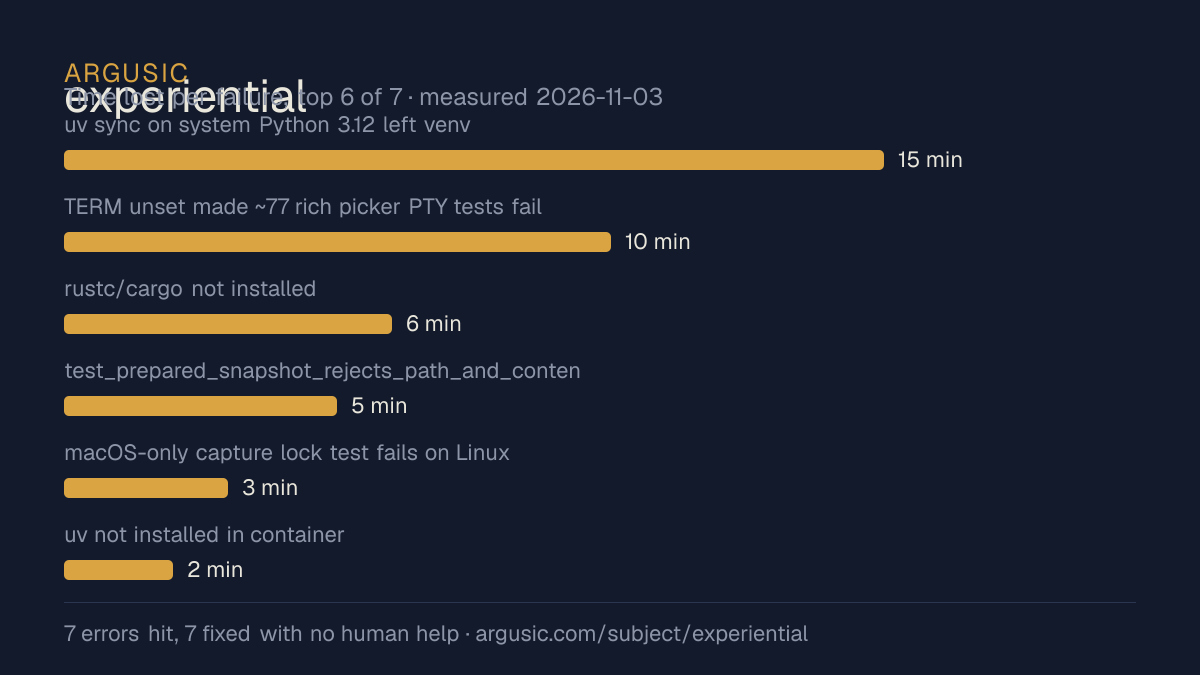
哪里出了问题,用 agent 自己的话说
agent 的原话,最严重的排在最前,从不改写成建议。
- uv sync on system Python 3.12 left venv incomplete; repo gates need 3.1315 分钟
- TERM unset made ~77 rich picker PTY tests fail (non-interactive fallback)10 分钟
- rustc/cargo not installed; native gateway crate requires them6 分钟
- test_prepared_snapshot_rejects_path_and_content_races[rewrite] fails on overlayfs ctime semantics in this container5 分钟
- macOS-only capture lock test fails on Linux because pwd exists and ~/Library 0755 trips fail-closed ancestor check3 分钟
- uv not installed in container2 分钟
- 安装时间
- 45 分钟
- 从冷启动机器到完成
- 74 分钟
- 遇到并修复的错误
- 遇到 7 个,在无人协助的情况下修复了 7 个
- 结果是如何证明的
- uv sync --extra dev exited 0; ruff check/format --check and ty check all reported All checks passed; .venv/bin/pytest -q = 8396 passed, 1 env-expected failure, 60 skipped; curl -s http://127.0.0.1:8000/health/ready returned 200 with body {"status":"ready"}; curl POST /v1/chat/completions with exp_vk_ key returned HTTP 200 with id chatcmpl_9feeeb47b3a8e4b60f01741637ca166a and content "Hello" via mock upstream; SSE stream returned chunks ending data: [DONE]
- 使用的模型 token
- 1,697,702
- 测试的确切 commit
- 1253c82fe479
- 容器镜像
- sha256:cdd920bce783
没有测量什么
另一半内容,让你清楚看到这些证据能说明到什么程度。缺失的数据就标为缺失,从不填补。
- GPU 显存峰值
- 本次运行在 CPU 机器上进行,没有可采样的 GPU
- 长时间运行的表现
- 每次尝试都使用文档中最小的设置和固定的时间预算,因此这里测量的是它能否运行,而不是它在负载下的表现
录屏的结尾
决定该结论的终端会话的最后几行,与录制时完全一致。
- Full pytest: **8396 passed, 1 failed (capture-lock env test), 1 error (flaky terminal-tasks test …
- Live gateway on loopback:
  - `exp config gateway init/provider add openai-compatible/alias create opus-5/identity create/gra…
  - `exp --root /tmp/exp-root-test --non-interactive --json --check` -> `{"status":"ready",...}` ex…
  - `exp --root ... --port 8000` launched; process stayed up (PID constant across probes).
  - `GET /health/ready` → 200 `{"status":"ready"}`.
  - `GET /v1/models` with issued `exp_vk_…` key → 200 listing the granted `opus-5` alias.
  - `POST /v1/chat/completions` (Bearer key, `{"model":"opus-5",...}`) → 200 real completion `"id":…
  - Streaming → 200 SSE `data:` chunks ending `data: [DONE]`.
  - `GET /usage` → 200 HTML accounting page (per-identity request/attempt/token tables); SQLite `ga…
  - 502s observed only when the background mock upstream had died between exec sessions (proven by …
**Honest scoping:** I did not run `exp build`/`exp optimize`/SFT (require real hosted provider keys…回放完整会话,从干净的机器到此刻的每一条命令。
测试方式
一个 agent,一个容器,没有人工协助。它按照项目自身文档所写的方式安装项目,运行它,并修复出错的地方。下面的一切都按实际发生的过程记录:终端会话、log 和确切的 commit。 完整方法论.
优势与局限
均为实测事实,而非观点。内容是如何撰写的.
顺利的部分
- 在干净的机器上达到了运行状态,会话有完整记录。
- 在无人介入的情况下从全部 7 个错误中恢复,说明这些故障的文档足以让人解决。
- 无需 GPU 即可运行,因此启动它并不需要 GPU。
- 采用 Apache-2.0 许可证,以其托管平台报告的信息为准。
- 已测量 2 次,因此结果并非偶然。
不顺利或尚不清楚的部分
- 安装用了 45 分钟,慢于 Argusic 测量过的 46 个同类项目的中位数。
在 Argusic 安装并计时过的 47 个 Python 项目中,experiential 达到运行状态的速度排名第 47,47 个项目中有 28 个达到了运行状态。
适合用于
- 在笔记本电脑或小型服务器上试用:它无需 GPU 即达到了运行状态。
运行历史
嵌入徽章
用于项目 README 的 Markdown。徽章链接回本页;使用条款见 条款页面.
[](https://argusic.com/subject/experiential)常见问题
- experiential 能运行吗?
- 是的。experiential 可以运行. Argusic 在一台干净的机器上安装并启动了它,用时 45 分钟,过程中遇到 7 个错误,并记录了整个会话。
- Argusic 是如何测试 experiential 的?
- 在一台全新的一次性机器上进行,每条命令都被记录,仓库固定在 commit 1253c82fe479。共记录了 2 次尝试,完整方法见方法论页面。
- 测试 experiential 花了多少钱?
- 得出该结论的那次运行花费 0.47 USD:这是真实的算力和模型成本,而不是按每百万 token 计的标价。该数字记录在那次运行的页面上。
- experiential 安装需要多长时间?
- 在决定该结论的那次运行中,从干净的机器到运行状态用了 45 分钟。这是一次实测的尝试,不是平均值。
- experiential 需要 GPU 吗?
- 启动它不需要。Argusic 在一台没有 GPU 的机器上让它达到了运行状态。
- 安装 experiential 时会出现什么问题?
- 已记录的运行中出现了 7 个问题,其中 7 个在无人协助的情况下被修复。每个问题及其耗费的时间都列在本页上。
- experiential 与其他替代方案相比如何?
- 在 Argusic 安装并计时过的 47 个 Python 项目中,experiential 达到运行状态的速度排名第 47,47 个项目中有 28 个达到了运行状态。
- experiential 的证据在哪里?
- 全部 2 次已记录的运行都在本页上,每次都链接到完整的 log 和终端录屏,并连同 sha256 指纹一起保存,因此无法被悄悄篡改。