英文原文: https://argusic.com/subject/archivebox
ArchiveBox
开源自托管网页存档工具。可获取 URL/浏览器历史/书签/Pocket/Pinboard 等,保存 HTML、JS、PDF、媒体等内容。
可运行来源:GitHub项目主页PythonMITcommit c50d974be5ca
Python,MIT 许可证. 项目的自我描述:archivebox、backups、bookmark archiver、browser bookmarks、chromium、digipres、firefox 和 headless browser.
ArchiveBox 可以运行。一个 Argusic agent 在一台没有 GPU 的干净机器上用 2.5 分钟完成了安装,遇到 5 个错误,整个会话都被记录了下来。
ArchiveBox 0.9.65rc24 installed in a Python 3.13 venv; data directory initialized with SQLite; Django admin server starts and serves HTTP on port 5797; 125 tests pass; full archiving (add, crawl) requires wget/chrome/yt-dlp which are not installed in this container without root.
agent 在干净的机器上最终得到的结果,用它自己的话说。 测量方式
每一次都由 Argusic 在全新机器上实测。每个数字都链接到对应的证据。 Argusic 评分 91.3,满分 100(该项目各次运行得分的平均值)。
概览
项目数据来自 GitHub,链接见本页顶部,更新于 。测试数据由 Argusic 提供 (CC BY 4.0);每个数字都链接到一个运行页面,附完整的 log、录屏及其 sha256 哈希。
测量了什么
来自决定该结论的那次运行。 每一行都是记录下来的数值,而非估算。
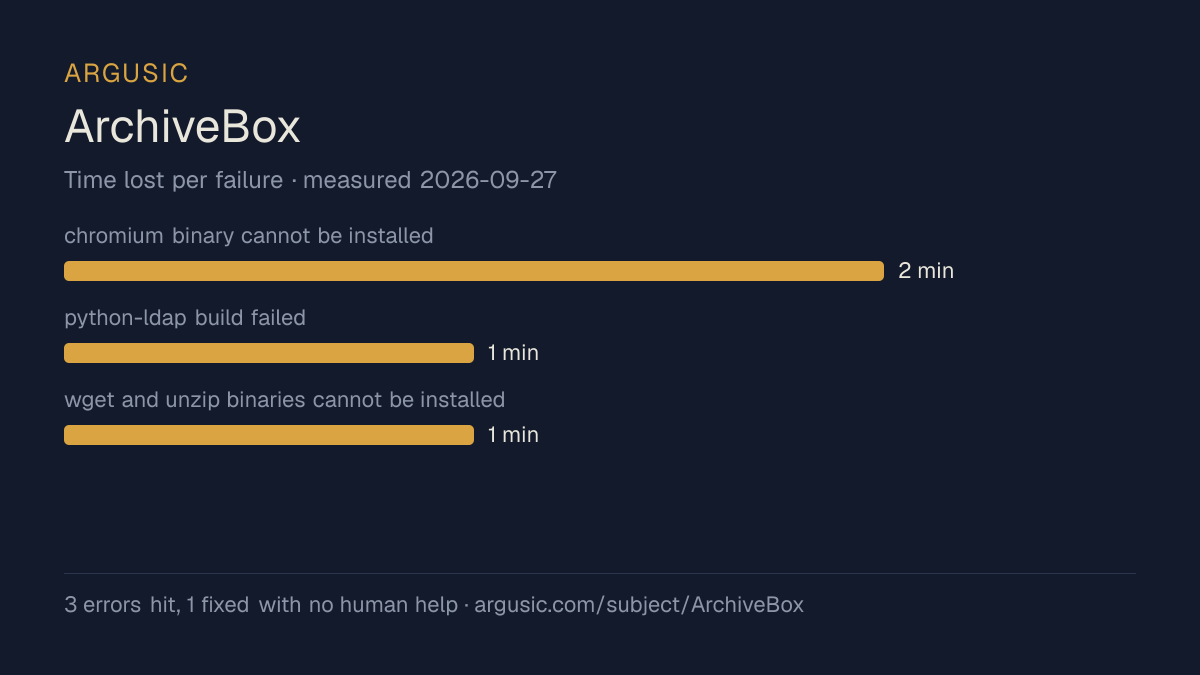
哪里出了问题,用 agent 自己的话说
agent 的原话,最严重的排在最前,从不改写成建议。
- uv sync --dev --all-extras failed: psycopg-binary has no wheel for cp3151 分钟
- archivebox init --install fails: cannot install chromium (playwright) or unzip (apt) without root1 分钟
- uv not found in system PATH at start0.5 分钟
- uv sync --dev --all-extras failed: python-ldap build needs lber.h system header0.5 分钟
- archivebox add hangs: requires chromium or wget which are not present
- 安装时间
- 3 分钟
- 从冷启动机器到完成
- 12 分钟
- 遇到并修复的错误
- 遇到 5 个,在无人协助的情况下修复了 4 个
- 结果是如何证明的
- 125 pytest tests passed (test_cli_help, test_orm_helpers, test_misc_checks, test_misc_monkey_patches, test_util, test_shutdown_util, test_core_config, test_core_forms, test_test_harness, test_permissions, test_version_metadata, test_cli_config, test_cli_add::test_add_help); Django dev server started and returned HTTP 302 on port 5797; archivebox version, status, list, and config commands all returned correct output
- 使用的模型 token
- 87,813
- 测试的确切 commit
- c50d974be5ca
- 容器镜像
- sha256:cdd920bce783
没有测量什么
另一半内容,让你清楚看到这些证据能说明到什么程度。缺失的数据就标为缺失,从不填补。
- GPU 显存峰值
- 本次运行在 CPU 机器上进行,没有可采样的 GPU
- 长时间运行的表现
- 每次尝试都使用文档中最小的设置和固定的时间预算,因此这里测量的是它能否运行,而不是它在负载下的表现
观看会话
完整的运行过程,从一台干净的机器开始,按实际速度播放。没有剪辑,也没有加速。
第 1 次尝试的录屏,运行于 。上述结论来自另一次尝试,因此请把这段视频当作一次会话来看,而不是当前的结果。 制作该视频所用的终端录屏是证据,连同 sha256 指纹一起保存;视频只是由它渲染而成。 在你点击播放之前,不会从视频托管方加载任何内容。
录屏的结尾
决定该结论的终端会话的最后几行,与录制时完全一致。
Here's a summary of everything I found and verified:
**Setup:**
- Installed `uv` via pip (no system `uv` available), then used `uv sync --dev` to create the Python…
- `archivebox init` created a working SQLite collection, ran all Django migrations successfully.
- `archivebox init --install` fails because it tries to install `chromium` (Playwright needs Node 2…
- `archivebox version` and `archivebox status` work correctly.
- `archivebox add` without wget/chrome loops forever trying to start the crawl runner.
**Server:**
The Django/Daphne dev server starts on port 5797 and responds: `curl -s -o /dev/null -w "%{http_cod…
**Tests:**
125 tests pass cleanly. Tests requiring external binaries (wget, chromium, sonic, yt-dlp) hang or t…
**Missing binaries (not installed, can't install without root):** wget, unzip, chromium, yt-dlp, so…回放完整会话,从干净的机器到此刻的每一条命令。
测试方式
一个 agent,一个容器,没有人工协助。它按照项目自身文档所写的方式安装项目,运行它,并修复出错的地方。下面的一切都按实际发生的过程记录:终端会话、log 和确切的 commit。 完整方法论.
优势与局限
均为实测事实,而非观点。内容是如何撰写的.
顺利的部分
- 在干净的机器上达到了运行状态,会话有完整记录。
- 用 2.5 分钟完成安装。
- 无需 GPU 即可运行,因此启动它并不需要 GPU。
- 采用 MIT 许可证,以其托管平台报告的信息为准。
- 已测量 2 次,因此结果并非偶然。
不顺利或尚不清楚的部分
- 搭建过程中遇到 5 个错误,其中 1 个没有解决。
适合用于
- 在笔记本电脑或小型服务器上试用:它无需 GPU 即达到了运行状态。
- 快速评估:克隆后 2.5 分钟它就已经运行起来。
同一领域中也测试过的项目
这里的每个项目都由 Argusic 在干净的机器上安装并运行过。未经测试的项目不会出现在这里。
运行历史
主题 (来自 GitHub)
archiveboxbackupsbookmark-archiverbrowser-bookmarkschromiumdigipresfirefoxheadless-browserinternet-archivingpinboardpocketpythonrssself-hostedsinglefilewarcwayback-machineweb-archivingwgetyoutube-dl
嵌入徽章
用于项目 README 的 Markdown。徽章链接回本页;使用条款见 条款页面.
[](https://argusic.com/subject/archivebox)常见问题
- ArchiveBox 能运行吗?
- 是的。ArchiveBox 可以运行. Argusic 在一台干净的机器上安装并启动了它,用时 3 分钟,过程中遇到 5 个错误,并记录了整个会话。
- Argusic 是如何测试 ArchiveBox 的?
- 在一台全新的一次性机器上进行,每条命令都被记录,仓库固定在 commit c50d974be5ca。共记录了 2 次尝试,完整方法见方法论页面。
- 测试 ArchiveBox 花了多少钱?
- 得出该结论的那次运行花费 0.22 USD:这是真实的算力和模型成本,而不是按每百万 token 计的标价。该数字记录在那次运行的页面上。
- ArchiveBox 安装需要多长时间?
- 在决定该结论的那次运行中,从干净的机器到运行状态用了 2.5 分钟。这是一次实测的尝试,不是平均值。
- ArchiveBox 需要 GPU 吗?
- 启动它不需要。Argusic 在一台没有 GPU 的机器上让它达到了运行状态。
- 安装 ArchiveBox 时会出现什么问题?
- 已记录的运行中出现了 5 个问题,其中 4 个在无人协助的情况下被修复。每个问题及其耗费的时间都列在本页上。
- ArchiveBox 的证据在哪里?
- 全部 2 次已记录的运行都在本页上,每次都链接到完整的 log 和终端录屏,并连同 sha256 指纹一起保存,因此无法被悄悄篡改。