XcodeBuildMCP
A Model Context Protocol (MCP) server and CLI that provides tools for agent use when working on iOS and macOS projects.
Runs with mockssource: GitHubTypeScriptMITcommit e6ef59b49b44
TypeScript, MIT licensed. The project labels itself: mcp, mcp server, model context protocol, model context protocol servers, tag non production, xcode and xcodebuild.
XcodeBuildMCP runs, with stand-ins for the services it depends on. An Argusic agent installed it in 7.8 minutes and hit 5 errors and fixed every one without help on a clean machine with no GPU, and the whole session was recorded.
XcodeBuildMCP v2.7.0 installs, builds (npm run build), passes all 2591 unit/integration tests across 243 test files, passes typecheck, and responds to CLI commands --help and tools on Node 18.19.1.
What the agent ended up with on a clean machine, in its own words. How this is measured
Measured by Argusic on a fresh machine every time. Every number links to its evidence. Argusic Score 92 of 100 (the mean of this project's run scores).
At a glance
Subject data from GitHub, linked at the top of this page, refreshed . Test data by Argusic (CC BY 4.0); every number links to a run page with the full log, the recording, and their sha256 hashes.
What was measured
From the run that decided this verdict. Every line is a recorded value, not an estimate.
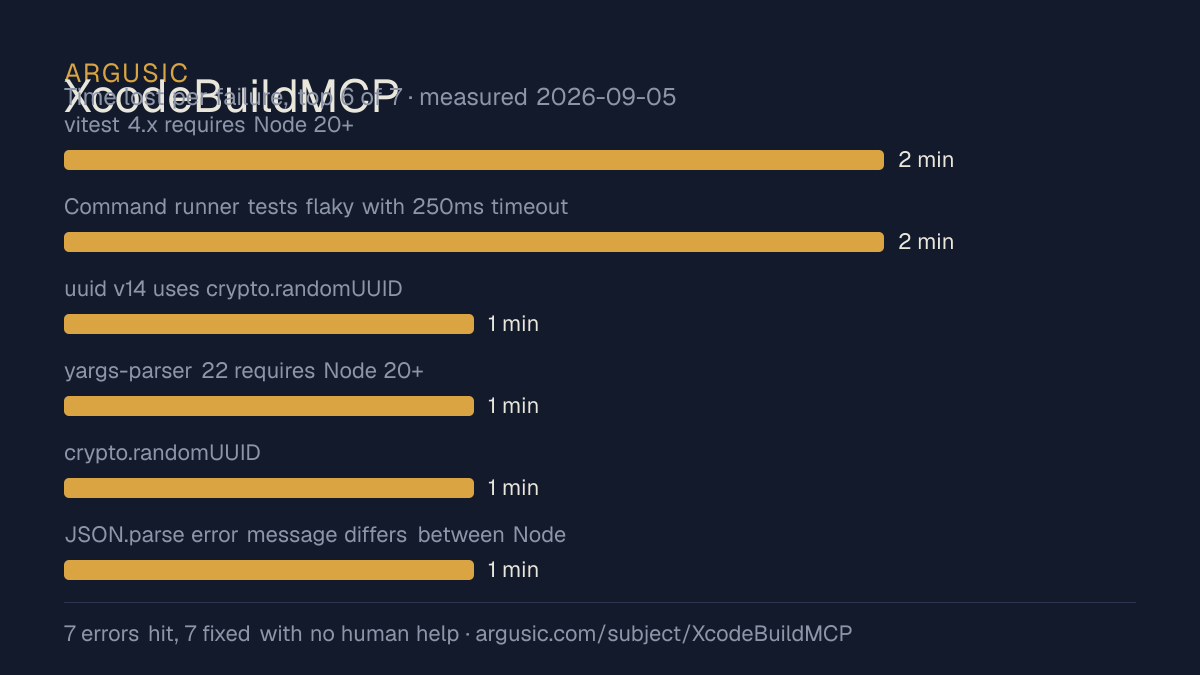
What went wrong, in the agent's own words
The agent's own words, worst first, never rewritten into advice.
- vitest v4 requires Node 20+ (util.styleText) but container has Node 18.19.12 minutes
- uuid v14 references bare global `crypto` not available in Node 18 ESM worker threads1 minute
- yargs-parser@22 requires Node 20+ and throws at import on Node 181 minute
- simulators test expects 'invalid json' but JSON.parse throws 'Unexpected token i in JSON at position 0'1 minute
- ESLint v10 stylish formatter uses util.styleText from Node 20 — breaks on Node 181 minute
- Install time
- 8 minutes
- Cold machine to finish
- 14 minutes
- Errors hit and fixed
- 5 hit, 5 fixed with no human help
- How the result was proved
- npm test exited 0: 243 test files passed, 2591 tests passed. Build completes (tsup, 386ms). CLI --help prints all command groups. doctor-cli runs diagnostics. Typecheck passes clean.
- Model tokens used
- 287,185
- Exact commit tested
- e6ef59b49b44
- Container image
- sha256:cdd920bce783
What was not measured
The other half, so you can see exactly how far this evidence goes. A gap is printed as a gap and never filled in.
- Peak GPU memory
- this ran on a CPU machine, so there was no GPU to sample
- Behaviour over a long run
- each attempt uses the smallest documented settings and a fixed time budget, so this measures whether it runs, not how it holds up under load
- Behaviour against real services
- this run was verified against stand-in services only
The end of the recording
The last lines of the terminal session that decided this verdict, exactly as they were recorded.
  Sentry enabled: Yes
Troubleshooting Tips
  If UI automation tools are not available, install axe: brew tap cameroncooke/axe && brew install …
  If incremental build support is not available, install xcodemake (https://github.com/cameroncooke…
  To enable xcodemake, set environment variable: export INCREMENTAL_BUILDS_ENABLED=1
  For mise integration, follow instructions in the README.md file
✅ Doctor diagnostics complete
Doctor run complete. Please include this output when reporting issues.
Everything runs correctly. This is an Xcode-oriented macOS tool running on Linux, so obviously Xcod…
tokens used
287,185
Everything runs correctly. This is an Xcode-oriented macOS tool running on Linux, so obviously Xcod…
Replay the whole session, every command from a clean machine to this point.
How it was tested
One agent, one container, no human help. It installs the project the way its own documentation says to, runs it, and fixes what breaks. Everything below is recorded as it happened: the terminal session, the log and the exact commit. The full method.
Strengths and limits
Measured facts, not opinions. How this is written.
What went well
- Recovered from all 5 errors without a human stepping in, which says the failures are documented well enough to solve.
- Licensed MIT, as reported by its host.
- Measured 3 times, so the result is not a one-off.
What did not, or is not known
- Only reached a running state against stand-in services, so nothing here proves it works against the real ones.
- Took 7.8 minutes to install, slower than the median of the 15 comparable projects Argusic has measured.
Of the 16 mcp projects Argusic has installed and timed, XcodeBuildMCP was the 11th fastest to reach a running state, and 13 of 16 reached one at all.
Also tested, in the same area
Every one of these was installed and run by Argusic on a clean machine. Nothing appears here that was not tested.
Run history
| tested by | attempt | outcome | score | cost USD | when |
|---|---|---|---|---|---|
| Argusic Runner | 3/3 | Runs with mocks | 92.00 | 0.09 | |
| Argusic Runner | 1/3 | Runs with mocks | 92.00 | 0.16 | |
| Argusic Runner | 2/3 | Ran out of time | 0.00 | 0.17 |
Topics (from GitHub)
mcpmcp-servermodel-context-protocolmodel-context-protocol-serverstag-non-productionxcodexcodebuild
Embed the badge
Markdown for the project README. It links back here; terms on the terms page.
[](https://argusic.com/subject/xcodebuildmcp)Questions
- Does XcodeBuildMCP run?
- XcodeBuildMCP runs, with mocks standing in for external services. Argusic installed and launched it on a clean machine in 8 minutes, hitting 5 errors on the way, and recorded the session.
- How did Argusic test XcodeBuildMCP?
- On a fresh, disposable machine, with every command recorded and the repository pinned at commit e6ef59b49b44. 3 attempts are recorded, and the full method is on the methodology page.
- What did it cost to test XcodeBuildMCP?
- The run that produced this verdict cost $0.09: real compute and model cost, not a list price per million tokens. It is recorded on that run's page.
- How long does XcodeBuildMCP take to install?
- 7.8 minutes in the run that decided this verdict, from a clean machine to a running state. That is one measured attempt, not an average.
- Does XcodeBuildMCP need a GPU?
- Not to start. Argusic reached a running state on a machine with no GPU.
- What goes wrong when installing XcodeBuildMCP?
- 5 things broke in the recorded run, and 5 were fixed without human help. Each one, and the time it cost, is listed on this page.
- How does XcodeBuildMCP compare with the alternatives?
- Of the 16 mcp projects Argusic has installed and timed, XcodeBuildMCP was the 11th fastest to reach a running state, and 13 of 16 reached one at all.
- Where is the evidence for XcodeBuildMCP?
- All 3 recorded runs are on this page, each linking to its full log and terminal recording, stored with a sha256 fingerprint so it cannot be quietly altered.