termscp
🖥 A feature rich terminal UI file transfer and explorer with support for SCP/SFTP/FTP/S3/SMB/WebDAV
Runs with mockssource: GitHubhomepageRustMITcommit 4120311bf62e
Rust, MIT licensed. The project labels itself: aws s3, command line tool, command line utility, ftp client, ratatui, rust, rust crate and rust lang.
termscp runs, with stand-ins for the services it depends on. An Argusic agent installed it in 8 minutes and hit 2 errors on a clean machine with no GPU, and the whole session was recorded.
termscp builds from source (without SMB), its binary responds to --version and --help, and all 335 unit tests pass.
What the agent ended up with on a clean machine, in its own words. How this is measured
Measured by Argusic on a fresh machine every time. Every number links to its evidence. Argusic Score 82 of 100 (the mean of this project's run scores).
At a glance
Subject data from GitHub, linked at the top of this page, refreshed . Test data by Argusic (CC BY 4.0); every number links to a run page with the full log, the recording, and their sha256 hashes.
What was measured
From the run that decided this verdict. Every line is a recorded value, not an estimate.
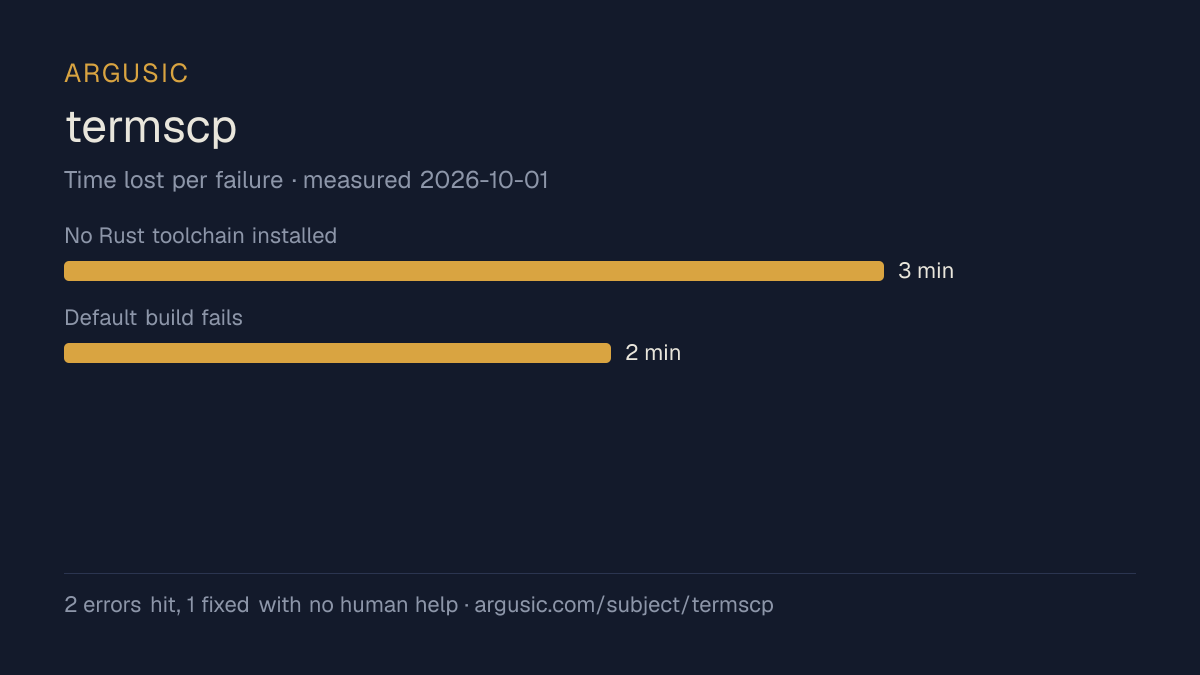
What went wrong, in the agent's own words
The agent's own words, worst first, never rewritten into advice.
- No Rust toolchain installed3 minutes
- Default build fails: libsmbclient-dev not found (pavao-sys requires smbclient.pc)2 minutes
- Install time
- 8 minutes
- Cold machine to finish
- 9 minutes
- Errors hit and fixed
- 2 hit, 1 fixed with no human help
- How the result was proved
- cargo test --no-default-features --features github-actions --no-fail-fast exited 0, 335 passed; ./target/debug/termscp --version printed 'termscp v1.2.0'
- Model tokens used
- 36,171
- Exact commit tested
- 4120311bf62e
- Container image
- sha256:cdd920bce783
What was not measured
The other half, so you can see exactly how far this evidence goes. A gap is printed as a gap and never filled in.
- Peak GPU memory
- this ran on a CPU machine, so there was no GPU to sample
- Behaviour over a long run
- each attempt uses the smallest documented settings and a fixed time budget, so this measures whether it runs, not how it holds up under load
- Behaviour against real services
- this run was verified against stand-in services only
The end of the recording
The last lines of the terminal session that decided this verdict, exactly as they were recorded.
   - Default build fails: `libsmbclient-dev` not found → cannot fix without root; documented system…
tokens used
36,171
Here is a complete summary of what I observed and the final result.
**What was done:**
1. **Rust toolchain** — `rustc`/`cargo` were not installed. I ran `sh <(curl -sSf https://sh.rustup…
2. **Build** — `cargo build --no-default-features` succeeded (5m53s). The default build (with SMB+k…
3. **Binary verification** — `./target/debug/termscp --version` printed `termscp v1.2.0` and `--hel…
4. **Test suite** — `cargo test --no-default-features --features "github-actions" --no-fail-fast` r…
5. **Errors encountered:**
   - No `rustc` installed → fixed via rustup
   - Default build fails: `libsmbclient-dev` not found → cannot fix without root; documented system…
Replay the whole session, every command from a clean machine to this point.
How it was tested
One agent, one container, no human help. It installs the project the way its own documentation says to, runs it, and fixes what breaks. Everything below is recorded as it happened: the terminal session, the log and the exact commit. The full method.
Strengths and limits
Measured facts, not opinions. How this is written.
What went well
- Installed in 8 minutes.
- Licensed MIT, as reported by its host.
What did not, or is not known
- Only reached a running state against stand-in services, so nothing here proves it works against the real ones.
- Hit 2 errors during setup, 1 of which were not solved.
- Measured once so far. A single attempt shows it can run, not that it runs reliably.
Also tested, in the same area
Every one of these was installed and run by Argusic on a clean machine. Nothing appears here that was not tested.
Run history
| tested by | attempt | outcome | score | cost USD | when |
|---|---|---|---|---|---|
| Argusic Runner | 1/3 | Runs with mocks | 82.00 | 0.03 |
Topics (from GitHub)
aws-s3command-line-toolcommand-line-utilityftp-clientratatuirustrust-craterust-langscpsftpsftp-clientssh-clientterminalterminal-apptuiutilitywinscpwinscp-equivalent-for-linuxwinscp-for-linuxwinscp-for-mac
Embed the badge
Markdown for the project README. It links back here; terms on the terms page.
[](https://argusic.com/subject/termscp)Questions
- Does termscp run?
- termscp runs, with mocks standing in for external services. Argusic installed and launched it on a clean machine in 8 minutes, hitting 2 errors on the way, and recorded the session.
- How did Argusic test termscp?
- On a fresh, disposable machine, with every command recorded and the repository pinned at commit 4120311bf62e. One attempt is recorded, and the full method is on the methodology page.
- What did it cost to test termscp?
- The run that produced this verdict cost $0.03: real compute and model cost, not a list price per million tokens. It is recorded on that run's page.
- How long does termscp take to install?
- 8 minutes in the run that decided this verdict, from a clean machine to a running state. That is one measured attempt, not an average.
- Does termscp need a GPU?
- Not to start. Argusic reached a running state on a machine with no GPU.
- What goes wrong when installing termscp?
- 2 things broke in the recorded run, and 1 were fixed without human help. Each one, and the time it cost, is listed on this page.
- Where is the evidence for termscp?
- The recorded run is on this page, each linking to its full log and terminal recording, stored with a sha256 fingerprint so it cannot be quietly altered.