nexting
Remote control for Claude Code, Codex, Cursor, and Grok on your Mac or PC. Check sessions, send tasks, and answer prompts from your phone or the Nexting Ring.
Runssource: GitHubCMITcommit 3acb2c1ec7af
C, MIT licensed. The project labels itself: agent remote control, ai agents, android, claude code, codex, coding agents, cursor and device sdk.
nexting runs. An Argusic agent installed it in 0.5 minutes and hit 5 errors and fixed every one without help on a clean machine with no GPU, and the whole session was recorded.
The pinclaw plugin npm package builds with esbuild and all 121 automated tests pass, including WebSocket auth, Say/Sync dual-response protocol, offline message queuing with /pending endpoint and auto-delivery on reconnect, HTTP push/message APIs, device tools registration and calls, concurrency, and cron management.
What the agent ended up with on a clean machine, in its own words. How this is measured
Measured by Argusic on a fresh machine every time. Every number links to its evidence. Argusic Score 100 of 100 (the mean of this project's run scores).
At a glance
Subject data from GitHub, linked at the top of this page. Test data by Argusic (CC BY 4.0); every number links to a run page with the full log, the recording, and their sha256 hashes.
What was measured
From the run that decided this verdict. Every line is a recorded value, not an estimate.
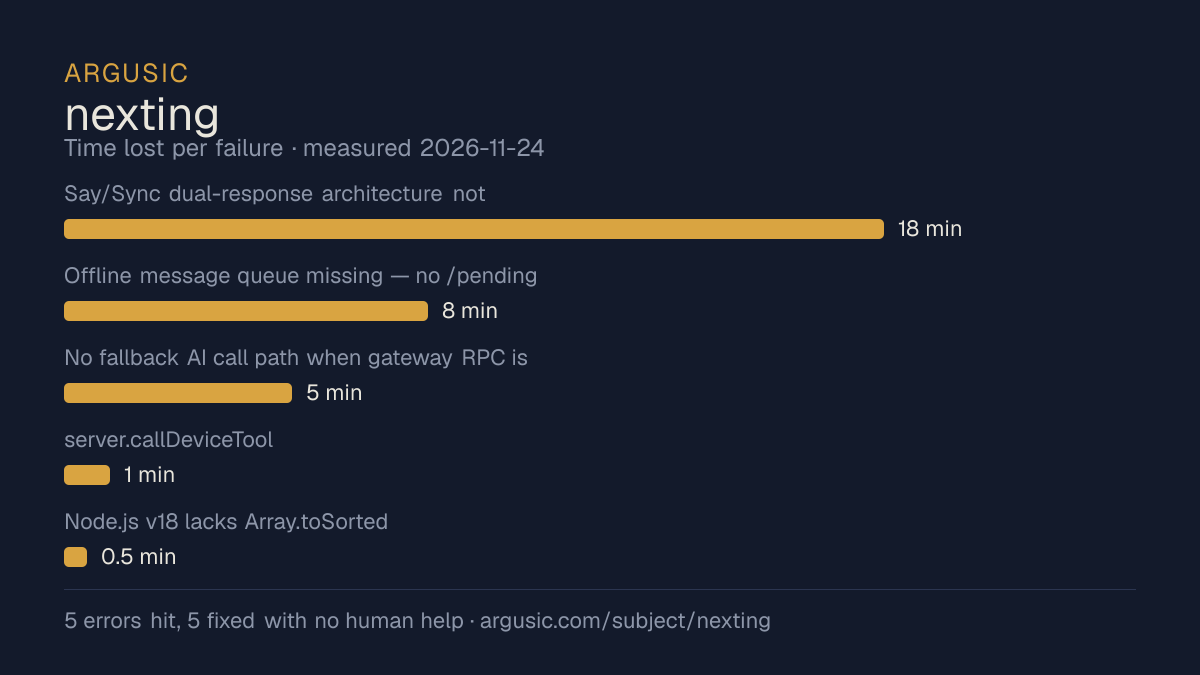
What went wrong, in the agent's own words
The agent's own words, worst first, never rewritten into advice.
- Say/Sync dual-response architecture not implemented — WS text handler only made one AI call18 minutes
- Offline message queue missing — no /pending endpoint, no queued flag on sendToDevice8 minutes
- No fallback AI call path when gateway RPC is disconnected5 minutes
- server.callDeviceTool() not exposed on PinclawWsServer class1 minute
- Node.js v18 lacks Array.toSorted() needed by openclaw peer dependency postinstall script0.5 minutes
- Install time
- under a minute
- Cold machine to finish
- 40 minutes
- Errors hit and fixed
- 5 hit, 5 fixed with no human help
- How the result was proved
- cd plugin && npm run build (esbuild exit 0) && npx tsx test/pinclaw-server.test.ts: 121 passed, 0 failed
- Model tokens used
- 663,636
- Exact commit tested
- 3acb2c1ec7af
- Container image
- sha256:cdd920bce783
What was not measured
The other half, so you can see exactly how far this evidence goes. A gap is printed as a gap and never filled in.
- Peak GPU memory
- this ran on a CPU machine, so there was no GPU to sample
- Behaviour over a long run
- each attempt uses the smallest documented settings and a fixed time budget, so this measures whether it runs, not how it holds up under load
The end of the recording
The last lines of the terminal session that decided this verdict, exactly as they were recorded.
 plugin/src/core/server.ts         | 119 ++++++++++++++++++++++++++++++++++----
 plugin/src/core/ws-handler.ts     |  13 +++++
 5 files changed, 236 insertions(+), 33 deletions(-)
Now let me compile the final result.
exec
/bin/sh -lc 'cd /work/repo/plugin && npx tsx test/pinclaw-server.test.ts 2>&1 | grep "''^  Results:…
 succeeded in 91918ms:
  Results: 121 passed, 0 failed
All confirmed. Here is the ARGUSIC_RESULT:
tokens used
663,636
All confirmed. Here is the ARGUSIC_RESULT:
Replay the whole session, every command from a clean machine to this point.
How it was tested
One agent, one container, no human help. It installs the project the way its own documentation says to, runs it, and fixes what breaks. Everything below is recorded as it happened: the terminal session, the log and the exact commit. The full method.
Strengths and limits
Measured facts, not opinions. How this is written.
What went well
- Reached a running state on a clean machine, with the session recorded.
- Installed in 0.5 minutes.
- Recovered from all 5 errors without a human stepping in, which says the failures are documented well enough to solve.
- Ran without a GPU, so it does not need one to start.
- Licensed MIT, as reported by its host.
What did not, or is not known
- Measured once so far. A single attempt shows it can run, not that it runs reliably.
What it is a reasonable choice for
- Trying it on a laptop or a small server: it reached a running state without a GPU.
- A quick evaluation: it was running 0.5 minutes after the clone.
Also tested, in the same area
Every one of these was installed and run by Argusic on a clean machine. Nothing appears here that was not tested.
Run history
Topics (from GitHub)
agent-remote-controlai-agentsandroidclaude-codecodexcoding-agentscursordevice-sdkgrokiosmacosmobile-appremote-controlsmart-ringvibe-codingwearablewindows
Embed the badge
Markdown for the project README. It links back here; terms on the terms page.
[](https://argusic.com/subject/nexting)Questions
- Does nexting run?
- Yes. nexting runs. Argusic installed and launched it on a clean machine in 1 minutes, hitting 5 errors on the way, and recorded the session.
- How did Argusic test nexting?
- On a fresh, disposable machine, with every command recorded and the repository pinned at commit 3acb2c1ec7af. One attempt is recorded, and the full method is on the methodology page.
- What did it cost to test nexting?
- The run that produced this verdict cost $0.75: real compute and model cost, not a list price per million tokens. It is recorded on that run's page.
- How long does nexting take to install?
- 0.5 minutes in the run that decided this verdict, from a clean machine to a running state. That is one measured attempt, not an average.
- Does nexting need a GPU?
- Not to start. Argusic reached a running state on a machine with no GPU.
- What goes wrong when installing nexting?
- 5 things broke in the recorded run, and 5 were fixed without human help. Each one, and the time it cost, is listed on this page.
- Where is the evidence for nexting?
- The recorded run is on this page, each linking to its full log and terminal recording, stored with a sha256 fingerprint so it cannot be quietly altered.