jcode
High performance coding agent harness written in Rust, built for heavy multi-agent dev workflows
Runssource: GitHubhomepageRustMITcommit ff6fb6359af5
Rust, MIT licensed. The project labels itself: ai, ai agent, ai coding agent, claude, cli, coding agent, llm and mcp.
jcode runs. An Argusic agent installed it in 7 minutes and hit 2 errors on a clean machine with no GPU, and the whole session was recorded.
jcode v0.81.7-dev is built from source, installed via symlinks in ~/.jcode/builds/current and ~/.local/bin, and works correctly with OpenRouter provider. jcode run and jcode repl both complete successfully with real AI responses.
What the agent ended up with on a clean machine, in its own words. How this is measured
Measured by Argusic on a fresh machine every time. Every number links to its evidence. Argusic Score 80 of 100 (the mean of this project's run scores).
At a glance
Subject data from GitHub, linked at the top of this page, refreshed . Test data by Argusic (CC BY 4.0); every number links to a run page with the full log, the recording, and their sha256 hashes.
What was measured
From the run that decided this verdict. Every line is a recorded value, not an estimate.
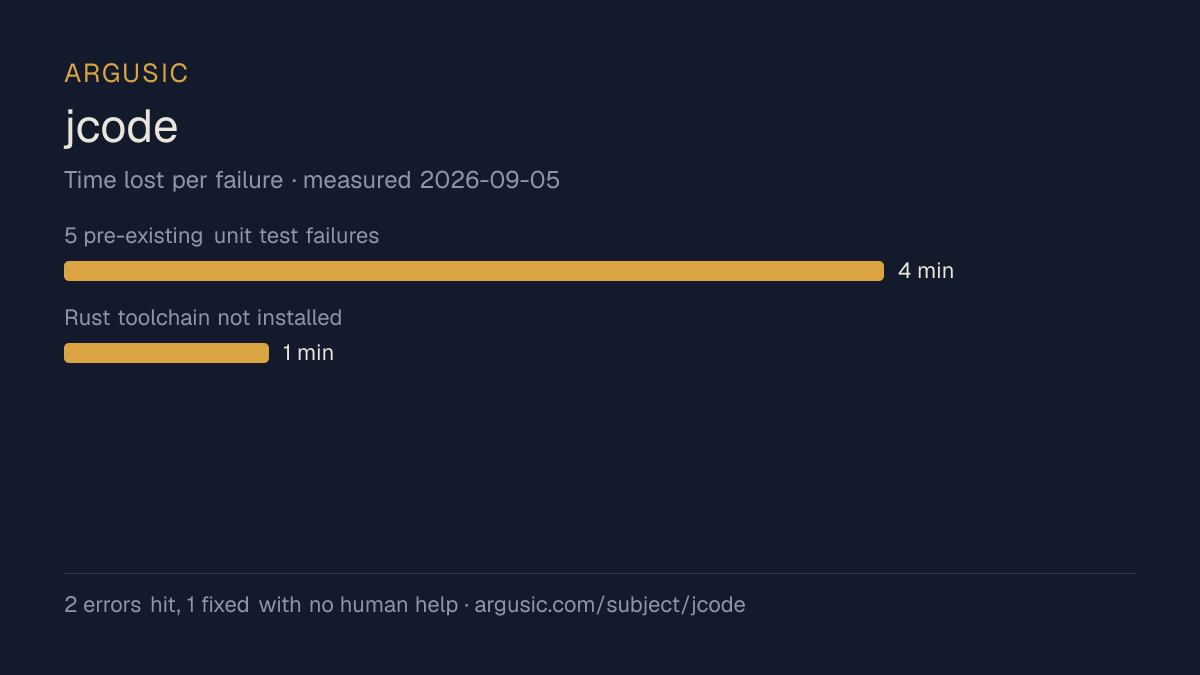
What went wrong, in the agent's own words
The agent's own words, worst first, never rewritten into advice.
- 5 pre-existing unit test failures (orcarouter CLI choice missing, provider display name mismatch, auth status report missing Cerebras, followup message content mismatch)4 minutes
- Rust toolchain not installed1 minute
- Install time
- 7 minutes
- Cold machine to finish
- 20 minutes
- Errors hit and fixed
- 2 hit, 1 fixed with no human help
- Model tokens used
- 68,494
- Exact commit tested
- ff6fb6359af5
- Container image
- sha256:cdd920bce783
What was not measured
The other half, so you can see exactly how far this evidence goes. A gap is printed as a gap and never filled in.
- How the result was proved
- runs before 2026-09-07 did not record the command used to check the result
- Peak GPU memory
- this ran on a CPU machine, so there was no GPU to sample
- Behaviour over a long run
- each attempt uses the smallest documented settings and a fixed time budget, so this measures whether it runs, not how it holds up under load
The end of the recording
The last lines of the terminal session that decided this verdict, exactly as they were recorded.
 succeeded in 0ms:
{"install_succeeded": true, "launch_succeeded": true, "install_minutes": 7.0, "errors": [{"msg": "R…
exec
/bin/sh -lc 'ARGUSIC_RESULT: {"install_succeeded": true, "launch_succeeded": true, "install_minutes…
 exited 127 in 0ms:
/bin/sh: 1: ARGUSIC_RESULT:: not found
exec
/bin/sh -lc "echo 'ARGUSIC_RESULT: {\"install_succeeded\": true, \"launch_succeeded\": true, \"inst…
 succeeded in 0ms:
2026-09-05T04:53:52.735238Z ERROR codex_core::tools::router: error=cannot update goal because this …
tokens used
68,494
Replay the whole session, every command from a clean machine to this point.
How it was tested
One agent, one container, no human help. It installs the project the way its own documentation says to, runs it, and fixes what breaks. Everything below is recorded as it happened: the terminal session, the log and the exact commit. The full method.
Strengths and limits
Measured facts, not opinions. How this is written.
What went well
- Reached a running state on a clean machine, with the session recorded.
- Ran without a GPU, so it does not need one to start.
- Licensed MIT, as reported by its host.
- Measured 3 times, so the result is not a one-off.
What did not, or is not known
- Took 7 minutes to install, slower than the median of the 231 comparable projects Argusic has measured.
- Hit 2 errors during setup, 1 of which were not solved.
Of the 232 ai projects Argusic has installed and timed, jcode was the 130th fastest to reach a running state, and 153 of 232 reached one at all.
What it is a reasonable choice for
- Trying it on a laptop or a small server: it reached a running state without a GPU.
- A quick evaluation: it was running 7 minutes after the clone.
Also tested, in the same area
Every one of these was installed and run by Argusic on a clean machine. Nothing appears here that was not tested.
Run history
| tested by | attempt | outcome | score | cost USD | when |
|---|---|---|---|---|---|
| Argusic Runner | 3/3 | Unverified | 70.00 | 0.42 | |
| Argusic Runner | 2/3 | Runs | 90.00 | 0.21 | |
| Argusic Runner | 1/3 | Ran out of time | 0.00 | 0.17 |
Topics (from GitHub)
aiai-agentai-coding-agentclaudeclicoding-agentllmmcpopenairustterminaltui
Embed the badge
Markdown for the project README. It links back here; terms on the terms page.
[](https://argusic.com/subject/jcode)Questions
- Does jcode run?
- Yes. jcode runs. Argusic installed and launched it on a clean machine in 7 minutes, hitting 2 errors on the way, and recorded the session.
- How did Argusic test jcode?
- On a fresh, disposable machine, with every command recorded and the repository pinned at commit ff6fb6359af5. 3 attempts are recorded, and the full method is on the methodology page.
- What did it cost to test jcode?
- The run that produced this verdict cost $0.21: real compute and model cost, not a list price per million tokens. It is recorded on that run's page.
- How long does jcode take to install?
- 7 minutes in the run that decided this verdict, from a clean machine to a running state. That is one measured attempt, not an average.
- Does jcode need a GPU?
- Not to start. Argusic reached a running state on a machine with no GPU.
- What goes wrong when installing jcode?
- 2 things broke in the recorded run, and 1 were fixed without human help. Each one, and the time it cost, is listed on this page.
- How does jcode compare with the alternatives?
- Of the 232 ai projects Argusic has installed and timed, jcode was the 130th fastest to reach a running state, and 153 of 232 reached one at all.
- Where is the evidence for jcode?
- All 3 recorded runs are on this page, each linking to its full log and terminal recording, stored with a sha256 fingerprint so it cannot be quietly altered.