dsnet
FAST command to manage a centralised wireguard VPN. Think wg-quick but quicker: key generation + address allocation.
Runssource: GitHubhomepageGoMITcommit d5eca4e18b93
Go, MIT licensed. The project labels itself: edgeos, edgerouter, ipv4, ipv6, linux, networking, ubuntu and vpn.
dsnet runs. An Argusic agent installed it in 4 minutes and hit 3 errors and fixed every one without help on a clean machine with no GPU, and the whole session was recorded.
dsnet builds successfully from source, all 65 unit tests pass, init generates a valid WireGuard config JSON, and add generates correct peer configs in wg-quick, vyatta, nixos, and routeros output formats. sync and report commands fail at runtime because they require root access to the WireGuard kernel netlink interface, which is unavailable without privileges or the kernel module.
What the agent ended up with on a clean machine, in its own words. How this is measured
Measured by Argusic on a fresh machine every time. Every number links to its evidence. Argusic Score 95 of 100 (the mean of this project's run scores).
At a glance
Subject data from GitHub, linked at the top of this page, refreshed . Test data by Argusic (CC BY 4.0); every number links to a run page with the full log, the recording, and their sha256 hashes.
What was measured
From the run that decided this verdict. Every line is a recorded value, not an estimate.
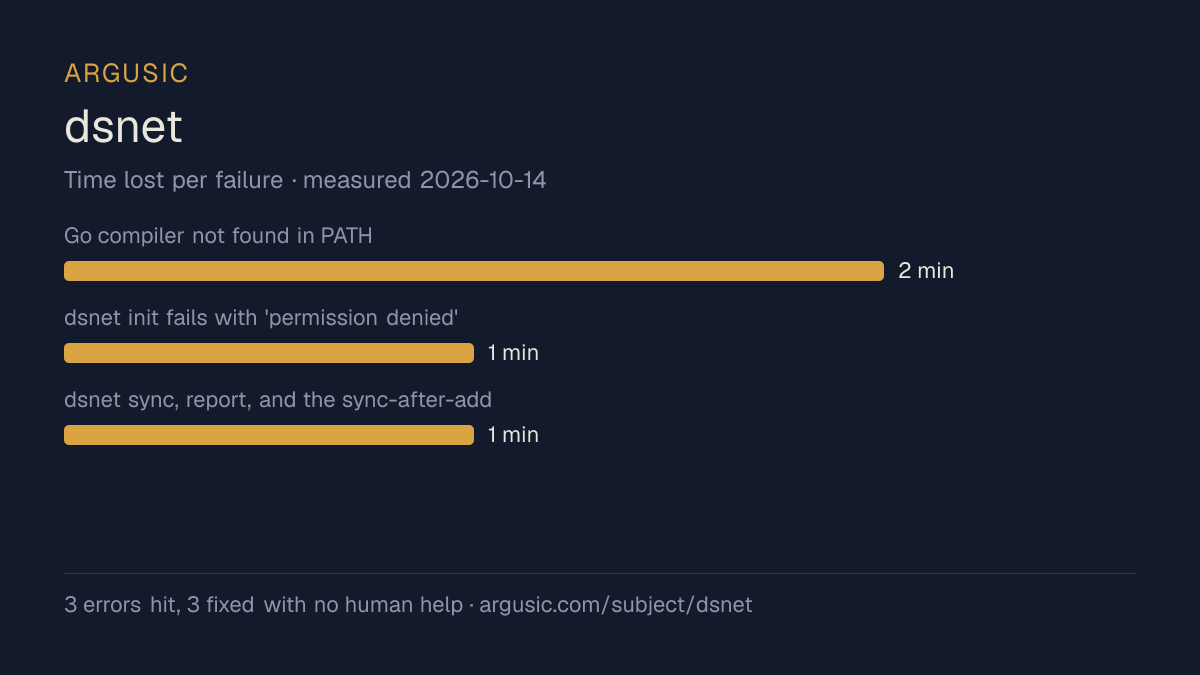
What went wrong, in the agent's own words
The agent's own words, worst first, never rewritten into advice.
- Go compiler not found in PATH (go: not found)2 minutes
- dsnet init fails with 'permission denied' writing to /etc/dsnetconfig.json (no root/sudo available)1 minute
- dsnet sync, report, and the sync-after-add step fail with 'operation not permitted' - requires root netlink access to WireGuard kernel interface1 minute
- Install time
- 4 minutes
- Cold machine to finish
- 4 minutes
- Errors hit and fixed
- 3 hit, 3 fixed with no human help
- How the result was proved
- go test -count=1 ./... exited 0: 65 tests passed across 3 packages; ./dist/dsnet version printed 'dsnet version unknown'; DSNET_CONFIG_FILE=/tmp/dsnetconfig.json ./dist/dsnet init wrote valid config; dsnet add generated valid wg-quick peer config; dsnet add --output nixos generated valid NixOS config
- Model tokens used
- 131,285
- Exact commit tested
- d5eca4e18b93
- Container image
- sha256:cdd920bce783
What was not measured
The other half, so you can see exactly how far this evidence goes. A gap is printed as a gap and never filled in.
- Peak GPU memory
- this ran on a CPU machine, so there was no GPU to sample
- Behaviour over a long run
- each attempt uses the smallest documented settings and a fixed time budget, so this measures whether it runs, not how it holds up under load
The end of the recording
The last lines of the terminal session that decided this verdict, exactly as they were recorded.
exec
/bin/sh -lc 'cd /work/repo && PATH="/home/runner/go-install/go/bin:$PATH" CGO_ENABLED=0 go test -co…
 succeeded in 724ms:
?     github.com/naggie/dsnet  [no test files]
?     github.com/naggie/dsnet/cmd  [no test files]
ok    github.com/naggie/dsnet/cmd/cli  0.036s
ok    github.com/naggie/dsnet/lib  0.035s
ok    github.com/naggie/dsnet/utils  0.053s
Here's my final assessment for this repository (dsnet - a WireGuard VPN config manager written in G…
tokens used
131,285
Here's my final assessment for this repository (dsnet - a WireGuard VPN config manager written in G…
Replay the whole session, every command from a clean machine to this point.
How it was tested
One agent, one container, no human help. It installs the project the way its own documentation says to, runs it, and fixes what breaks. Everything below is recorded as it happened: the terminal session, the log and the exact commit. The full method.
Strengths and limits
Measured facts, not opinions. How this is written.
What went well
- Reached a running state on a clean machine, with the session recorded.
- Installed in 4 minutes.
- Recovered from all 3 errors without a human stepping in, which says the failures are documented well enough to solve.
- Ran without a GPU, so it does not need one to start.
- Licensed MIT, as reported by its host.
- Measured 2 times, so the result is not a one-off.
What it is a reasonable choice for
- Trying it on a laptop or a small server: it reached a running state without a GPU.
- A quick evaluation: it was running 4 minutes after the clone.
Also tested, in the same area
Every one of these was installed and run by Argusic on a clean machine. Nothing appears here that was not tested.
Run history
Topics (from GitHub)
edgeosedgerouteripv4ipv6linuxnetworkingubuntuvpnvyattawireguard
Embed the badge
Markdown for the project README. It links back here; terms on the terms page.
[](https://argusic.com/subject/dsnet)Questions
- Does dsnet run?
- Yes. dsnet runs. Argusic installed and launched it on a clean machine in 4 minutes, hitting 3 errors on the way, and recorded the session.
- How did Argusic test dsnet?
- On a fresh, disposable machine, with every command recorded and the repository pinned at commit d5eca4e18b93. 2 attempts are recorded, and the full method is on the methodology page.
- What did it cost to test dsnet?
- The run that produced this verdict cost $0.04: real compute and model cost, not a list price per million tokens. It is recorded on that run's page.
- How long does dsnet take to install?
- 4 minutes in the run that decided this verdict, from a clean machine to a running state. That is one measured attempt, not an average.
- Does dsnet need a GPU?
- Not to start. Argusic reached a running state on a machine with no GPU.
- What goes wrong when installing dsnet?
- 3 things broke in the recorded run, and 3 were fixed without human help. Each one, and the time it cost, is listed on this page.
- Where is the evidence for dsnet?
- All 2 recorded runs are on this page, each linking to its full log and terminal recording, stored with a sha256 fingerprint so it cannot be quietly altered.