LiveStream-Agent-Studio
面向抖音直播电商的 Windows 本地 AI Agent Studio,贯通主播发现、直播洞察、直播复盘与短视频内容编导的统一智能工作流。
Runs with mockssource: GitHubPythonMITcommit 1614dfa166f7
Python, MIT licensed. The project labels itself: ai agent, douyin, livestream and speech to text.
LiveStream-Agent-Studio runs, with stand-ins for the services it depends on. An Argusic agent installed it in 27 minutes and hit 7 errors and fixed every one without help on a clean machine with no GPU, and the whole session was recorded.
The web UI serves 200 with the LiveAgent Studio title, the local gateway health endpoint verifies both mock DashScope and mock OSS as configured/verified, all 37+16+3 agent unit tests plus the frontend build tests pass, and the full video breakdown pipeline produced and decoded a real timestamped Excel transcript.
What the agent ended up with on a clean machine, in its own words. How this is measured
Measured by Argusic on a fresh machine every time. Every number links to its evidence. Argusic Score 92 of 100 (the mean of this project's run scores).
At a glance
Subject data from GitHub, linked at the top of this page, refreshed . Test data by Argusic (CC BY 4.0); every number links to a run page with the full log, the recording, and their sha256 hashes.
What was measured
From the run that decided this verdict. Every line is a recorded value, not an estimate.
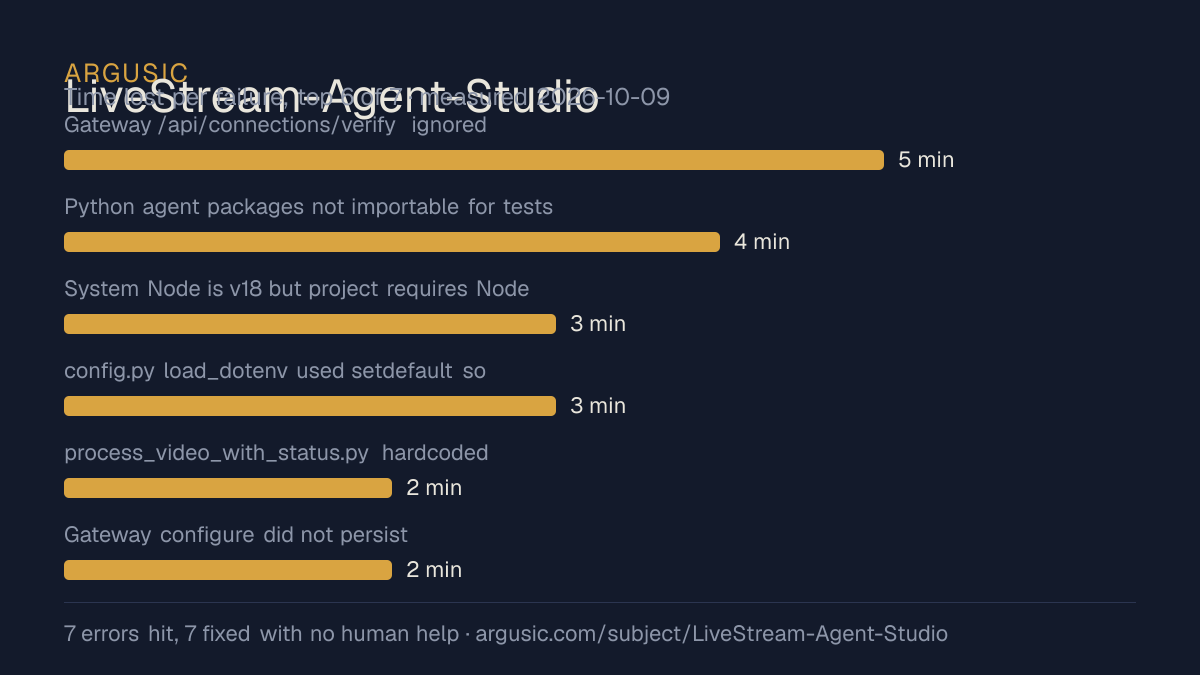
What went wrong, in the agent's own words
The agent's own words, worst first, never rewritten into advice.
- Gateway /api/connections/verify ignored DASHSCOPE_BASE_URL and used GET models5 minutes
- Python agent packages not importable for tests (src layout)4 minutes
- System Node is v18 but project requires Node >=22.133 minutes
- config.py load_dotenv used setdefault so pre-set env overrode .env3 minutes
- process_video_with_status.py hardcoded ALIYUN_OSS_ENDPOINT2 minutes
- Gateway configure did not persist DASHSCOPE_BASE_URL2 minutes
- Install time
- 27 minutes
- Cold machine to finish
- 27 minutes
- Errors hit and fixed
- 7 hit, 7 fixed with no human help
- How the result was proved
- curl -s -o /dev/null -w %{http_code} http://127.0.0.1:4173/ returned 200; curl -s http://127.0.0.1:8785/api/health returned 200; npm test exited 0 with 2 pass; python3 -m unittest scout 37 OK, breakdown 16 OK, retro 3 OK; process_video_with_status.py completed and openpyxl decoded the Excel
- Model tokens used
- 3,782,234
- Exact commit tested
- 1614dfa166f7
- Container image
- sha256:cdd920bce783
What was not measured
The other half, so you can see exactly how far this evidence goes. A gap is printed as a gap and never filled in.
- Peak GPU memory
- this ran on a CPU machine, so there was no GPU to sample
- Behaviour over a long run
- each attempt uses the smallest documented settings and a fixed time budget, so this measures whether it runs, not how it holds up under load
- Behaviour against real services
- this run was verified against stand-in services only
The end of the recording
The last lines of the terminal session that decided this verdict, exactly as they were recorded.
1. `live_breakdown_agent/process_video_with_status.py` hardcoded `ALIYUN_OSS_ENDPOINT`, ignoring th…
2. `live_breakdown_agent/src/live_breakdown_agent/config.py` used `os.environ.setdefault`, so a pre…
3. `liveagent-studio/local_gateway.py`:
   - `/api/connections/verify` always hit the real DashScope URL and used GET (404 on my mock) → no…
   - `/api/connections/configure` didn't persist `DASHSCOPE_BASE_URL` → added to the mapping.
   - Retro submission required `job_id` in the response, my mock returns `id` → added a fallback.
**Mock verification (tier2_mock)**
- Stood up a local DashScope-compatible mock and a minimal OSS mock (schema-correct `BucketInfo` XM…
- Configured via the real gateway API: `/api/connections/configure` then `/api/connections/verify` …
- Ran the real full breakdown pipeline (`process_video_with_status.py`) on a generated 3-second vid…
**Final state:** web UI, gateway, all three agent test suites, and the full livestream breakdown pi…
`ARGUSIC_RESULT:{"install_succeeded":true,"launch_succeeded":true,"install_minutes":27,"errors":[{"…
Replay the whole session, every command from a clean machine to this point.
How it was tested
One agent, one container, no human help. It installs the project the way its own documentation says to, runs it, and fixes what breaks. Everything below is recorded as it happened: the terminal session, the log and the exact commit. The full method.
Strengths and limits
Measured facts, not opinions. How this is written.
What went well
- Recovered from all 7 errors without a human stepping in, which says the failures are documented well enough to solve.
- Licensed MIT, as reported by its host.
What did not, or is not known
- Only reached a running state against stand-in services, so nothing here proves it works against the real ones.
- Took 27 minutes to install, slower than the median of the 74 comparable projects Argusic has measured.
- Measured once so far. A single attempt shows it can run, not that it runs reliably.
Of the 75 ai-agent projects Argusic has installed and timed, LiveStream-Agent-Studio was the 64th fastest to reach a running state, and 50 of 75 reached one at all.
Also tested, in the same area
Every one of these was installed and run by Argusic on a clean machine. Nothing appears here that was not tested.
Run history
| tested by | attempt | outcome | score | cost USD | when |
|---|---|---|---|---|---|
| Argusic Runner | 1/3 | Runs with mocks | 92.00 | 0.76 |
Topics (from GitHub)
Embed the badge
Markdown for the project README. It links back here; terms on the terms page.
[](https://argusic.com/subject/livestream-agent-studio)Questions
- Does LiveStream-Agent-Studio run?
- LiveStream-Agent-Studio runs, with mocks standing in for external services. Argusic installed and launched it on a clean machine in 27 minutes, hitting 7 errors on the way, and recorded the session.
- How did Argusic test LiveStream-Agent-Studio?
- On a fresh, disposable machine, with every command recorded and the repository pinned at commit 1614dfa166f7. One attempt is recorded, and the full method is on the methodology page.
- What did it cost to test LiveStream-Agent-Studio?
- The run that produced this verdict cost $0.76: real compute and model cost, not a list price per million tokens. It is recorded on that run's page.
- How long does LiveStream-Agent-Studio take to install?
- 27 minutes in the run that decided this verdict, from a clean machine to a running state. That is one measured attempt, not an average.
- Does LiveStream-Agent-Studio need a GPU?
- Not to start. Argusic reached a running state on a machine with no GPU.
- What goes wrong when installing LiveStream-Agent-Studio?
- 7 things broke in the recorded run, and 7 were fixed without human help. Each one, and the time it cost, is listed on this page.
- How does LiveStream-Agent-Studio compare with the alternatives?
- Of the 75 ai-agent projects Argusic has installed and timed, LiveStream-Agent-Studio was the 64th fastest to reach a running state, and 50 of 75 reached one at all.
- Where is the evidence for LiveStream-Agent-Studio?
- The recorded run is on this page, each linking to its full log and terminal recording, stored with a sha256 fingerprint so it cannot be quietly altered.